Suramya's Blog : Welcome to my crazy life…

October 25, 2011

Bio computers come a bit closer to reality

Filed under: My Thoughts,News/Articles,Tech Related — Suramya @ 6:29 PM

Readers of this blog (all 2 of you 🙂 ) and people who know me, know that I have always been interested in Bio/DNA computers and have even written about them in the past. But to my sorrow most of the current work on Bio computers is still in the very theoretical stage.

Recently, Researchers at Imperial College London have claimed to have successfully built logic gates out of bacteria and DNA. The team built an AND gate using e-coli (Escherichia coli) bacteria which is normally found in the lower intestine and another team built on top of that to create a NAND gate which is basically an AND gate combined with a NOT gate.

While this doesn’t sound like much it is indeed a step forward because all computers are basically a collection of logic gates and if the team can manage to connect more of them together then we have the beginnings of a working Bio computer.

More details on their work is available at: Scientists create computing building blocks from bacteria and DNA

The study can be downloaded from here.

Sources: ZEE News & Wired UK

As always if I find more information I will post a follow-up entry here.

– Suramya
October 13, 2011

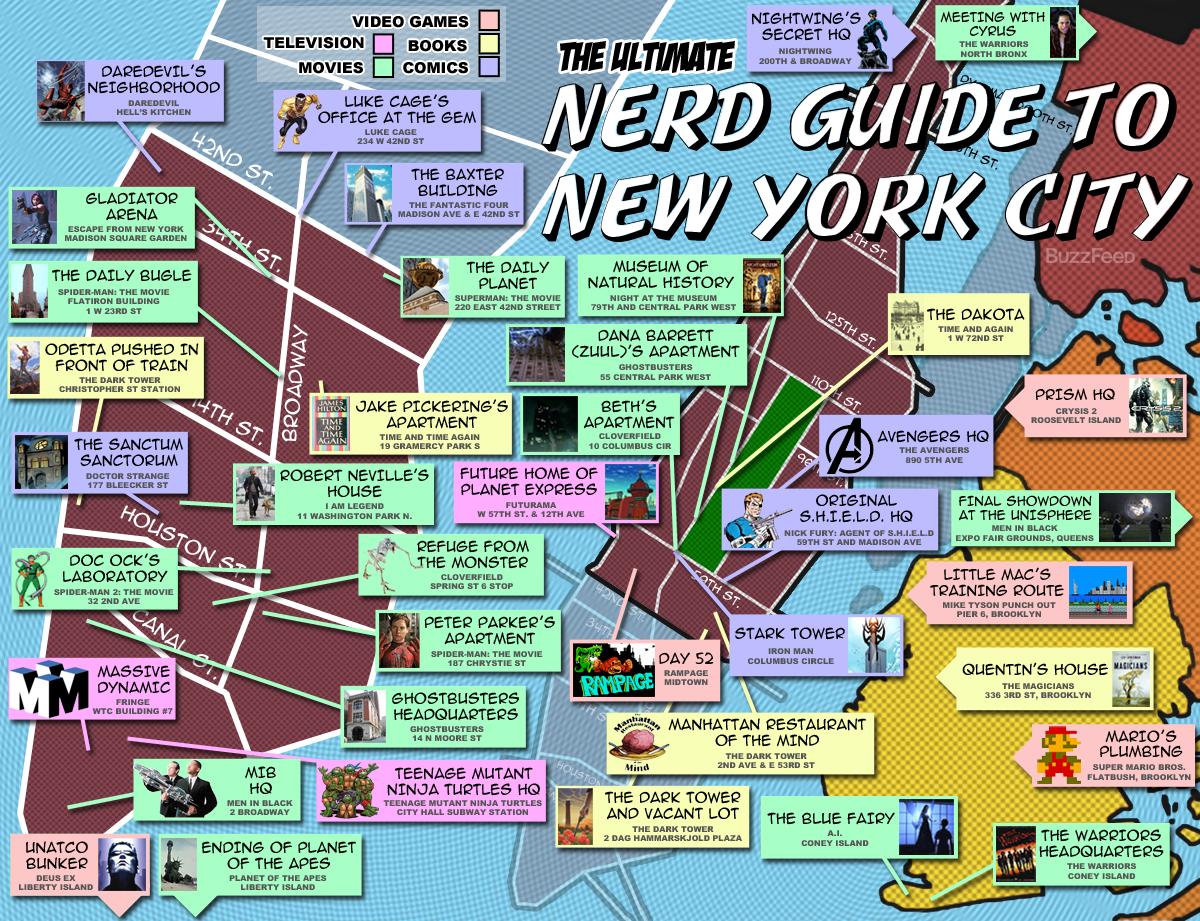
A nerdy Guide To New York City

Filed under: Interesting Sites,Tech Related — Suramya @ 6:53 PM

Are you a big movie/comic book fan? If yes then you will like this map created by users on BuzzFeed. Basically, instead of showing typical tourist landmarks like the statue of liberty etc it shows the location of famous landmarks from comics, video games, movies etc. I wish it had been created a couple of months ago while I was visiting NY. Ah well, the next time I visit I know what I will be checking out during my trip around the city.

Check it out:


A nerdy guide to New York City

Now someone should create a similar map for locations in India that were used in Movies/comics/books etc. Hmm… not a bad idea for a project. Guess it should be possible to find a list of locations in India that were used in a book/movie/comic and them map them out in Google maps. The hard part would be compiling the list of locations, mapping it out shouldn’t be that hard.

Source: Ultimate Nerd Guide to New York City

– Suramya

September 20, 2011

New Script Web2Email Released

Filed under: Linux/Unix Related,Software Releases,Tech Related — Suramya @ 2:47 AM

Just released Ver 0.1 of Web2Email. Web2Email is a Perl Script that allows the user to send a message with a list of URL’s to a special mail account and get back a snapshot of the websites as PDF files.

You can download it from Scripts.Suramya.com: Web2Email.

If you want a demo, send an email to: web2email@suramya.com with website URL’s in the email body (one per line) and after about 5 mins you will get an email with the snapshots of the sites listed as PDF files.

Update: The cron job running this on my machine is having issues, will fix it once I get back home and this should be back up again tonight.

Update (22nd Sep 2011): The project wasn’t the cron job, there is an issue with the version of wkhtmltopdf that is available in the Debian repo. Basically if you have both http & https images in a site it goes for a toss. The static built version should fix this issue but haven’t got the time to install and test. Till that is done the demo version will be on hold.

As always I would appreciated any feedback/suggestions you might have.

– Suramya

September 19, 2011

Trouble-Maker: Learn to fix computer issues

Filed under: Computer Software,Linux/Unix Related,Tech Related — Suramya @ 2:38 AM

This interesting app randomly breaks your system so you can learn how to fix it.

Haven’t tried it yet because as of now I only have one working Linux system at home, but as soon as I fix that I will be installing this on my secondary system. Once I do that I will log my experiences here.

You can download it from Trouble-Maker‘s site.

– Suramya

September 18, 2011

How to set different backgrounds for each desktop in KDE 4.6.5

Filed under: Computer Tips,Linux/Unix Related,Tech Related — Suramya @ 11:59 PM

I have talked about How to set different backgrounds for each desktop in KDE4 in a previous post. However in KDE 4.6.5 the previous steps no longer work, so posting the new steps to get different backgrounds in KDE:

  • Click on the ‘Start Menu’ (The K at the bottom Right of the screen)
  • Click on ‘System Settings’ under the Settings menu
  • Double Click on the ‘Workspace Behavior’ under the “Workspace Appearance and Behavior” section
  • Check the “Different widgets for each desktop”
  • Click Apply

That’s it. Now you can change the wallpaper by Right clicking on the desktop and selecting ‘Desktop Settings’. Its good to know that the KDE Developers paid attention to complaints that the users made about their software and addressed it.

– Suramya

September 5, 2011

Getting RTL8111/8168B PCI Express Gigabit Ethernet controller to work in Debian 6

Filed under: Knowledgebase,Linux/Unix Related,Tech Related,Tutorials — Suramya @ 11:28 PM

Once I got Debian 6 installed on my server I needed to connect it to the internet to download updates etc, however my network card wasn’t being detected correctly so I had to perform the following steps to get it to work correctly:

  • Download the latest Linux drivers for the RTL8111 Chipset from the Realtek site on a computer that can connect to the Internet.
  • Copy the file over to your new system via USB or smoke signals
  • Login as root to the server
  • Identify the kernel version that you are running, using the following command:
  • uname -a

    It will give you a result like the following:

    Linux StarKnight 2.6.30-2-686 #1 SMP Sat Aug 27 16:41:03 UTC 2011 i686 GNU/Linux

    Now you need to install the kernel source code for this version on the server. First we need to find the package name of the kernel source code, we do that by running the following command:

    apt-cache search linux |grep header |grep 2.6 

    If you have a 2.4.x kernel, replace grep 2.6 with grep 2.4. Once you have the package name install it using the following command as root:

    apt-get install linux-headers-2.6.30-2-686

    Make sure you replace linux-headers-2.6.30-2-686 with the package name you got.

    Once we have the kernel source installed we can go ahead and install the driver using the following commands:

    tar -jxvf r8168-8.025.00.tar.bz
    cd r8168-8.025.00
    ./autorun.sh 
    

    This will compile the drive and install it. I didn’t get any errors when I ran it, but if you do get errors try searching for the error message on Google, it usually provides a solution.

    After I installed the driver I tried initializing my network but kept getting the following error message:

    StarKnight:~# ifdown eth0
    ifdown: interface eth0 not configured
    StarKnight:~# ifup eth0
    Ignoring unknown interface eth0=eth0.
    

    Fixing it was fairly simple though, all I had to do was edit the /etc/network/interfaces file and add the following lines to it (This assumes you are using DHCP):

    auto eth0
    iface eth0 inet dhcp
    

    Once you add the lines, you can try starting the network again using the command:

    ifup eth0

    If all went well, you will be assigned an IP address and will now be able to successfully browse the net.

    Hope this helped.

    – Suramya

    June 11, 2010

    The first foldable dual screen ebook reader/netbook is out

    Filed under: Computer Hardware,Linux/Unix Related,Tech Related — Suramya @ 2:07 AM

    If I would ever get a ebook reader I think I will go for this one or something similar.

    This is an Android device which has a 9.7″ E-paper Display and a 10.1″ LCD Touchscreen Display. So you can have a book open on one side and surf the web on the other side. Or have a programming manual open on one side and code on the other.

    The enTourage eDGeâ„¢ Specifications are as follows:

    * Dimensions: 8.25″ x 10.75″ by 1.0″ (closed)
    * Weight: approx. 3 lbs.
    * Internal Memory: 4 GB (3 GB for user)
    * E-reader File Formats: ePub, PDF
    * LCD Touchscreen Display Size: 1024 x 600 (10.1″)
    * E-paper Display Size: 9.7″ e-Ink®(1200 x 825), 8 shades of gray
    * E-paper Input: Wacom® Penabled®
    * Operating System: Linux with Google® Android®
    * Screen Rotation: 90 and 180 degrees
    * Connectivity: WiFi 802.11 b/g, Bluetooth capability
    * Battery Life: 16+ hours utilizing the e-reader screen / up to 6 hours running the LCD screen
    * Battery Type: Lithium-ion polymer
    * External Memory: SD card slot, 2 USB ports
    * Audio and Microphone Jack: 3.5 mm each. Includes internal microphone and speakers.
    * Audio playback: MP3, WAV, 3GPP, MP4, AAC, OGG, M4A
    * Video playback: 3GP, MP4, Adobe Flash Lite (H.264)
    * Input: Stylus input on e-paper and touchscreen. Virtual keyboard. USB keyboard (optional)

    The cost is $499.

    – Suramya

    Source: Handle With Linux.

    May 26, 2010

    Microsoft’s E&D Chief confirms that the Courier Tablet ‘wasn’t a device’

    Filed under: Computer Hardware,My Thoughts,Tech Related — Suramya @ 8:20 PM

    The courier tablet caused a big splash when a video from Microsoft that showcased the functionality of the Tablet was released and a lot of people were eagerly waiting for its launch. However when its launch was canceled last month a lot of skeptics wondered if there was ever an actual device or was it all a ‘concept’.

    Now thanks to Microsoft’s Entertainment and Devices Chief Robbie Bach we know for sure. He confirmed in his exit interview that the Courier Tablet ‘wasn’t a device’. In his own words:

    Well, Courier — Courier, first of all, wasn’t a device. The project and the incubation and the exploration we did on Courier I view as super important. The “device” people saw in the video isn’t going to ship, but that doesn’t mean we didn’t learn a bunch and innovate a bunch in the process.

    So basically it was all a big PR stunt. I not saying that companies should stop publicizing their feature lists or that the company should include every feature in their feature list into the final product. I know that its not always possible to include every feature that you envision into the final product. But still… If MS had a device in production that did a major portion of the features that were touted in the video or even a minor portion of them it would still make sense. But creating a PR hype on a product that they have no intention of releasing and then giving it a launch date is cheating and just wrong. I believe that such devices are rightly called vaporware.

    It looks to me like all they were doing was trying to steal some of the hype from the product launches of other companies.

    – Suramya

    Source: Robbie Bach Q&A Part 3
    Thanks to: The Raw Feed for the initial heads up

    May 18, 2010

    Boot From a USB Drive even when your BIOS Won’t Let You

    Filed under: Computer Software,Computer Tips,Tech Related — Suramya @ 11:37 PM

    If you are like me then you have gotten into the habit of carrying a Live Linux CD with you at times, I keep mine in my Laptop bag so its there when I need it. However CD’s have a lot of inherent problems like, an inability to update the version without burning a new disk and a susceptibility to scratches.

    Having a Bootable USB drive with the latest version of Linux solves all these problems. USB drives are quite cheap now and it makes sense to have one available loaded with the latest diagnostic tools. But till date I didn’t carry a bootable USB drive with me because a lot of the systems I encountered didn’t allow me to boot from USB which made the bootable drive pretty much useless. Now, there is a way to fix the problem. What you need is a Blank CD and the latest version of PLoP.

    PLoP is a Bootmanager that allows you to create a boot CD that will enable the system to boot from a USB drive even when that option is not supported by the BIOS. You can download PLoP from here. Installing it is quite easy. You just need to extract the .ZIP file that you downloaded and burn the .iso image to a CD. There are two ISO images on the CD and you can use either one of them, however according to the readme file plpbtnoemul.iso should work “everywhere” so if you have some doubt use that image.

    Once you burn the image to the CD, reboot the system and configure it to boot off the CD. When the system boots up you will get a boot menu that will allow you to choose USB as the device to boot from. Once you do that the system will boot off the USB drive as normal and you can proceed from there.

    Hope you find this as helpful as I am going to.

    – Suramya

    Source: Boot From a USB Drive Even if your BIOS Won’t Let You – How-To Geek.

    March 28, 2010

    Wikibooks has a open-content textbook on Cryptography

    Filed under: Computer Security,Interesting Sites,Tech Related — Suramya @ 11:56 PM

    I don’t know if you have heard about Wikibooks yet or not. If you haven’t then you are missing out on a great resource. Basically Wikibooks is a community for creating a free library of educational textbooks that anyone can edit. Sort of like Wikipedia but specifically for Books.

    One of the books they have is a book on Cryptography that is quite easy to read and follow. At the time of this writing a lot of the sections in the book still have to be added but new content is added regularly and over time I think it will become a great resource for everyone.

    Check it out.

    – Suramya

    « Newer PostsOlder Posts »

    Powered by WordPress