Suramya's Blog : Welcome to my crazy life…

March 14, 2012

Ready Player One: Read this book if you like gaming/80’s movies

Filed under: Books Related / Reviews,My Thoughts — Suramya @ 11:54 PM

Once in a while you will find a book that is so good that you end up staying up till morning just to finish the book. Ready Player One by Ernest Cline is one such book. I started reading it thinking that I would read a couple of chapters then crash as it was late and I had an early morning meeting the next day that I couldn’t miss. However the book was so engrossing that I ended up staying up till a bit after 5:30am to finish it. The next day was a blur that I survived only with the help of a *lot* of caffeine but the book was worth it.

The book is based in the near future (2044) where the world is an ugly place and most of humanity spends their waking hours in a virtual reality (OASIS) where spell-slinging mages battle giant Japanese robots, entire planets are inspired by Blade Runner, and flying DeLoreans achieve light speed. The creator of OASIS (James Halliday) hid an Easter egg in the game that would give whoever found it controlling shares of the parent company that created OASIS which immediately translated to multimillion dollars of real world money and lots of power (enough to create a whole generation dedicated to finding the egg).

What makes the book really interesting is that James hid clues to find the Easter egg in references to 80’s movie/books/sci-fi/music in the virtual world and the players had to really know their 80’s trivia to find the hints. I am a big fan of a lot of the books/movies referred to in the book and had spent a lot of time playing some of the Games referenced as well, so the book was a great trip down memory lane. I am now really tempted to download some of the old games esp the text adventure games to relive some of them.

Some of the sub-plots in the book were a little predictable and a bit one dimensional but the main plot was pretty well paced and any issues with the complexity were easily ignored to enjoy a well crafted story line. The hacking shown in the book was a bit over the top but easily ignorable. Its not like most books don’t go overboard in showing that.

This is the first book by the author and I am eagerly waiting for more books by him. I believe that Warner Bros. has purchased the film rights to the script and I really hope they don’t screw it up as this has the potential to be a cult classic movie if done right.

Check it out: Ready Player One by Ernest Cline

– Suramya

March 13, 2012

Running Ubuntu on my Samsung Galaxy Tablet

Filed under: Computer Software,My Thoughts,Tech Related — Suramya @ 1:25 AM

A couple of days about someone at work posted an email asking about Ubuntu Installer and if anyone has tried installing Ubuntu on their android tablet using this software (Sorry I can’t remember your name but am too lazy to log on to the office network to find it in my mailbox). I volunteered to try it out because it sounded interesting and cool to have. This application allows you to install Ubuntu on your Android device on top of android so you basically run Ubuntu as a virtual machine in Android in a fairly easy and painless way. From the FAQ on the developer’s website:

This projects aim is to bring a range of linux distros to your android device through a method known as ‘chroot’, see it has running a linux distro within a virtual machine on your phone. You can access this virtual machine and run it on your phone without causing any damage to your device, or having to overwrite anything. Why might you want this? well my apps are designed to make the install and set up process as easy as possible (more so in the paid apps) while still giving you some flexibility. Once you have the distro up and running then you can pretty much run and install any linux software you like (so long as there is a arm port or it is not architecturaly depenedent), sure there a very few big benefits over what android itself can do but it is still pretty dam cool. (and with the free ubuntu version, hey its free does it matter how useful you find it?)

Excluding the time it took to download the image, the entire process took me about 15 mins to complete so that shows you how easy & painless the entire process was. The app install takes only a couple of mins to complete and that just installs an application that gives you a user guide that explains the install process and buttons to make the process faster/easier. The process is pretty self explanatory and if you can read and understand English and are good at following directions you should have no issues installing. 🙂 I would really suggest downloading the images over WiFi because downloading 1.5GB over 3G/GPRS would be too expensive.

There are two Ubuntu images available: small (450 MB) & large which is 1.5 GB, The large image requires 3.5GB of free space on your SD card and the small image requires 2.5GB of free space. If you have enough free space then you should go for the larger image as that has the Gnome desktop plus a ton of applications pre-installed the small one doesn’t have too many applications preinstalled and uses LXDE instead of GNOME. I first downloaded the small image to try it out and liked it enough to download the large image.

The install itself was mostly painless. I did hit an issue initially when unzip’ing the small image file (the download is a zip file) with AndroZip as it was unable to handle the large file size and kept dying on me. Using Astro’s built in extractor resolved this and I was then able to extract the file without issues. Learning from this I downloaded the large image on my computer and copied it over after extracting it there (plus I didn’t have enough space to download the file and then extract it on the tablet itself).

After you download the images, the instructions tell you to install the VNCViewer app and the Terminal app. It wasn’t clear from the instructions that VNC was required to see the actual desktop itself so I didn’t install it at first thinking that it was so that you could connect to your laptop/desktop from the tablet. I later realized that it was needed to see the Gnome desktop so installed it and was good to go.

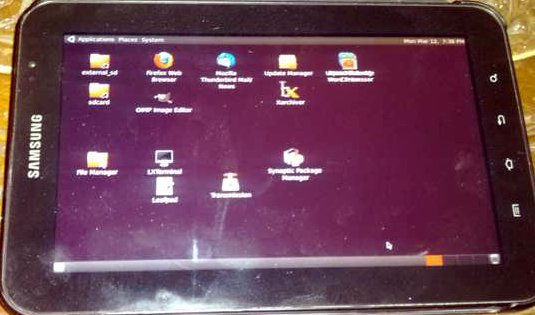
The process to start Ubuntu is a bit cumbersome and requires you to type a few commands on the Terminal but once you start the image and select the desktop size you are good to go and all you have to do then is connect to the Ubuntu desktop using VNC. The desktop is fairly responsive and you can zoom in for more fine grained control. The large image installs the Gnome desktop and not Unity but still it was pretty good. Would have liked to get the option to try Unity as it was designed for tablets but I guess that is a project for another day.

Below is an photo of the tablet with the Gnome desktop running on it (Taking a photo of a tablet at night is a pain because the flash reflects off the screen and without the flash the photo is too dark):

Ubuntu on Samsung Galaxy Tab

Over all a cool and geeky thing to have, but not really that useful in the long run unless you have programs that you want to be able to work on when not at your desktop and don’t have net access.

– Suramya

March 12, 2012

Voice Recognition on Samsung Galaxy Nexus using Swype

Filed under: My Thoughts,Tech Related — Suramya @ 11:59 PM

I like the voice recognition built into Swype keyboard a lot and have been using it quite often to type out SMS’s etc when I have net access and am feeling lazy (The service requires net access to work). For the most part the recognition works quite well and it looks like it learns the more you use it. So I decided to stress test it by using it to type out a complete blog post… Unfortunately that didn’t work out that well. The first para came out ok, but for the next few para’s it got 90% of the stuff wrong instead of the other way which was what I was expecting. I finally gave up typing the blog on the phone because it was taking too long.

It would have been cool if it worked the way I expected so that I could make notes/reminders for myself while driving which is when I get a lot my my project ideas. At present if I use this to make notes then I would spend the next 10 hours trying to figure out what the hell I was thinking about, so I think that for now I will stick to trying to remember stuff and then transcribing it at red lights and traffic jams.

But for just typing SMS’s it works great and is a lot faster than trying to type stuff out.

Final verdict? Cool implementation but requires a lot more work before it can be used as a keyboard replacement.

– Suramya

March 7, 2012

Yet another post on Ebooks

Filed under: Books Related / Reviews,My Thoughts — Suramya @ 4:18 PM

Long time readers of this blog will remember (or atleast I would like to think so) that I am an avid reader and have been posting a lot about ebooks on the blog. Today I saw this article(Ebooks on Tablets fight Digital distractions) on NY Times which made me laugh. The article starts off with the following heading:

Can you concentrate on Flaubert when Facebook is only a swipe away, or give your true devotion to Mr. Darcy while Twitter beckons?
People who read e-books on tablets like the iPad are realizing that while a book in print or on a black-and-white Kindle is straightforward and immersive, a tablet offers a menu of distractions that can fragment the reading experience, or stop it in its tracks.

Then gets more silly as it goes on, This excerpt was especially interesting:

“The tablet is like a temptress,” said James McQuivey, the Forrester Research analyst who led the survey. “It’s constantly saying, ‘You could be on YouTube now.’ Or it’s sending constant alerts that pop up, saying you just got an e-mail. Reading itself is trying to compete.”

Indeed, the basic menu for the Kindle Fire offers links to video, apps, the Web, music, newsstand and books, effectively making books (once Amazon’s stock in trade) just another menu option. So too with the multipurpose iPad, which Allison Kutz, a 21-year-old senior at Elon University in North Carolina, bought in 2010. She says her reading experience has not been the same since.

She is constantly fending off the urge to check other media, making it tough to finish books. For example, in late September 2010, she bought “Breaking Night,” a memoir about a homeless girl turned Harvard student. Ms. Kutz said the only time she was able to focus on it was on an airplane because there was no Internet access.

“I’ve tried to sit down and read it in Starbucks or the apartment, but I end up on Facebook or Googling something she said, and then the next thing you know I’ve been surfing for 25 minutes,” Ms. Kutz said.

Blaming tablets because you don’t have the self control to focus on one task at a time is a bit like blaming doughnuts or McDonalds for being fat because you don’t have the self control to stop eating. I read a lot on my tablet and I read a lot of paper books as well, and so far I don’t see a big difference in my reading experience or the time I need to finish a book on either platform.

I know some people have medical conditions that make it difficult for them to focus on one thing at a time (ADHD) but for most people the problem is a lack of discipline and self-control instead of an actual medical problem. The people who get distracted while reading an ebook will get distracted while reading a regular book as well. There is nothing that prevents a person reading a regular book from picking up the remote to watch a bit of TV or the phone to call someone or a laptop to surf the net. I don’t know Allison Kutz personally but I have a feeling that she would be hard pressed to finish a regular hardcopy book also without getting distracted in the middle.

These ‘studies’ seem very contrived and a conspiracy theorist could argue that the publishing houses are trying to scare people against buying ebooks and push them towards buying paper books. The following article in the Telegraph (Jonathan Franzen: e-books are damaging society) doesn’t do anything to convince me otherwise either. People made the same claims about TV, Radio’s, VCR’s etc etc and we are still here… You can’t stop technology/progress, all you can do is adapt and work with it.

Well this is all for now, I will get off my soap-box and go back to my corner to finish this book I was reading.

– Suramya

March 3, 2012

Configuring Dual monitors in Debian

Filed under: Knowledgebase,Linux/Unix Related,Tech Related,Tutorials — Suramya @ 12:01 AM

[Update 8th Aug 2012: This is an older method of setting up the monitor kept for historic reasons. In the newer version of KDE the process is a lot simpler, please refer to this post for the updated steps – Suramya.

Recently I went ahead and bought two new Dell 20″ monitors for my home system as I had gotten used to working with two monitors at work and wanted the same experience at home as well. The problem started because initially I tried installing another graphics card and hooking up the second monitor to that card using VGA. For some reason maybe because I was to tired and wasn’t thinking clearly, I couldn’t get both the cards to work at the same time. I would get one or the other but not both. To make things even more fun, the monitors are 16:9 aspect ratio and when I used the Opensource driver the only resolution with that aspect ratio I would get was 1600×900 which was too small and the fonts looked kind of jagged at that resolution.

Since I was going to be out of town and was planning on switching to DVI cables anyways I left the system like that (after spending a bit of time experimenting) and left. Once I got back I ordered DVI cables and finally managed to get the dual monitor setup working after spending about an hour one the issue. Below is the sequence I followed to get stuff to work (documenting this so that if I ever have to do this again I have a record of what I did):

  • Removed the second video card to reduce complexity. Might add it back later if required, or if I want to hook my old monitor as a third display.
  • Connected both monitors to the onboard ATI Radeon HD 4250 card, one over DVI and the second using VGA
  • Removed the Proprietary ATI and nVidia drivers (both installed in my previous attempts to get this working). Instructions here
  • Restarted X
  • Installed Catalyst (a.k.a fglrx) a proprietary “blob” (closed source binary) driver, using the following command:
  • apt-get install fglrx-atieventsd fglrx-control  fglrx-driver fglrx-glx fglrx-modules-dkms glx-alternative-fglrx libfglrx libgl1-fglrx-glx libxvbaw

Once the driver was installed I restarted X once again and got both monitors working, but the second monitor’s display was a clone of the first one which is not what I wanted so I had to do some more digging and finally managed to fix that using the following steps:

  • Open a terminal/Command Prompt
  • Disable access control so that clients can connect from any host by issuing the following command as a regular user
  • xhost +

    This is required so that we can start a GUI command from a root shell. If we don’t do this you will get an error similar to the following in the next step:

    No protocol specified
    No protocol specified
    amdcccle: cannot connect to X server :0
  • Run ‘Ati Catalyst Control Center’ as root
  • sudo amdcccle
  • Click on ‘Display Manager’ and configure your monitors (Resolution, location etc)
  • Click on ‘Display Options’ -> ‘Xinerama’ and enable ‘Xinerama’
  • There is a bug in the display manager that prevents it from saving any changes if the xorg.conf file exists, to fix:

  • Run the following command as root:
  • mv /etc/X11/xorg.conf /etc/X11/xorg.conf_original
  • Click ‘Apply’ in the Catalyst Control Center
  • Restart X

That’s it. Once I did all that, my dual monitor setup started working without issues. Well… mostly. For some reason my desktop effects have stopped working (Transparent/Translucent windows etc) but I am not going to worry about it for now. That’s a battle for another day, maybe over the weekend.

Please note, that setting up Dual monitors usually is not this complicated in Linux. When I hooked up my TV to this same system I didn’t have to make any changes to get it to work. In this case since I was fiddling around I had to fist fix the mess I made before I was able to get this to work properly.

For those of you who are interested, the final xorg.conf that the above steps created is listed below:

Section "ServerLayout"
        Identifier     "amdcccle Layout"
        Screen      0  "amdcccle-Screen[1]-0" 0 0
        Screen         "amdcccle-Screen[1]-1" 1440 0
EndSection

Section "ServerFlags"
        Option      "Xinerama" "on"
EndSection

Section "Monitor"
        Identifier   "0-CRT1"
        Option      "VendorName" "ATI Proprietary Driver"
        Option      "ModelName" "Generic Autodetecting Monitor"
        Option      "DPMS" "true"
        Option      "PreferredMode" "1440x900"
        Option      "TargetRefresh" "60"
        Option      "Position" "0 0"
        Option      "Rotate" "normal"
        Option      "Disable" "false"
EndSection

Section "Monitor"
        Identifier   "0-DFP1"
        Option      "VendorName" "ATI Proprietary Driver"
        Option      "ModelName" "Generic Autodetecting Monitor"
        Option      "DPMS" "true"
        Option      "PreferredMode" "1440x900"
        Option      "TargetRefresh" "60"
        Option      "Position" "0 0"
        Option      "Rotate" "normal"
        Option      "Disable" "false"
EndSection

Section "Device"
        Identifier  "amdcccle-Device[1]-0"
        Driver      "fglrx"
        Option      "Monitor-DFP1" "0-DFP1"
        BusID       "PCI:1:5:0"
EndSection

Section "Device"
        Identifier  "amdcccle-Device[1]-1"
        Driver      "fglrx"
        Option      "Monitor-CRT1" "0-CRT1"
        BusID       "PCI:1:5:0"
        Screen      1
EndSection

Section "Screen"
        Identifier "amdcccle-Screen[1]-0"
        Device     "amdcccle-Device[1]-0"
        DefaultDepth     24
        SubSection "Display"
                Viewport   0 0
                Depth     24
        EndSubSection
EndSection

Section "Screen"
        Identifier "amdcccle-Screen[1]-1"
        Device     "amdcccle-Device[1]-1"
        DefaultDepth     24
        SubSection "Display"
                Viewport   0 0
                Depth     24
        EndSubSection
EndSection

Hope all this made sense and helps someone. If not feel free to ask questions.

– Suramya
March 2, 2012

Thoughts/Feedback on my Galaxy Nexus after about a month of use

Filed under: My Life,My Thoughts — Suramya @ 5:29 PM

As I mentioned earlier I purchased the Galaxy Nexus in Jan end and really like it so far. However there are some parts of it that are annoying and I just wanted to list them out for anyone who is thinking about buying it:

  • The screen gets scratched really easily. Mine already has two scratches, one from my keys and another from the Rivet near my jeans pocket. On the other hand my GalaxyTab has traveled all over the place and doesn’t have a single scratch (so far) and my Nokia was in use for more than 3 years with barely any scratches
  • The ring volume is really low. The max is lower than what I used to put on my phone for Office use in any of my previous phones. Its to the point that I now keep the phone on the desk in front of me so that if someone calls I can atleast see the screen come on and answer. At times I have missed calls with the phone in my pocket, forget about it being in another room.
  • The Battery gets heated really fast. It touches 35 deg C in about 10 mins of use and I have seen the bat temp go up to 42 deg C.

Now for some of the Pro’s of the phone:

  • Really good battery life. With Wifi, Bluetooth, and listening to music + calls I routinely get about 2 days plus of use on a single charge. Plus it recharges really fast.
  • Screen is very good and bright. Easy to see even outside in the sun
  • Face unlock is very cool and fast
  • The camera is pretty good and takes decent photos in low light as well. The Zero shutter lag is also a big plus.
  • The position lock is very fast and accurate.

Those were the major points I wanted to cover. Over all, do I regret buying the phone? Nope. Love it. Do I recommend others to get the phone? Yeah, I do.

Well, this is all for now. Will post more later.

– Suramya

PS: Yes, I know that I haven’t posted about my trip to Renukut for Richa’s wedding. But things have been a bit crazy with the traveling and then catching up at work.

February 13, 2012

Case of the missing translucent panels

Filed under: Knowledgebase,Linux/Unix Related — Suramya @ 11:39 PM

A couple of days ago I decided to try hooking up my LCD TV to my computer to see if I could use it as an extra monitor (that didn’t work that well because the TV was too big to be comfortable but that is a different story). So while I was connecting the TV over HDMI I also installed the proprietary drivers for my RADEON HD 4250 card (and promptly forgot about doing this).

Didn’t like working with the TV (too big, too close) so put it back and then noticed that my panel was no longer translucent and none of the desktop effects were working. Ignored it for a couple of days and then decided to fix the issue.

Tried disabling and enabling the Desktop effects from the Settings -> Desktop Effects but I kept getting and error stating that the effects could not be activated and that I should check my Xorg.conf for errors. Tried searching for the Xorg.conf file but that file doesn’t exist on my system so was stumped.

Ignored the issue for another day or so but then got irritated enough today to try and fix it again. Searched online for a fix and found some tips, some bug reports but nothing that worked. Then I found a page where this person was asking if the Opensource driver is better than the propitiatory one. This tickled my brain cells and I had a hazy memory of installing the other version, so decided to take a chance and uninstall the propitiatory version and re-install the Opensource version.

Used the following commands to do this:

  apt-get remove --purge fglrx*
  apt-get remove --purge xserver-xorg-video-ati xserver-xorg-video-radeon 
  apt-get install xserver-xorg-video-ati
  apt-get install --reinstall libgl1-mesa-glx libgl1-mesa-dri xserver-xorg-core
  dpkg-reconfigure xserver-xorg

After doing this I restarted my system (had to do it anyways) and got my desktop effects back. Yay me!

Thanks to wiki.Unbuntu.org for the steps to purge the propitiatory driver.

Hope someone else also finds this useful sometime.

-Suramya

February 12, 2012

Google Wallet PIN cracked on Android devices

Filed under: Computer Related,Computer Security,My Thoughts,Tech Related — Suramya @ 8:53 PM

The past few days there has been a lot of press around the fact that the Google Wallet Pin was cracked on rooted android phones. Lots of people including computer programmers and technologists (who should frankly know better) have reacted to this by posting messages/comments equivalent to: “rooting is bad”, “rooting causes security holes” etc etc etc… Guess they have forgotten the simple rule of computer security: “physical access is total access”, basically it means that if I have physical access to a device I can get full access to it eventually.

This fact was demonstrated it quite nicely by the news that you don’t really need to root your phone to get your pin hacked, all you need to do is reset the application data.

The problem in both cases is caused by the fact that the Google Wallet’s pin is stored locally on the phone itself instead of online so if you can get access to it you can bruteforce it or if you clear the app data it removes the pin and lets you choose another.

One way of fixing the second issue would be to force the phone to link to the internet after the local cache is cleared to sync the pin with the online secure server instead of just letting a user choose a new one. The fix for the first case is a lot harder because you can’t have a wallet that requires the phone to be connected to the web everytime you use it, and if you store it locally then you are just asking for trouble.

Another way would be for the receiving side to validate the pin sort of line how we do it for credit cards but that doesn’t seem too feasible either. Or we could salt the pin with the user’s account info/do a dual encryption, first one requires the pin to unlock the second one requires the account password.

Now if I can come up with such solutions then I am sure the people at Google and the various banks working on this issue will come up with other more secure options. Its not the end of the world. yet. This is a new technology and like all new tech it has its teething issues and I am looking forward to the final fixed product.

– Suramya

February 11, 2012

Dr Who and Star Trek now to have an official Crossover

Filed under: Interesting Sites,Tech Related — Suramya @ 10:38 PM

Dr Who and Star Trek are my two favorite shows and even though there have been numerous fan fiction titles where the two cross over, there was no official cross over till now…. 🙂 In May IDW is going to publish a Doctor Who/Star Trek: The Next Generation crossover series. I am definitely going to go buy the books when they come out. I have read the Star Trek cross overs with X-Men and a couple of others but I believe this one is going to be the best.

Make it… geronimo!

Bleeding Cool has squirrelled out news of an upcoming crossover that might send certain minds reeling. That in May, IDW are to publish a Doctor Who/Star Trek: The Next Generation crossover series. Featuring The Doctor, Rory, Amy, Captain Picard, Worf, Data, Geordi LaForge, Deanna Troi, Will Riker and the rest. And that this art, featuring the Doctor, Rory and Amy on the bridge of the Enterprise is a cover that will be used in the series.

Doctor Who has never engaged in any such officially sanctioned crossover outside of the Doctor Who universe before. The closest was Dimensions In Time, a much derided charity telethon show which featured characters from the BBC soap opera Eastenders. Then there was Death’s Head who kinda popped in and out. Star Trek has also seen comic book crossovers with X-Men and the Legion Of Superheroes. But this is the first time that two such major competing TV sci-fi franchises have been allowed to merge in any way before.

Source: Bleedingcool.com

Maybe there is hope for an official Star Trek & Star Wars crossover?

– Suramya

February 10, 2012

Kodak discontinues its Camera business

Filed under: My Thoughts,News/Articles — Suramya @ 6:33 PM

Its been expected for a while now but its finally official; Kodak is shutting down its camera business by June to focus on its current brand licensing program, and seek licensees in these categories. Its sad that the company that was once a synonym for camera’s and photos is going to shut down. 🙁 I remember my first camera, it was a point and shoot Kodak camera that I spent loads of time and effort on to take some really cool and interesting photos with. I think I still have it at home sitting in one of the boxes of old stuff along with my Nintendo and other artifacts of my childhood. Future generations will have no idea what a kodak moment refers to and that just sucks.

From their press release:

Eastman Kodak Company (the “Company”) (OTB: EKDKQ.PK) announced today that, as a result of its ongoing strategic review process and commitment to drive sustainable profitability through its most valuable business lines, it plans to phase out its dedicated capture devices business – comprising digital cameras, pocket video cameras and digital picture frames – in the first half of 2012. Kodak will instead expand its current brand licensing program, and seek licensees in these categories. Following this decision, Kodak’s Consumer Business will include online and retail-based photo printing, as well as desktop inkjet printing.

Kodak has contacted its retail partners, and is working closely with them to ensure an orderly transition. Kodak will continue to honor all related product warranties, and provide technical support and service for its cameras, pocket video cameras and digital picture frames.

“For some time, Kodak’s strategy has been to improve margins in the capture device business by narrowing our participation in terms of product portfolio, geographies and retail outlets. Today’s announcement is the logical extension of that process, given our analysis of the industry trends,” said Pradeep Jotwani, President, Consumer Businesses, and Kodak Chief Marketing Officer.

A few months ago I remember reading about how Kodak went from being a leader in its field to a struggling company that is almost ready to shut down, can’t find the article right now but it was a really interesting read.

RIP Kodak.

Thanks to CNET for the initial story.

– Suramya

« Newer PostsOlder Posts »

Powered by WordPress