Suramya's Blog : Welcome to my crazy life…

September 26, 2007

My trip to Garh Mukteshwar

Filed under: My Life,Travel/Trips — Suramya @ 6:06 PM

This Sunday Mom, Dad, Me and Richa (My cousin) made a trip to see Garh Mukteshwar which is located on the banks of Ganga and has a lot of religious significance. In-fact it used to be a suburb of Hastinnapur in ancient times. There is a temple of Mukteshwar Shiva here. Close to the temple is the ancient Jharkhandeshwar Shiva-ling. A fair is held here on Kartik Purnima which is almost as popular as the Kumbh Mela held in Allahabad.

We left at 4:15 am so that we would find empty roads and could reach there before the crowds started arriving. We got there at 5:45 am just as the Sun was rising. It looked beautiful. Once there we rented a boat and crossed the river to get to an area that didn’t have any people/shops and just relaxed over there for a while. Dad took a dip in the river to get rid of his ‘sins’ (According to Hindu belief bathing in Ganges washes off your sins). I washed my feet in it. Rest of the sins I am keeping with me.

At about 8:30 am we left from there and started the drive back. On the way back we stopped for breakfast as a road side restaurant where I had Onion Paratha’s. They were pretty good. We got home at about 11 am. Then I read a book and after that I fell asleep.

This is all for now. Will post more later.

– Suramya

September 21, 2007

Setting up NGO’s

Filed under: My Life,My Thoughts — Suramya @ 7:53 PM

Mom is starting a NGO (Non Government Organization) for charity work and watching her has been an educational experience. I never realized how much work setting up and organizing an NGO takes.

An NGO is somewhat of a incorrect characterization because all private companies can technically also fall under the NGO banner, but in India the term NGO refers specifically to organizations dedicated to social welfare/charity work that are not affiliated with the government.

Setting an NGO up requires that you have members from atleast 7 states in India and these members (called the founding members) can’t be blood relations. This is to prevent a group of friends or relatives deciding to start a NGO to get grant money and then disappearing with the money. It also shows that you have the capacity to work all over India. You can focus on a specific region but should have the capacity for broader work.

If you are wondering how I know so much, I have been proofreading the Rules and Memorandum for the NGO mom is setting up so got to know a lot from that, which was followed up with a lot of questions to mom. I will be designing and registering a website one as soon as the name is registered which should be sometime in October.

If any of you are interested in working in the NGO or want to donate money for charity work let me know and I will pass the word on. I can personally guaranty that the money won’t be misappropriated as I know most of the people who are going to be in the executive council of the NGO and they are honest people who want to work for the people. The regular memberships are not that expensive and I will let you know the pricing as soon as the fee structure has been finalized. (I have seen the drafts, but don’t want to commit incase it changes before finalization)

I won’t be active as a worker (Going out in the field) in the NGO (Lack of time) but am definetley going to be a member plus I will be the one maintaining the website and the mail servers etc.

I think its about time for me to start giving something back to the society and start helping people. This is one option that I will have.

Well this is all for now. Will post more later.

– Suramya

September 20, 2007

Starflight By Andre Norton

Filed under: Books Related / Reviews,My Thoughts — Suramya @ 6:05 PM

Just finished reading ‘Star Flight’ which is an Omnibus edition containing ‘The Stars are Ours’ and ‘Star Born’ both written by Andre Norton in the 50’s. Baen released the omnibus as an ebook this month so I grabbed a copy and I liked it. The plot of the book is not very complicated but is interesting. In the first book, scientific thinking has been banned on earth (by the Pax) after an attack that destroyed most of the life on earth which was blamed on the Scientists. Now its death to be a thinker and any scientific knowledge is now taboo. But a handful of scientists are holding out and are secretly building a spaceship that would allow them to travel intergalactically under while the humans hibernate.

The person who developed the cold sleep is killed during a raid and only his brother knew the formula that he had developed. The book basically follows him and his niece as they try to join up with the scientists and then prepare the ship for flight. They make it to a planet that they call Astra after a few centuries of flight and settle happily over there.

In the second book, Centuries after the desperate flight from Earth, Pax has been overthrown on earth and humanity again reaches for the stars. A spaceship reaches the planet Astra, not knowing that the planet already has a colony established centuries ago by the fugitive humans from Earth . . . and that the apparently friendly natives of the planet are actually malevolent invaders from elsewhere, who are plotting to eliminate all humans from Astra, both the recent arrivals and the star born colonists.

I liked the first book better than the second one. A point which really bugged me was that when the colonists landed on Astra they didn’t face any major problems. All the food was edible, there were no surprises and everything was like it seemed. the only things that were different in the new planet were the colors and a couple of the plant life. The colonists had no trouble eating the native food and they pretty much faced no hardships. After reading books that portray landings on alien planets more realistically (At least to me) I thought that these guys had it really easy. The second one was better in this regard with the new guys getting pulled into an ongoing war without realizing that they were helping the wrong people.

Another issue I had with the book was all the spelling/proofing errors in the book. I have been proofing a lot of documents over the last few weeks so it really bugged me to find errors in the book. I guess they didn’t proof read it well enough when it was initially published.

In all the book was a good read. It didn’t require a lot of brain-power to follow the plot lines etc, good for light reading. When I want to do heavy reading I will read my programming text-books or Lord of the Rings (Which always puts me to sleep).

Now reading ‘Wolf Who Rules’ by Wen Spencer. Had read the eARC (electronic Advance Reader Copy) earlier and finally got my hands on the actual released version. There are not that many changes in the book (at least that I found so far) compared to the final released version.

This is all for now. Will post more later.

– Suramya

September 15, 2007

Vista ‘Wow’ factor Part 2

Filed under: My Life,My Thoughts,Tech Related — Suramya @ 6:56 PM

I have spoken a bit about the Vista WOW factor in a previous post and in my last post I had mentioned that I had the opportunity to play some more with Vista on Gaurang’s laptop and had promised to log my ‘WOW’ experience in another post… So here it is. Without any further ado the Vista ‘WOW’ factor. 🙂

Gaurang had bought a new Sony Vaio laptop with is almost the top of the line, dual core, 2GB RAM and looks great. Unfortunately he got it with Vista pre-installed. I had mentioned the issues I had with Vista to him so he told me that it works ok and the automatic trouble shooter works great. According to him if a program crashed it would connect to the internet and would find a solution for the crash. So his Vista install was supposed to be very stable…. Yeah Right.

We wanted to share files between our computers so I enabled SAMBA on my Linux system and shared the folder in XP on my Laptop. I could share files without any issues between both my computers and the connection was pretty fast too. (We were both on a LAN) When I connected to my Linux box using its IP address I would get the password prompt within 2-3 seconds on Vista it would take almost 20 seconds for the password prompt to show up. WOW!

Then once he finally connected he started to copy files over but accidentally selected the wrong set so I asked him to cancel the copy and start again. It refused to cancel the copy. Once we clicked on cancel It said ‘Canceling Copy’ and sat like that for almost 5 mins… (This happened to us multiple times.) We tried killing the process but that killed explorer and we had to log out and back in so that we could see the Desktop again.

Then it kept freezing a lot. In the 1 1/2 days he was here we had to forcfully reboot his system about 10 times (Maybe more). When we applied patches and it asked us to reboot, Gaurang’s comment was “This is the first time today that I am rebooting the system normally” (This was after we had rebooted the box 5-6 times already). WOW!

Vista takes forever to reconnect to the net if you accidentally unplug the network cable. Noticed this because we had cables running all over the place and invariably one of us would pull the wrong cable and disconnect one of the laptop’s. On XP if you unplug the LAN cable and then replug it, it connects back to the net immediately. If the system is set for a dynamic IP it usually gets it within a few seconds. But Vista… If you unplug it, it took it atleast 10-15 seconds to get back on the net and this is not that we unplugged the wire and waited a min and then plugged it back it, It was me tripping on the cable and pulling it out for 1 or 2 seconds max. Talk about annoying.

Also Bit defender is one of the most annoying software ever made. Its like the Bonsai Buddy. Keeps popping up everytime making a nuisance of itself.

The best part was that my laptop is older than his, and is slower with less RAM but it is more responsive compared to his. On Vista without him running any additional programs (Except Antivirus and Firewalls) his system was using ~ 850 – 900 MB of RAM. On my system with me running 4-5 programs together the RAM usage was aprox 400 – 500 MB of RAM.

So after using it for a day I have decided that I am very Happy with Linux and if I have to use Windows I would rather use XP instead of driving myself nuts by trying to use Vista.

Have any of you had any similar experiences with Vista? Do share.

Well this is all for now. Will post more later.

Cya,
Suramya

September 14, 2007

A quick update

Filed under: My Life — Suramya @ 9:54 AM

Yeah I know its been a while since I last posted. Been a bit busy.
The medicines I was taking fixed the intestinal infection so now I can eat without throwing up. Gaurang visited last weekend and we had a lot of fun talking. He had brought his new laptop over so I got to try out Vista in a controlled environment and guess what I still think it sucks. I will log my ‘WOW’ experience in a separate post.

Redid some cabling in my house and bought a new UPS. So the router and DSL modem are now back in the Study and my Vonage line is hooked up to all the rooms separately. Earlier I only had it in my room (Because I had moved the router/modem over there).

Well this is all for now. Will post more later.

– Suramya

September 1, 2007

Me still alive… I think.

Filed under: My Life — Suramya @ 6:21 PM

The past two weeks have been interesting (as in the Chinese curse). On the 27th I fell sick, it started with my vomiting a lot all day along with a slight fever and giddiness. So we decided to go see a doctor as it had gotten to the point where I couldn’t drink a sip of water without throwing up. Instead of going to a regular doctor we decided to go to Swami Ramdev’s clinic where they prescribe aurvedic medicines. We did this because we thought that antibiotics usually have side effects and aurvedic medicines have helped me before.

The guy over there looked at me, poked a pen in my palm a couple of places and in my stomach and told us that I have hyper acidity and gave me some really horrible tasting medicines to eat. At first they helped and I stopped throwing up but today I started getting worse again with the same symptoms as before along with abdominal pains.

So this time we went to an actual doctor and got a whole lot of tests done because the aurvedic medicines had failed. This one did a lot more poking in my stomach and took my BP etc. So far we have no idea whats wrong. the Initial diagnosis is that I could have either of the following: Acute Appendicitis, Early version of Hepatitis, Mild Jaundice or a intestinal infection.

So far we have ruled out the Appendicitis after an ultra-sound. I will know more when the results of the rest of my tests come back. Lets see. I am getting tired of throwing up.

Had to give blood for the tests. Hated that part. (I am scared of needles).

Well this is all for now. Here’s hoping for the best.

Update (Sep 2nd): Well… its official. I have an intestinal infection. Taking antibiotics so that should help. On the other hand my hemoglobin is at 16.1 which is good news. Must be because of all the spinach I eat. 🙂

– Suramya

August 31, 2007

Rakhi 2007

Filed under: My Life — Suramya @ 11:05 PM

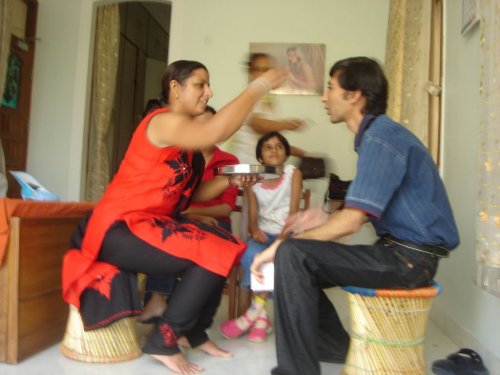
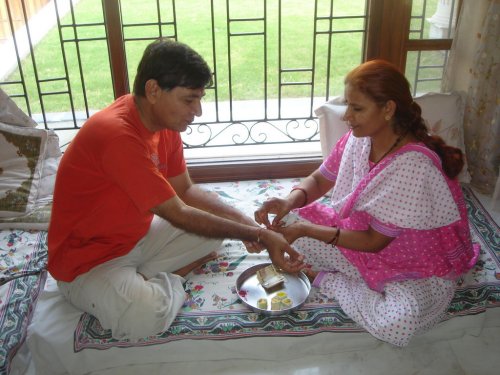
This year Rakhi was a lot of fun. I was still in India so I got to meet some of my cousins when they came over to tie rakhi. Usha Buaji (Dad’s sister) was the first on the scene at ~9 am and she was the first one to tie Rakhi for my dad.

dsc01904.jpg
Usha Buaji Tyeing Rakhi

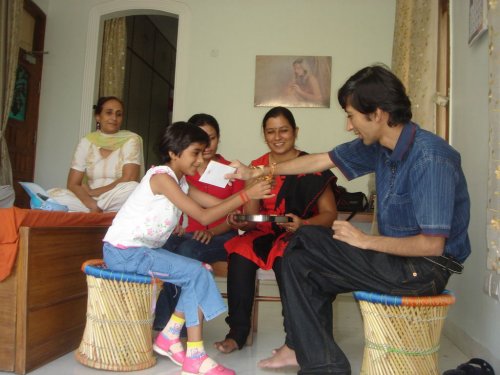
Then Rakhi Didi (Yes that is her actual name) and Jijaji (her husband) joined us along with Ria (my Niece) and both Rakhi Didi and Ria tied rakhi. (Ria did it because she wanted to… usually only sisters tie Rakhi).


dsc01918.jpg
Rakhi Didi Tyeing Rakhi

dsc01916.jpg
Ria Tying Rakhi

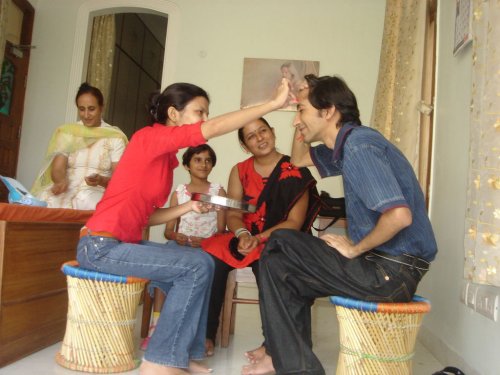
During this time Richa had joined us so she also tied Rakhi.

dsc01915.jpg
Richa Tying Rakhi

Then we all had some Kheer and talked a bit before everyone left due to other commitments (They have a lot of brothers 😉 ).

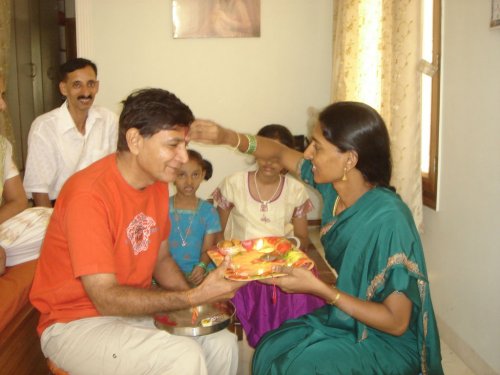
At noon Padmini Buaji joined us with her family. She had just moved to Delhi and she was personally tying Rakhi after 28 years (or was it 22 years… ) Usually we were posted at different locations so she had to mail her Rakhi to dad so this was the a big event for her. She got all dressed up and she even made laddu’s and Kheer herself for us. The laddu’s were great. I got to eat three of them, Two of them at once (Courtesy of Neru and Nritia [Sorry if I misspelled the names]) and the third a little later (One each for the both of them and one for Maithili Buaji’s Daughter).

dsc01925.jpg
Padmini Buaji Tying Rakhi

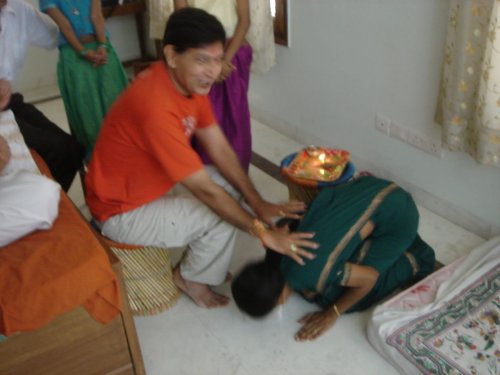
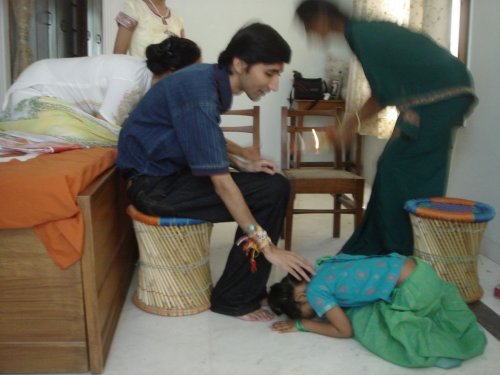
Apparently they have a custom in the South where after the girl ties rakhi she then proceeds to touch the brothers feet for blessing. It was a surprise for us because it was the first time we heard of it. But it was also very touching to watch/have someone touch your feet.

dsc01941.jpg
Padmini Buaji Touching Dad’s feet

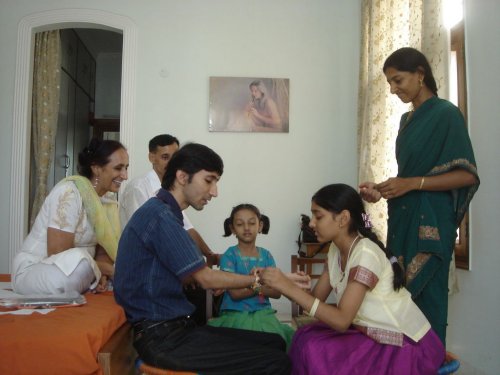
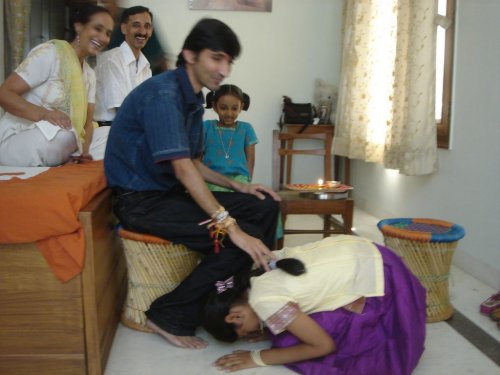
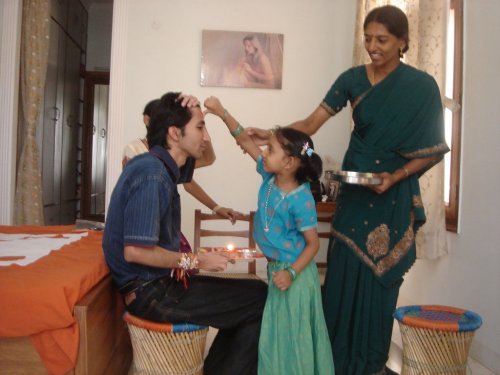
After Buaji her daughters tied rakhi on my hand then they also proceeded to touch my feet. I think I like this custom. Surabhi: The next time you tie rakhi you also have to touch my feet. 😀

dsc01956.jpg
Tying Rakhi

dsc01962.jpg
Then touching my feet.

dsc01967.jpg
Tying Rakhi

dsc01983.jpg
and touching my feet.

Was very touching and fun. Unfortunately the rest of my cousins couldn’t make it as some of them were sick, some out of town. When I was a kid I had Rakhi’s all the way up to my shoulders. I think I have a couple of photos of me with all the Rakhi’s but I will have to search for them.

Well this is all for now. Will post more later.

– Suramya

PS: For those of you who don’t know what rakhi is here’s a summary: “Rakhi, commonly called “Raksha Bandhan” is one of the most popular festivals of India. The Rakhi festival is a celebration of the pure and sacred bond between brothers and sisters. ‘Raksha Bandhan’ or ‘Rakhi’ is a very special day for brothers and sisters, when the sister celebrates her emotional bonding by tying a holy thread around the wrist of her brother. This thread, which symbolizes love and care, is called the ‘Rakhi’. “Rakhi” means the bond of protection. The Raksha Bandhan festival also connotes a broad significance that the strong must protect the weak from all the evils and dangers. ” (Source: Rakhifestival.com)

August 23, 2007

Kiva.org: A site worth checking out.

Filed under: Interesting Sites,My Thoughts — Suramya @ 7:34 PM

Kiva.org is a website that connects you to small businesses in the developing world and lets you give them loans for a short period of time. This loan can be as small as $25 and over a period of time (usually 6-12 months) your loan is repaid.

Usually giving loans requires a lot of money and contributing to charity is an iffy proposition, you don’t know how much of that money is actually being spent on the cause and how much is being pocketed. But this looks like a good compromise. For a small amount of money you are helping someone gain financial independence.

Check it out.

Kiva.org – Loans that change lives

From their site:

Kiva lets you connect with and loan money to unique small businesses in the developing world. By choosing a business on Kiva.org, you can “sponsor a business” and help the world’s working poor make great strides towards economic independence. Throughout the course of the loan (usually 6-12 months), you can receive email journal updates from the business you’ve sponsored. As loans are repaid, you get your loan money back.

– Suramya

August 22, 2007

Idiots in Delhi want to continue the Ban on female bar tenders

Filed under: My Thoughts — Suramya @ 4:54 PM

Apparently men in Delhi can’t hold their liquor and thats why a group of five idiots has petitioned the Supreme Court to overrule a ruling by the Delhi High court last year in which they stuck down a ban on female bartenders in Delhi.

Their justification is “Delhi is a “rogue city”, and not mature enough to have pubs and bars with women bartenders. “. Ok… I suppose that makes sense to them. What about the few thousand women who go to these clubs and bars? Are they not at risk from this so called threat to them? I suppose the next step will be to ban women from bars and pubs..

This is what annoy’s me. A few people who have time to waste end up making life difficult for everyone else. Guess what, your way is not the only way. Other people (like me) disagree. Who are you to decide that women are not safe working as a bartender? I am sure that women who want to be a bartender have this little thing called common sense and a little ability to do something called threat assesment. If they believe the risks are worth it then who are you to stop them?

Its not like they are becoming prostitutes. The are selling drinks to someone who wants to have a few drinks the same way a guy would.

sheesh. Get a life people.

Source: Female bar ban ‘should carry on’ (BBC)
Source: Times of India

– Suramya

August 18, 2007

’10 commandments for Linux users’ and some thoughts on them

Filed under: Linux/Unix Related,My Thoughts — Suramya @ 7:39 PM

I was browsing the web and I found this post called “The 10 Commandments for New Linux Users” with some simple rules for new linux users that the author thought might be useful for new users. Before I start with my comments, lets just read the ‘commandments’:

1. Thou shalt not log in as root.
    Use “sudo” or “su -” for administrative tasks.

2. Thou shalt use the package manager when possible.
    Sometimes installing from source code can’t be avoided, but when you use your distro’s package manager to install software, you can also use it to update and remove it. This is one of the main strengths of Linux.

3. Thou shalt be a part of the community.
    Freely give what you have received for free. Offer help and advice whenever you can.

4. Thou shalt read documentation and man pages.
    Always read the documentation. The people who wrote the software tried to anticipate your questions, and provided answers before you asked.

5. Thou shalt use the available support system.
    Switching to Linux can be tough. It can be frustrating, but there are a lot of people out there who want to help you. Let them.

6. Thou shalt search.
    In most cases, your question or problem has already been addressed. Try to find the answers that are already out there before asking someone to provide a new one.

7. Thou shalt explore.
    Linux opens a whole new world of options and possibilities. Try everything you can.

8. Thou shalt use the command line.
    Especially when it comes to configuration, use the GUI tools to get your system working, but get to know the command line versions as well. In many cases, the command line is the only way to use some of the more advanced features.

9. Thou shalt not try to recreate Windows.
    Linux is not meant to be a clone of Windows. It’s different. Embrace and appreciate the differences.

10. Thou shalt not give up.
    I tried several distributions before I found one I liked. I still try other distros from time to time. I also tried several different programs to serve one purpose before settling on what I use now (amarok, xmms, beep, exaile for music – azureus, ktorrent, deluge for bittorrents). If you don’t like the defaults, remember that you can change almost everything to suit you.

You won’t believe the responses he got to this post. They ranged from helpful additions to the list, some jokes and some rather rude personal comments on the author and the Linux community in general. This is one of the things I hate about the Fanboy and zealots that abound on the internet. They don’t have the knowledge to actually help someone and are retarded idiots whose sole purpose in life is to provoke a reaction from the other person. They don’t have the guts to standup to someone in real life so they hide behind their computer and make rude remarks about everyone else. I have found a couple of them on my site also and usually I either ignore them or make fun of them. What these idiots don’t realize that the person they are making fun of and calling a nerd/geek/looser is a person who probably earns 10 times more and probably has double their IQ.

Anyways, now that we have that out of the way lets talk about the Commandments themselves:

1. Thou shalt not log in as root.

This doesn’t mean that you shouldn’t log in to root at all. It means that you should login as your normal user for everyday tasks and only login to root when required. I have worked as root for hours when it was required (I was troubleshooting an install) but once I was done I logged out immediately. The issue is that if a root account is compromised or you make a mistake as root it can have a huge impact.

Lets take an example: lets say you are trying to delete all files in your home directory and you wanted to enter the following command: rm -rf ~/* but because you were tired you entered the following instead: rm -rf ~ /* (Notice the space between the ~ and the /). Now, if you are logged in as a normal user you will get a bunch of permission denied messages and you are fine. BUT if you are logged in as root it will delete every file in the / directory (Which is the top folder on the disk and hence contains all the files on your system). In one step you have made your system scrap. You will have to restore from backups or re-install which will take time.

Think that wont happen? It does. More times than you can imagine. Think that this just happens on Linux? Sorry, wrong again. I have personal experience with it on Windows (It was Windows 3.1) and at that time I was just learning how to use computers. I had installed a bunch of fonts on the computer thinking I was installing a fonts program. When I realized that the few 100 MB’s worth of stuff I installed on my system didn’t give me any new programs I was upset. So I decided to delete the fonts from my system. Unfortunately the command I entered was: “deltree c:\Windows”. This command deleted my entire windows directory and I spent a week reinstalling. This would not have happened if I was on Linux or if DOS/Windows had any concept of multiuser access controls. They have gotten a lot better at it and XP/Vista is a whole lot more secure than the older versions.

2. Thou shalt use the package manager when possible.

Usually a good idea unless you have a specific reason for not using it. Think of the package manager as the ‘Add/Remove’ programs equivalent in the Linux world. Only its a lot more powerful and versatile than it. Basically it makes managing the system/installing new software a lot easier. Basically all you have to do is select the program you want to install (using the gui frontend or the commandline) and it does the work for you. The same goes for removing programs. Adding a program manually (by compiling it) confuses the system as the package manager doesn’t know its there so if it needs it for some other program it will just download and install the latest version which might not be compatible with the version you installed.

Compiling programs and installing them is usually only required for users with specific needs or for software that doesn’t exist in the package manager repository. (Most popular programs do exist in the repositories)

3. Thou shalt be a part of the community.

An important part. This doesn’t mean that we expect you to start handing in code patches and fixes. It just means that you share your experiences and if someone asks a question that you can answer, you reply. You can be a part of the community by reporting bugs, creating documentation, help organize a meeting or create a new logo or layout thats more efficient. Proofreading the guides and reporting the issues you found while following it is also helpful. Feedback from a new user is an important step in software development and is appreciated.

4. Thou shalt read documentation and man pages.

Also important, but it doesn’t mean that if you have read it and still don’t understand it you can’t ask questions. It just means that if you want to know what the command is to delete files, you search on google for ‘how to delete files in linux’ before asking questions. Its an important rule because it saves both your time and ours. In the time it took you to ask someone and wait for a reply you could have found the answer if you looked first.

5. Thou shalt use the available support system.

Don’t really agree with this one because sometimes the hardest part is finding the support system. I face this problem when I try to fix issues on Windows systems. If I hit an issue I sometimes have a hard time because I don’t know the correct forums/news groups to ask questions in, while I do know what forums to look in when I have a linux question. So I guess new Linux users face the same issue also.

6. Thou shalt search.

See Point 4.

7. Thou shalt explore.

This is true on both Windows and Linux. Don’t be scared of your computer, its not an evil machine plotting to make your life miserable. Its a tool. When you buy a new car don’t you want to explore all the features in it? Same with a computer.

My cousin just bought a new computer for my nephew and the first thing I told him was “don’t be afraid to experiment whatever you break in the software can be fixed.” (so can the hardware. But that might cost money. 😉 ) I have learned more by breaking down the system and then trying to fix it than just playing with it.

If in doubt ask.

8. Thou shalt use the command line.

I would rephrase this as “Thou shalt learn to use the command line”. Because if you want to (and are interested in it) you can save a lot of time by entering a command to do something instead of clicking through 10 dialog boxes.

9. Thou shalt not try to recreate Windows.

Good one. Linux is a new system. Think of it like a new language. When you are learning Spanish, would you try to enforce English vocabulary rules in it? No right… So why do the same in Linux? You can recreate the layout, etc but don’t expect it to behave exactly like Windows.

10. Thou shalt not give up.

Very important rule. For everything in life as well as computers. If you give up you will never know what you are missing. You are more than welcome to try it and decide that it isn’t for you (Thats your choice) but don’t start installing and then quit the minute you hit the first obstruction.

Finally a new addition from my side:

11. Thou are more than welcome to use whatever OS that suites your needs

The main idea is to get the computer to work for you. If you are happy with Windows and if it works for you then you are more than welcome to continue using it. After all its all a matter of choice. I won’t force you to follow mine and I expect the same from you.

Enjoy the computing world. This is all for now. Will post more later.

– Suramya
« Newer Posts — Older Posts »

Powered by WordPress