Suramya's Blog : Welcome to my crazy life…

April 9, 2005

System log management Applications and Resources

Filed under: Security Tools,Tech Related — Suramya @ 9:49 PM

Programs to monitor the Log files for multiple computers running Windows 2000/XP/NT/2003.

GFI LANguard S.E.L.M:

GFI LANguard S.E.L.M. can analyze application, system and other event logs. You can back up and clear event logs on all remote machines in your network automatically; and view, report and filter events network-wide, instead of just per machine. GFI LANguard S.E.L.M. collects all events in one central database, making it easy to create network-wide reports and custom filters. Using the custom rules, you can create your own event alerts based on event ID, condition and event contents.

syslogng:

syslogng provides a centralised, securely stored log of all devices on your network, whatever platform they run on. And syslog-ng also incorporates a host of powerful features, including filtering based on message content, as well as customisable data mining and analysis capabilities.

Syslog Daemon for Windows:

Kiwi Syslog Daemon is a freeware Syslog Daemon for Windows. It receives, filters, logs, displays and forwards Syslog messages and SNMP traps from hosts such as routers, switches, Unix hosts and any other syslog enabled device.

LogAnalysis.org:

A site dedicated to pulling together a repository of useful information on log analysis for computer security

Implementing Central Logging Server

This document attempts to provide a practical guide for implementing a centralized syslog server at an Enterprise level. The document includes details on porting cross platform logs to a central syslog server, porting messages to a database and real time viewing and querying of the logs

Update (12th May 2005):

MS Log Parser:

Log parser is a powerful, versatile tool that provides universal query access to text-based data such as log files, XML files and CSV files, as well as key data sources on the Windows® operating system such as the Event Log, the Registry, the file system, and Active Directory®.

SecurityFocus has a good article explaining how to use the logparser.
April 4, 2005

GIMPshop for Windows is available

Filed under: Computer Related,Tech Related — Suramya @ 4:17 PM

Matthias from http://blog.yumdap.net has created a GIMPshop installer for installer for Windows (tested on WinXP and Win2k). Download the installer from here

I havn’t tried it yet but it looks promising. I will install it when I get home and will let you know how it went.

For those who don’t already know, the Gimp is a powerful, open source image editing application. For more info on the Gimp visit Gimp.org GIMPshop is essentially the same program with some cosmetic changes to make the menu structure feel more like Adobe Photoshop.

Update:

I Tried out the GimpShop Windows Installer and it works great, I didn’t have any problems installing it. The addition of the GIMP Deweirdifier Plugin in this installer puts all GIMP windows in a single parent window and makes GIMPShop a lot easier to use.

I also created a mirror for GIMPShop (Available Versions: RPM, Debian, Windows Exe, Source Code), so visit http://mirror.suramya.com to download GIMPShop and try it out today.

– Suramya

April 2, 2005

Wrote a guide on How to compile and Install GIMPShop

Filed under: News/Articles,Tech Related,Website Updates — Suramya @ 9:44 AM

One of the most common complains that most graphics artists have when they try switching to GIMP (GNU Image Manipulation program) is that the user interface for GIMP is clunky and is hard to use. I have faced the same problem but over time I got used to the GIMP interface so didn’t do anything about it.

On the other hand Scott Moschella; actually decided to do something about it and spent a lot of time hacking the GIMP source to create GIMPShop where the tools, options, windows, and menus closely resemble Adobe Photoshop’s menu structure and naming conventions. This modification makes it really easy for Adobe Photoshop users to switch to GIMP threreby saving a lot of money.

He initially created GIMPShop for the Mac OS and the original package with a Mac Installer is available here;. He also made his ;modified source available so that others can port it to different OS’s. I downloaded it to my computer and got it to work on my Debian Linux machine.

Check out my Guide on How to compile and Install GIMPShop; and let me know what you think.

– Suramya

February 18, 2005

Post-It Notes Go Mobile

Filed under: Tech Related — Suramya @ 4:41 AM

Read in the ACM Technews that Siemens has developed a new application that lets a user post a message to a specific location and when anyone with a cell phone who passes through that area. It seems like an interesting concept but has a lot of potential for abuse.&

Think about it, the messages posted are not censored at all. Anyone can post anything and whoever passes through that area will get that message. So all the new age spammer has to do is send such a message to Times Square or New York Penn station or Madison Square garden and anyone in that area will get the message as an SMS. So in the near future a 15 year old with a cell phone walking down broad street in NY could get a message asking him to step into a shop to get really cheap porno’s or cheap drugs etc.

And the pranksters will have a field day with this one. They can post a porn image to a crowded area and watch the reactions on everyone’s face. There are hundreds of such possibilites and if I can think of them res assured others can too…

Original Summary:
Siemens has developed a new “digital graffiti” application that would allow mobile phone users to send a message to a specific geographic location, where it would appear on the screens of other mobile phone users who are passing through the area.

The concept is similar to placing a Post-It note in a certain spot. The application also resembles SMS (Short Message Service), although the message would be directed to a defined radius and the mobile phone users who are in the area, rather than a specific person. The ability to post notes to a zone makes the digital graffiti technology more than just a mobile phone location-based service. “Imagine a foreman walking through a plant and making notes of things to check for the maintenance crew on the production floor, or a friend who really knows his way around an area leaving tips of places to go for less familiar buddies,” says a Siemens spokesperson. Users can post text messages and pictures, and have the information expire at a certain date. Researchers at the University of Linz in Austria and the Ars Electronica Center in Linz assisted on the application, which could have a commercial rollout by 2007.

Complete Article: Here

– Suramya

January 30, 2005

MSNBot Sucks

Filed under: My Thoughts,Tech Related — Suramya @ 10:03 PM

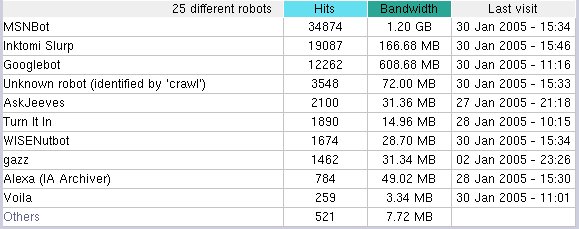
Really pissed of at the stupid MSNBot and its stupid webcrawling allgorithim right now. In the past one month it has hit my site 34,892 times and has transfered 1.2 GB of data from my site. I have no idea what on my site it thinks has changed and needs to be reindexed, it did the same thing last month where the traffic from all the other Bots combined was less than the traffic from it.

The funny part is that in the past one month the only thing that changed on my site was the Blog, addition of one new article and an update to my resume. I have no idea how this could translate to 1.2 GB of data. Below is a snapsot showing the amount of data transfered by each web crawler.

NEway’s I have emailed Microsoft about it, lets see if I actually get a response to my mail.

– Suramya

December 20, 2004

Solar Powered backpack

Filed under: Tech Related — Suramya @ 4:13 PM

Now this is something cool. Voltaic Systems just released a backpack with integrated solar panels. This allows the user to charge most electronics (excluding laptops unfortunately) using solar energy without having to setup the solar panels.

The price is a bit on the high side at $229 + Shipping. But for regular travellers it should be a great help. It even has pockets for most electronic gear (ipod’s, PDA’s etc). Check out the site for the pics.

Would like to buy this when I get some cash and go travelling.

– Suramya
<br />

December 16, 2004

X-10 Releases new home automation software

Filed under: Tech Related — Suramya @ 4:28 PM

X10 which was known for its pop up ads for wireless camera’s has released a new package which makes it easier for people to ‘give your home a brain’, meaning you can now use the software to create a smart house.

I was looking into this last year and when my house in India is nearing completion I will be buying the package and automating the entire house. The new kit costs about $100 with new modules costing ~$15. I am thinking I will add biometric scanners to the mix to allow me to unlock the door without needing keys. Although I will be adding manual overrides in case the power goes out and I will use Linux to control the system instead of windows. I will be adding UPS backup to the server incase of power outages and stuff. Another cool thing to add to this would be voice recognition software.

One of the neat things about this new system is that it doesn’t need the computer to be on after you have programmed it. Meaning once you are done programing the controller you can pug it into any electric supply and shut down the computer and still enjoy the benefits of home automation.

I will keep post updates when I actually start working on this.

Original Story: Wired News

December 1, 2004

Cool Search Engines

Filed under: Computer Related,Tech Related — Suramya @ 7:15 AM

Found two really cool search engines today. Each of them caters to a specific kind of search unlike Google which is a generic search engine.

Koders.com:
This cool website allows you to search through existing source code that solves many common development problems with our vast index of working source code from a variety of open source projects. In many cases you may find code that solves the exact problem you are working on, and in other cases, you can find an 80% solution – where existing code can be suited to your needs with minor modifications.

SingingFish.com:
Singingfish is the premier audio/video search engine. Unlike traditional search engines, Singingfish only indexes multimedia formats, including Windows Media, Real, QuickTime, and mp3s.

Hope you find these as usefull as I do.

– Suramya

November 27, 2004

Text editor for Linux

Filed under: Tech Related — Suramya @ 12:29 AM

While looking for a good document editor for Linux I came across TextMaker created by SoftMaker Software ltd. Its is a very light weight program and requires no configuration, all you have to do if unzip it and run it.

TextMaker launches lightning-fast, needs little memory, does not require complicated setup and still has the full feature set of a modern high-end word processor. It reads and writes Microsoft Word 6/95/97/2000/XP/2003 files without losing formatting or content.

Unfortunately its not free or open source ($49 to buy) bu I think its worth the price. The site offers a 30 day free trial version so check it out if you are looking for a wordprocessor for linux.

URL: http://www.softmaker.de/tml_en.htm

– Suramya

November 5, 2004

Playboy has a mirror for CPAN

Filed under: Funny News,Tech Related — Suramya @ 5:56 AM

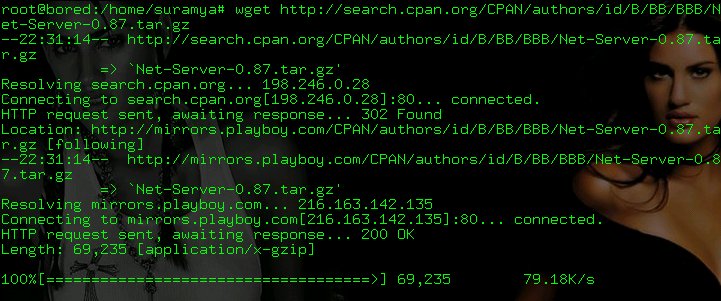
Ok this is something I really didn’t expect to find. Today when downloading perl modules from CPAN I noticed that the file I was downloading was being served on mirror.playboy.com. I took a screenshot of the window as proof

Playboy Mirror

« Newer PostsOlder Posts »

Powered by WordPress