Suramya's Blog : Welcome to my crazy life…

April 5, 2007

How I fixed my Vonage phone issues

Filed under: Tech Related — Suramya @ 2:24 PM

Today I finally fixed a problem that I have been having with my Vonage phone. Basically what was happening was that everytime the power went out and the inverter (Sort of a UPS for the entire house) kicked in the phone would stop working. All I would get was a lot of static on the line and no incoming calls would come though. If I switched the UPS powering the router off so that it was running on internal power the line would clear up. Couldn’t figure out why this was happening so I moved the UPS to a outlet that wasn’t connected to the inverter so when the power went out it would kick to battery backup, but this wasn’t a good solution as the beeping would get on my nerves.

Today I found that the phone was having the same issue even when the inverter wasn’t running so I thought that the issue might be the power supply for the router. I tired plugging it directly to the wall but the issue persisted so I tried running it off the UPS with the main turned off and it worked fine. Then I dug out the extra power supply I have for the router and then the problem was magically fixed.

The weird part is that I still can’t figure out why the thing worked when the UPS was running off battery power but didn’t work when the UPS was running off the mains power.

Oh well. Atleast the stupid thing is working again.

– Suramya
April 1, 2007

Installing Debian without burning CD’s

Do you want to install Debian on a system thats running Windows but doesn’t have a working CD-ROM (Like my current laptop)? Earlier you had to try to install it using floppies and other methods that didn’t always work but now there’s an easier method:

You can now download a “Debian-Installer Loader” from their project site which is basically an exe file which you can run as a regular exe file. Once you run it, it will work for a few moments and then it’ll ask to reboot your PC, at which point you’ll be given the option to run Windows or Debian. Choose Debian and you will end up in a regular Debian installer interface.

Here are some Screenshots of how the installer looks like.

I haven’t tried it yet so I can’t personally verify how well it works but so far I have heard only good things about it. If you try it out let me know how it works out.

Thanks,
Suramya

March 23, 2007

Programs that detect/monitor File alteration

Filed under: Knowledgebase,Security Tools,Tech Related — Suramya @ 5:56 PM

The following is a list of programs that detect/monitor file changes on both *nix/Windows:

Good article on how to do a File Integrity Assesment and how to securely use AIDE.

– Suramya

March 16, 2007

Legally watch World Cup matches online in near real time

Filed under: Interesting Sites,Tech Related — Suramya @ 6:07 PM

I am not a big cricket fan (Understatement of the year…) but this is something really interesting. As some of you might know the cricket World cup is currently going on and is a big craze in India/England/Australia/and a lot of other countries.

Now Sky Television has the exclusive rights to broadcast the matches live so if you want to watch the show live you have to pay them for it. There’s nothing wrong with it but in places that don’t have SKY TV it becomes and issue. There are websites that broadcast the matches live but they are illegal and usually very slow with horrible picture quality.

There is a website called cricinfo.com that solves this issue in a very unique way:

Cricinfo 3D is based on public domain information gathered by our scorers who record a number of factors such as where the ball pitched, the type of shot played and where the ball goes in the field,” said a Wisden statement. “That data is then fed as an xml to anyone who has Cricinfo 3D running on their desktops and the software generates an animation based on this data.”

The match coverage is delayed by between 3 and 12 balls during the match and its still in Beta so might not work perfectly. But still Pretty cool eh?

Check it out: http://www.cricinfo.com/3d/

Thanks to OpenDotDotDot for the link.

– Suramya

March 1, 2007

Open Source Alternatives

Filed under: Computer Software,Interesting Sites,Tech Related — Suramya @ 11:09 PM

Using open source doesn’t mean that you have to run Linux. Its just that Linux has sort of become the flagship of the Open Source Software (OSS) and whenever a person talks about OSS the general perception is that you need linux to enjoy/use OSS. But thankfully this is not true. Even on my Windows system most of the applications I use are open source. e.g. OpenOffice for word processing, Firefox for browsing, GIMP for image manipulation etc.

Now a major problem which newcomers have is that its difficult to figure out what Open Source alternatives are available for a given popular commercial software. The Open Source Alternative website attempts to solve this issue by giving a listing of the various OSS alternatives available for a given proprietary program.

Check it out, you might find some software that replaces the current program you use thus saving you a lot of money.

– Suramya

December 26, 2006

LCD Window Kit

Filed under: Interesting Sites,Tech Related — Suramya @ 4:50 PM

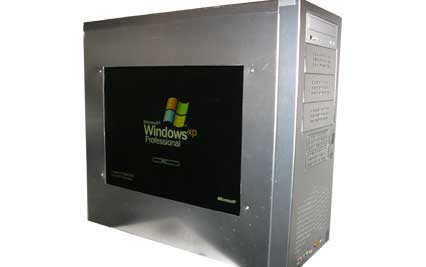
Here’s a different twist of the usual mod where users modify their computer case so that you can look into the innards of the CPU. In this version, instead of creating a window looking inside we put in a LCD monitor in the CPU. Which looks really cool. Below is a pic of what it might look like.

main.jpg

I have a flat screen sitting under my desk from an old system I bought a couple of years ago so maybe I will try to set this up sometime in the near future when I get some free time.

The site has some other really interesting projects also. Check it out if you are interested in DIY projects.

Source: Inventgeek.com – LCD Window Kit

– Suramya

December 11, 2006

Flashlight Slippers

Filed under: Tech Related — Suramya @ 5:04 PM

Interesting… I think I need one of these

Flashlight Slippers

– Suramya

November 15, 2006

Open Source Freeware list

Filed under: Computer Software,Linux/Unix Related,Tech Related — Suramya @ 2:59 PM

Good list of Open Source Freeware. Most of these software work on both Windows and Linux desktop systems.

Check it out..

Thanks to nixcraft for the link.

– Suramya

November 14, 2006

OpenStreetMap: Creating a free map of the planet

Filed under: Interesting Sites,Tech Related — Suramya @ 12:26 PM

This is a really interesting idea. It uses the power of open source/wiki/group efforts to create a free map of the planet. Now you might ask why do we need a free map of the world? Can’t we just use Google Maps or Yahoo Maps to get a map? After all they don’t charge us for access…

Well yes and no. In the open source world there are two kinds of free: “free as in beer” and “free as in speech”. Google Maps are free as in beer, not as in speech.

Basically since Google has to pay for the mapping data it can’t make it available for free. So even though I can access it for free online and get directions I can’t export the map data and create a map to be used on a GPS from it. That would violate Google’s copyright. You can’t copy it to your local system and fix a street name that they got wrong or add new items to the map.

To fix this issue OpenStreetMap was born. It uses GPS coordinates fed to it by users to a Wiki like system and allows users to fill in information like street names etc. Which gives us surprisingly accurate and upto date data as whenever anything changes (e.g. a new street is added) anyone can edit the map and make the changes.

Check it out here: OpenStreetMap.

I think I will be using my GPS on my trips from now on and upload the tracking data collected to the site.

Thanks to TechRepublic for the link.

– Suramya

November 13, 2006

Getting flash working in Firefox in Linux

Filed under: Computer Software,Linux/Unix Related,Tech Related — Suramya @ 11:32 PM

The past few hours I have been trying to get Flash to work on my Linux system using Firefox. Specifically I wanted to be able to listen to music at Pandora.com. I tried everything I could think of including installing different versions of the Flash plugin. I even installed gnash , which is a free version of the flash player but nothing seemed to work.

The funny part was when I tried accessing the swf file directly it would open it and I would see the player initializing but since it needed info from other sections of the page it wouldn’t play anything. Finally I thought that maybe one of my extension’s was causing problems so I tried shutting off Adblock and that fixed the issue.

So now I could start the Pandora music player, but I still didn’t get any sound. The fix for that issue was thankfully simple, all I had to do was:

  • Install alsa-oss by issuing the following command as root: apt-get install alsa-oss
  • Edit /etc/firefox/firefoxrc and add the following line to it:
    FIREFOX_DSP=”aoss”
  • Restart Firefox

After I did this I can now enjoy music from Pandora without any issues. Well, almost any issues. For some reason when I play music from Pandora Firefox memory usage goes upto 70%. I am running Firefox 2.0 on a Debian Unstable system. If any of you have suggestions on how to reduce the CPU usage please let me know.

Well this is all for now. Hope this helps someone else also.

– Suramya

« Newer PostsOlder Posts »

Powered by WordPress