Suramya's Blog : Welcome to my crazy life…

March 1, 2007

Open Source Alternatives

Filed under: Computer Software,Interesting Sites,Tech Related — Suramya @ 11:09 PM

Using open source doesn’t mean that you have to run Linux. Its just that Linux has sort of become the flagship of the Open Source Software (OSS) and whenever a person talks about OSS the general perception is that you need linux to enjoy/use OSS. But thankfully this is not true. Even on my Windows system most of the applications I use are open source. e.g. OpenOffice for word processing, Firefox for browsing, GIMP for image manipulation etc.

Now a major problem which newcomers have is that its difficult to figure out what Open Source alternatives are available for a given popular commercial software. The Open Source Alternative website attempts to solve this issue by giving a listing of the various OSS alternatives available for a given proprietary program.

Check it out, you might find some software that replaces the current program you use thus saving you a lot of money.

– Suramya

December 26, 2006

LCD Window Kit

Filed under: Interesting Sites,Tech Related — Suramya @ 4:50 PM

Here’s a different twist of the usual mod where users modify their computer case so that you can look into the innards of the CPU. In this version, instead of creating a window looking inside we put in a LCD monitor in the CPU. Which looks really cool. Below is a pic of what it might look like.
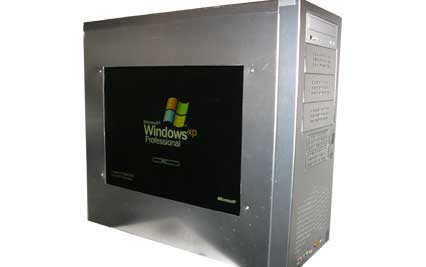
main.jpg

I have a flat screen sitting under my desk from an old system I bought a couple of years ago so maybe I will try to set this up sometime in the near future when I get some free time.

The site has some other really interesting projects also. Check it out if you are interested in DIY projects.

Source: Inventgeek.com – LCD Window Kit

– Suramya

December 11, 2006

Flashlight Slippers

Filed under: Tech Related — Suramya @ 5:04 PM

Interesting… I think I need one of these

Flashlight Slippers

– Suramya

November 15, 2006

Open Source Freeware list

Filed under: Computer Software,Linux/Unix Related,Tech Related — Suramya @ 2:59 PM

Good list of Open Source Freeware. Most of these software work on both Windows and Linux desktop systems.

Check it out..

Thanks to nixcraft for the link.

– Suramya

November 14, 2006

OpenStreetMap: Creating a free map of the planet

Filed under: Interesting Sites,Tech Related — Suramya @ 12:26 PM

This is a really interesting idea. It uses the power of open source/wiki/group efforts to create a free map of the planet. Now you might ask why do we need a free map of the world? Can’t we just use Google Maps or Yahoo Maps to get a map? After all they don’t charge us for access…

Well yes and no. In the open source world there are two kinds of free: “free as in beer” and “free as in speech”. Google Maps are free as in beer, not as in speech.

Basically since Google has to pay for the mapping data it can’t make it available for free. So even though I can access it for free online and get directions I can’t export the map data and create a map to be used on a GPS from it. That would violate Google’s copyright. You can’t copy it to your local system and fix a street name that they got wrong or add new items to the map.

To fix this issue OpenStreetMap was born. It uses GPS coordinates fed to it by users to a Wiki like system and allows users to fill in information like street names etc. Which gives us surprisingly accurate and upto date data as whenever anything changes (e.g. a new street is added) anyone can edit the map and make the changes.

Check it out here: OpenStreetMap.

I think I will be using my GPS on my trips from now on and upload the tracking data collected to the site.

Thanks to TechRepublic for the link.

– Suramya

November 13, 2006

Getting flash working in Firefox in Linux

Filed under: Computer Software,Linux/Unix Related,Tech Related — Suramya @ 11:32 PM

The past few hours I have been trying to get Flash to work on my Linux system using Firefox. Specifically I wanted to be able to listen to music at Pandora.com. I tried everything I could think of including installing different versions of the Flash plugin. I even installed gnash , which is a free version of the flash player but nothing seemed to work.

The funny part was when I tried accessing the swf file directly it would open it and I would see the player initializing but since it needed info from other sections of the page it wouldn’t play anything. Finally I thought that maybe one of my extension’s was causing problems so I tried shutting off Adblock and that fixed the issue.

So now I could start the Pandora music player, but I still didn’t get any sound. The fix for that issue was thankfully simple, all I had to do was:

  • Install alsa-oss by issuing the following command as root: apt-get install alsa-oss
  • Edit /etc/firefox/firefoxrc and add the following line to it:
    FIREFOX_DSP=”aoss”
  • Restart Firefox

After I did this I can now enjoy music from Pandora without any issues. Well, almost any issues. For some reason when I play music from Pandora Firefox memory usage goes upto 70%. I am running Firefox 2.0 on a Debian Unstable system. If any of you have suggestions on how to reduce the CPU usage please let me know.

Well this is all for now. Hope this helps someone else also.

– Suramya

November 9, 2006

Thinkature – Real-time collaboration for the web

Filed under: Interesting Sites,Tech Related — Suramya @ 11:24 PM

I like the concept of realtime collaboration over the web and I have used a couple of tools for this earlier but didn’t find any that I really liked. Until now. I really like Thinkature as its pretty easy to use and intuitive.

Thinkature has a couple of features that I really like:

  • Its free. (Duh..)
  • It doesn’t use Flash. (I am not a fan of flash, I know it lets you do stuff that you couldn’t do without it but I still don’t like it.)
  • The interface is simple and clutter free.

The parts I am not a big fan of are:

  • Its a visual collaborative tool, You cant use it to collaborate on coding or development. Though you can use it for designing presentations and flow charts.
  • There doesn’t seem to be any official privacy policy (That I could find…) on the site. Who owns the content I create on the site? Do I still maintain ownership?

    I have emailed their support about it, lets see what they say,

  • They don’t have any export/import feature (Though it looks like they are working on it.)

Over all a good tool. Check it out over here: Thinkature – Real-time collaboration for the web

Thanks to OpenDotDotDot for the link.

– Suramya

October 25, 2006

SSLBridge AJAX based samba and windows shares

Filed under: Computer Security,Linux/Unix Related,Tech Related — Suramya @ 11:26 PM

Interesting concept. Haven’t tired it out but it looks promising.

SSLBridge is an AJAX and DHTML enhanced web application for viewing and accessing shared files and folders in a network. SSLBridge uses Samba and an SSL connection to create a VPN tunnel into a corporate network. Basically a Samba web client.

Check it out: Here

Thanks to nixCraft for the link.

– Suramya

October 18, 2006

How I broke Windows XP Genuine Advantage test and then fixed it

Filed under: Computer Related,Computer Tips,Tech Related — Suramya @ 11:50 PM

A couple of days ago I had a slight problem with my internet connection, basically what was happening was that I couldn’t access google.com and associated sites (Orkut, gmail etc) but I could access everything else with issues so I spoke to a Comcast representative and she told me to run the following command on my Windows XP laptop (I told her I was using XP because I didn’t want to get into an argument with her that the problem was because I was using Linux.):

regsvr32 softpub.dll

I ran the command and it didn’t fix the issue. So I decided to un-register the dll using the following command:

regsvr32 /u softpub.dll

as I wasn’t sure what this dll did and didn’t want to register random stuff on my system. I ran the command and everything was fine for a couple of days, I could browse the net without issues and everything seemed to work.

Then all of a sudden after a couple of days I get an error message stating that my version of windows could not be validated so I must be running a pirated version of XP. The funny part was that I had installed WGA two months ago on the laptop and it had validated the license and the license is valid. So I went to the Windows update site and tried to validate my copy but ActiveX refused to run. It told me to try a manual check where it downloaded the ActiveX and then tried to run it but that also failed… Finally I tried a check using an executable I downloaded but that validated my license as valid. Now I was confused and tried to force a validation test but every time the system would refuse to run ActiveX and the validation would fail.

After beating my head on the issue for a little while I finally remembered the dll that I had unregistered a while ago so I went through my command history and found the command to re-register it and went ahead and registered it. Then I had to reboot the box and when it came back up I was finally able to run the online validation tool which verified my version of windows was valid. After it verified it I had to reboot again and that fixed the issue.

Moral of the story: If you don’t know what a dll does then don’t uninstall it.
Second Moral of the story: Its a good habit to keep a log of all the commands you run, and any changes you make to the system. Having this will save you a lot of time an energy when something gets messed up.

This is all for now, will post more about my experiments with computers and the messes I caused later.

– Suramya

October 17, 2006

Microsoft Restricts Vista Transfers

Filed under: Computer Related,My Thoughts,Tech Related — Suramya @ 12:09 PM

As some of you know Vista is supposed to come out next year and its going to require a big upgrade for most of the users. Now in a move to alienate even more of its customers MS has changed its licensing terms, limiting the number of times that Windows Vista can be transfered to, to ONE. Thats right One, Uno. In the older versions of windows if you bought a new computer you could install your old version of windows on it provided you uninstalled it from the old computer. With the new licensing you can only do it once so if you upgrade your computer more than once you need a new Vista license.

Hows that for utter stupidity. It is supposed to restrict piracy but the only thing its going to do is annoy regular users. A lot of people upgrade their computers a lot and if MS thinks it can force people to buy a new license every time they upgrade its sadly mistaken. Its going to be a pain for everyone involved and the only people it won’t affect are the software pirates as the pirated version will probably have this check disabled.

I know I transfered my windows XP license from my original 350 Mhz system to a 1.1 ghz system to another system before it got its final home in the machine its on now (All the older systems are now running Linux).

If I had vista I would have had to spend additional money to install an OS that I have a license for on a system that I am going to be using. You know what, I think I will stick with Linux and XP for now. I wasn’t planning to upgrade anyways but with news like this I have even less incentive to try it out.

Original Article: Microsoft Restricts Vista Transfers

Update: Some more thoughts on the new MS Licensing: Lxer.com

– Suramya

« Newer PostsOlder Posts »

Powered by WordPress