Suramya's Blog : Welcome to my crazy life…

September 30, 2020

How to fix vlc’s Core dumping issue while playing some videos

Over the past 2 days I found that the VLC install on my computer was suddenly having issues playing some of the video files on my computer. Initially I thought that it was a problem with the video file, then I realized that this was also happening with videos that had be playing fine earlier. When I ran vlc from the command line to play the problem video it gave the following output on screen when it crashed:

[00005587b42751b0] dummy interface: using the dummy interface module…
[00007f00c4004980] egl_x11 gl error: cannot select OpenGL API
[00007f00c4004980] gl gl: Initialized libplacebo v2.72.0 (API v72)
[00007f00c402a310] postproc filter error: Unsupported input chroma (VAOP)
[00007f00bd986e50] chain filter error: Too high level of recursion (3)
[00007f00c4028d40] main filter error: Failed to create video converter
[00007f00bd986e50] chain filter error: Too high level of recursion (3)
[00007f00c4028d40] main filter error: Failed to create video converter
[00007f00bd986e50] chain filter error: Too high level of recursion (3)
[00007f00c4028d40] main filter error: Failed to create video converter
[00007f00bd986e50] chain filter error: Too high level of recursion (3)


[00007f00c44265c0] chain filter error: Too high level of recursion (3)
[00007f00c4414240] main filter error: Failed to create video converter
[00007f00bd9020d0] main filter error: Failed to create video converter
[00007f00cc047d70] main video output error: Failed to create video converter
[00007f00cc047d70] main video output error: Failed to compensate for the format changes, removing all filters
[00007f00c4004980] gl gl: Initialized libplacebo v2.72.0 (API v72)

A google search told me that a possible solution was to disable hardware acceleration in the Video settings but that didn’t fix my problem. So I took a look at the kernel.log file in /var/log and I got the following error when the program crashed:

Sep 30 21:11:44 StarKnight kernel: [173399.132554] vlc[91472]: segfault at 28000000204 ip 00007f2d8916c1d8 sp 00007f2d8aa69db0 error 4 in libpostproc.so.55.7.100[7f2d8915c000+1d000]
Sep 30 21:11:44 StarKnight kernel: [173399.132568] Code: 98 48 8d 44 07 20 0f 18 08 8b 44 24 08 4d 8d 0c 1a 4d 8d 04 2b 85 c0 0f 85 cb fd ff ff 4c 8b 6c 24 28 4b 8d 04 29 4b 8d 14 20 <41> 0f 6f 01 43 0f 6f 0c 29 41 0f 7f 00 43 0f 7f 0c 20 43 0f 6f 04

Spent about an hour searching for the solution using the details from the kernel.log but got nowhere. Finally I found a forum post where one of the solutions offered was to remove the vlc configuration files, since I didn’t have any other bright idea’s I renamed the vlc config folder by issuing the following command:

mv ~/.config/vlc ~/.config/vlc_09302020

Then I started vlc and just like that everything started working again. 🙂 Not sure what caused the settings to get borked in the first place but the issue is fixed now so all is well.

– Suramya
September 29, 2020

Mounting a Network drive over ssh in Windows using WinFsp & SSHFS-Win

I have computers running both Windows & Linux and at times I need to share files between them and I have been looking for a convenient way to access the files from my Linux machine from my Windows machine without having to run SAMBA on the Linux. This is because historically SAMBA has been a security nightmare and I don’t want to run extra services on the computer if I can avoid it. Earlier this week I finally found a way to mount my Linux directories on Windows as a network mount over SSH using WinFsp & SSHFS-Win and I have been running it for a couple of days so far without any issues. (So far)

Follow these steps to enable SSHFS-Win on your windows machine:

Install WinFsp (Windows File System Proxy)

WinFsp is a set of software components for Windows computers that allows the creation of user mode file systems similar to FUSE (Filesystem in Userspace) in the Unix/Linux world. You can download it from the project’s GIT repository. The Installation file is available by clicking on the download link under ‘Releases’ near the top right corner of the page. The latest version is WinFsp 2020.1 at the time of this writing.

You install the software by running the MSI file you downloaded and the default options worked for me without modification.

Install SSHFS For Windows

SSHFS-Win is a minimal port of SSHFS to Windows. It is available for download from the project’s Git repository. You can compile from source or download the installation file by clicking on the download link under ‘Releases’ near the top right corner of the page. The latest version is SSHFS-Win 2020 at the time of this writing.

Please note that you will need to have WinFsp installed already before you can install SSHFS-Win successfully.

Usage:

Once you have installed both the software you can start using them and map a network drive to a directory using Windows Explorer or the net use command. Instructions for use are as below (Taken from the project Documentation):

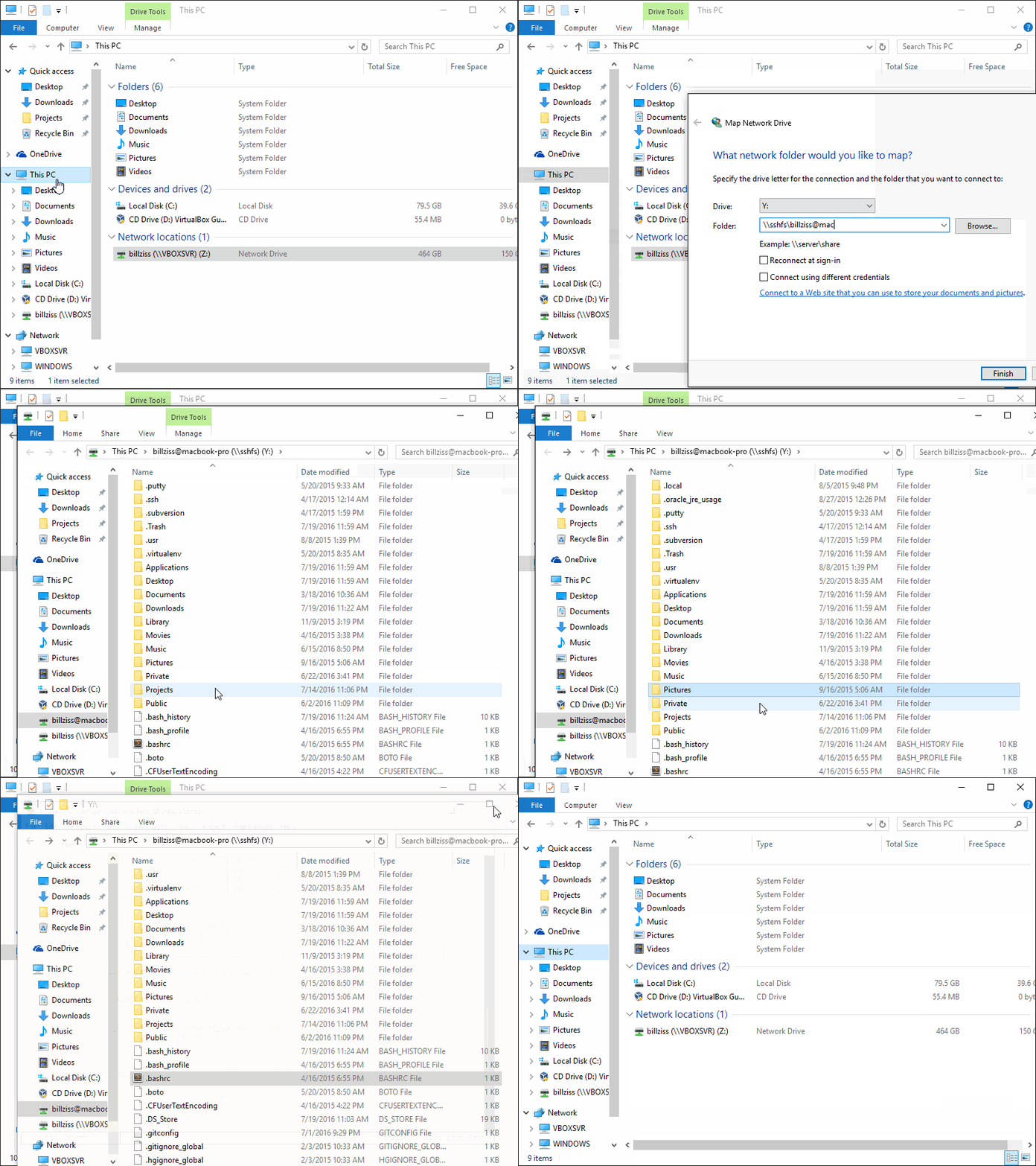
In Windows Explorer select This PC > Map Network Drive and enter the desired drive letter and SSHFS path using the following UNC syntax:

\\sshfs\REMUSER@HOST[\PATH]

The first time you map a particular SSHFS path you will be prompted for the SSH username and password which can be saved using the Windows Credential Manager so that you don’t get prompted for it again. In order to unmap the drive, right-click on the drive icon in Windows Explorer and select Disconnect.


Visual demo of how to Map a Network drive using SSHFS-Win

You can map a network drive from the command line as well using the net use command:

net use X: \\sshfs\suramya@StarKnight

You will then be prompted for the password and once you authenticate you can use the new drive as usual. You can unmap the drive as follows:

net use X: /delete

I find this quite useful and hope you do as well.

Thanks to MakerLab, Department of Computer Science, HKU for pointing me in the correct direction

– Suramya

September 27, 2020

Using ncdu to Check Disk Space Usage In Linux

One of the common tasks I face on my Linux system is to identify what files/directories are using the most space. The traditional way to find out is to go to the top level directory and run a ‘du -hs *’ (without the quotes) on the directory and then cd into each directory, rinse and repeat. The other option available is to right click on the folder in Dolphin or any other file manager and select Properties. With the same process as before when you go into each directory individually, right click and get the properties. This is very tedious and time consuming.

Instead you can use ncdu (NCurses Disk Usage) for looking at the storage space utilization on your computer as it has a lot of advantages. It is designed to find space hogs on a remote server where you don’t have an entire graphical setup available. It is fast, simple and very easy to use. I have been using it for a while now and absolutely love it.

To Install ncdu on a Debian system, you can issue the following command:

apt-get install ncdu

Once you have it installed, the usage it very simple. Simply open a command prompt and issue the following command:

ncdu

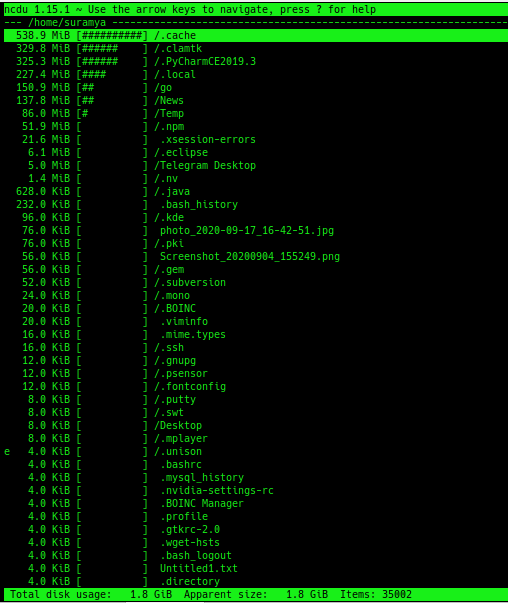
It will start in the current directory and index all the sub-directories under it. The initial scan can take a while depending on the size of the directories under the current directory. But its comparable to the time taken when running du -hs on the directory. Once the program completes its scan, you get a simple ncurses based interface that you can navigate using the keyboard.


ncdu display for my home directory

All directories & are listed with their sizes in human readable format sorted by size with the largest files & directories at the top (in the default view). You can go into a directory by selecting it and hitting enter. The sizes for the subdirectory are immediately shown without having to run additional commands. You can also delete directories & files from within ncdu by hitting the delete key which is a huge timesaver.

If you haven’t tried it out do check it out. You will love it.

– Suramya

September 26, 2020

Source code for multiple Microsoft operating systems including Windows XP & Server 2003 leaked

Filed under: Computer Related,Tech Related — Suramya @ 5:58 PM

Windows XP & Windows Server source code leaked online earlier this week and even though this is for an operating system almost 2 decades old this leak is significant. Firstly because some of the core XP components are still in use in Windows 7/8/10. So if a major bug is found in any of those subsystems after people analyze the code then it will have a significant impact on the modern OS’s as well from Redmond. Secondly, It will give everyone a chance to try and understand how the Windows OS works so that they can enhance tools like WINE and other similar tools to have better compatibility with Windows. The other major impact will be on systems that still use XP like ATM’s, embedded systems, point-of-sale, automated teller machines, set-top boxes etc. Those will be hard to upgrade & protect as is some cases the companies that made the device are no longer in business and in other cases the software is installed in devices that are hard to upgrade.

This is not the first time Windows source code has leaked to the internet. In early 2000 a mega torrent of all MS Operating systems going back to MS-DOS was released, it allegedly contained the source code for the following OS’s:

OS from filename Alleged source size (bytes)
——————— —————————
MS-DOS 6 10,600,000
NT 3.5 101,700,000
NT 4 106,200,000
Windows 2000 122,300,000
NT 5 2,360,000,000

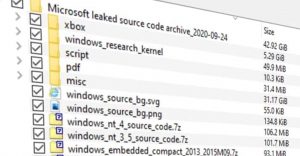
Leaked Data from the latest leak


Alleged contents of the Torrent file with MS Source Code.

The leaked code is available for download at most Torrent sites, I am not going to link to it for obvious reasons. If you want to check it out you can go download it, however as always be careful of what you download off the internet as it might have viruses and/or trojans in it. This is especially true if you are downloading the torrent on a Windows machine. Several users on Twitter claim that the source code for the original Xbox is included as well, but the information is varied on this. I haven’t downloaded it myself so can’t say for sure either way.

Keep in mind that the leak was illegal and just because it has leaked doesn’t mean that you can use it to build a clone of Windows XP without written authorization from Microsoft.

Source: ZDNet: Windows XP source code leaked online, on 4chan, out of all places

– Suramya

September 21, 2020

Diffblue’s Cover is an AI powered software that can write full Unit Tests for you

Writing Unit Test cases for your software is one of the most boring parts of Software Development even though having accurate tests allows us to develop code faster & with more confidence. Having a full test suite allows a developer to ensure that the changes they have made didn’t break other parts of the project that were working fine earlier. This make Unit tests an essential part of CI/CD (Continuous Integration and Continuous Delivery) pipelines. It is therefore hard to do frequent releases without rigorous unit testing. For example SQLite database engine has 640 times as much testing code as code in the engine itself:

As of version 3.33.0 (2020-08-14), the SQLite library consists of approximately 143.4 KSLOC of C code. (KSLOC means thousands of “Source Lines Of Code” or, in other words, lines of code excluding blank lines and comments.) By comparison, the project has 640 times as much test code and test scripts – 91911.0 KSLOC.

Unfortunately, since the tests are boring and don’t give immediate tangible results they are the first casualties when a team is under a time crunch for delivery. This is where Diffblue’s Cover comes into play. Diffblue was spun out of the University of Oxford following their research into how to use AI to write tests automatically. Cover uses AI to write a complete Unit Test including logic that reflects the behavior of the program as compared to the other existing tools that generate Unit Tests based on Templates and depend on the user to provide the logic for the test.

Cover has now been released as a free Community Edition for people to see what the tool can do and try it out themselves. You can download the software from here, and the full datasheet on the software is available here.


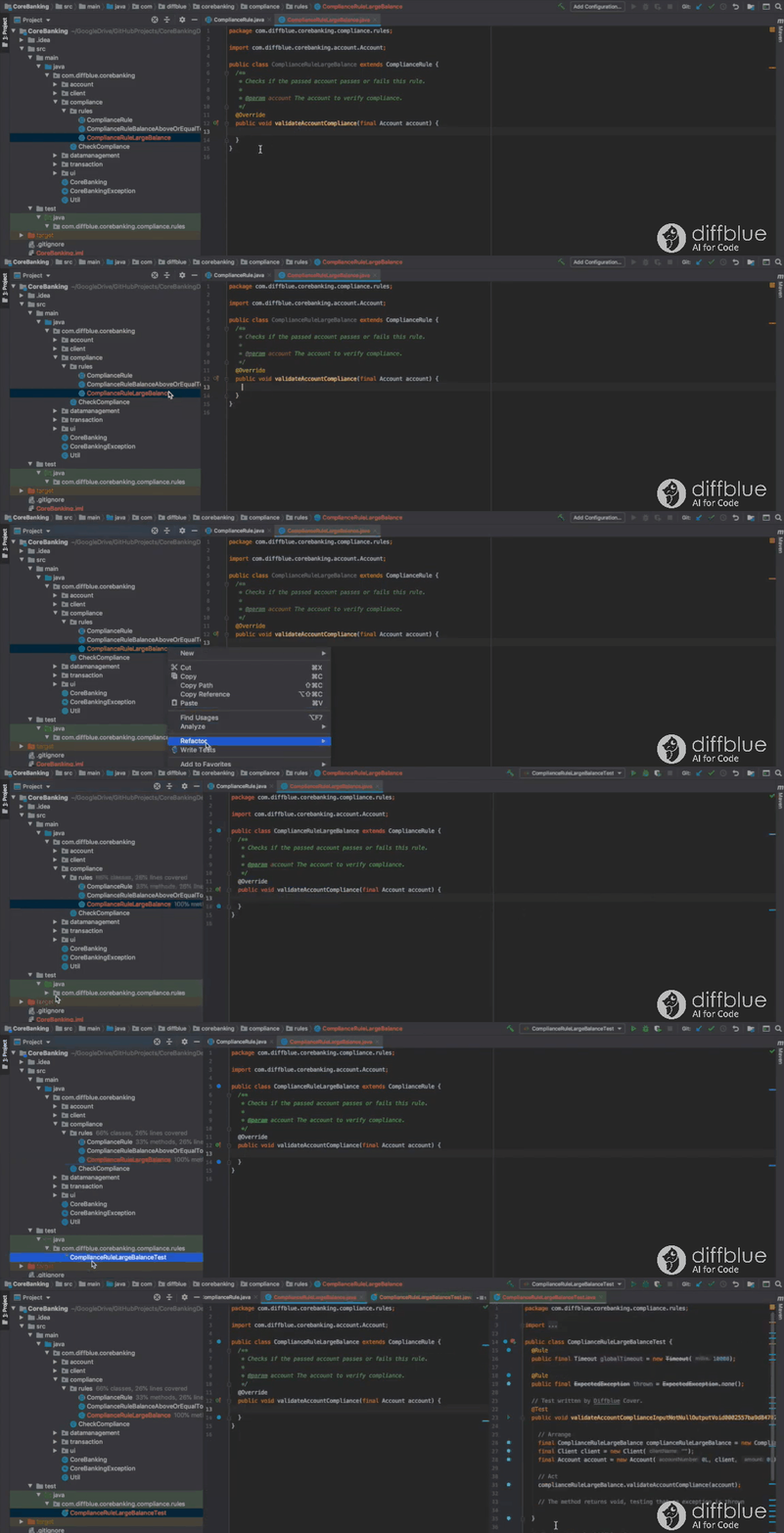
Using Cover IntelliJ plug-in to write tests

The software is not foolproof as in it doesn’t identify bugs in the source code. It assumes that the code is working correctly when the tests are added in, so if there is incorrect logic in the code it won’t be able to help you. On the other hand if the original logic was correct then it will let you know if the changes made break any of the existing functionality.

Lodge acknowledged the problem, telling us: “The code might have bugs in it to begin with, and we can’t tell if the current logic that you have in the code is correct or not, because we don’t know what the intent is of the programmer, and there’s no good way today of being able to express intent in a way that a machine could understand.

“That is generally not the problem that most of our customers have. Most of our customers have very few unit tests, and what they typically do is have a set of tests that run functional end-to-end tests that run at the end of the process.”

Lodge’s argument is that if you start with a working application, then let Cover write tests, you have a code base that becomes amenable to high velocity delivery. “Our customers don’t have any unit tests at all, or they have maybe 5 to 10 per cent coverage. Their issue is not that they can’t test their software: they can. They can run end-to-end tests that run right before they cut a release. What they don’t have are unit tests that enable them to run a CI/CD pipeline and be able to ship software every day, so typically our customers are people who can ship software twice a year.”

The software is currently only compatible with Java & IntelliJ but work is ongoing to incorporate other coding languages & IDEs.

Thanks to Theregister.com for the link to the initial story.

– Suramya

September 17, 2020

How HTTPS Works? Explained in a comic!

Filed under: Computer Security,Security Tutorials,Tech Related — Suramya @ 10:41 AM

Found a fantastic explanation of HTTPS works, what is SSL/TLS & why you should care about any of it in a easy to understand comic format. I love seeing comics like this that aim to show concepts in simple ways.

Have you ever wondered why a green lock icon appears on your browser URL bar? And why is it important? We did too, and this comic is for you!
Follow the adventures of Certificat, Browserbird, and Compugter as they explain why HTTPS is crucial for the future of the web and how it all works together.
Don’t let the bad crabs get you (you’ll know what we mean in the comic). Get to know HTTPS and why it is essential to your privacy.

Check it out at: howhttps.works

– Suramya

September 12, 2020

Post-Quantum Cryptography

Filed under: Computer Related,Quantum Computing,Tech Related — Suramya @ 11:29 AM

As you are aware one of the big promises of Quantum Computers is the ability to break existing Encryption algorithms in a realistic time frame. If you are not aware of this, then here’s a quick primer on Computer Security/cryptography. Basically the current security of cryptography relies on certain “hard” problems—calculations which are practically impossible to solve without the correct cryptographic key. For example it is trivial to multiply two numbers together: 593 times 829 is 491,597 but it is hard to start with the number 491,597 and work out which two prime numbers must be multiplied to produce it and it becomes increasingly difficult as the numbers get larger. Such hard problems form the basis of algorithms like the RSA that would take the best computers available billions of years to solve and all current IT security aspects are built on top of this basic foundation.

Quantum Computers use “qubits” where a single qubit is able to encode more than two states (Technically, each qubit can store a superposition of multiple states) making it possible for it to perform massively parallel computations in parallel. This makes it theoretically possible for a Quantum computer with enough qubits to break traditional encryption in a reasonable time frame. In a theoretical projection it was postulated that a Quantum Computer could break a 2048-bit RSA encryption in ~8 hours. Which as you can imagine is a pretty big deal. But there is no need to panic as this is something that is still only theoretically possible as of now.

However this is something that is coming down the line so the worlds foremost Cryptographic experts have been working on Quantum safe encryption and for the past 3 years the National Institute of Standards and Technology (NIST) has been examining new approaches to encryption and data protection. Out of the initial 69 submissions received three years ago the group narrowed the field down to 15 finalists after two rounds of reviews. NIST has now begun the third round of public review of the algorithms to help decide the core of the first post-quantum cryptography standard.

They are expecting to end the round with one or two algorithms for encryption and key establishment, and one or two others for digital signatures. To make the process easier/more manageable they have divided the finalists into two groups or tracks, with the first track containing the top 7 algorithms that are most promising and have a high probability of being suitable for wide application after the round finishes. The second track has the remaining eight algorithms which need more time to mature or are tailored to a specific application.

The third-round finalist public-key encryption and key-establishment algorithms are Classic McEliece, CRYSTALS-KYBER, NTRU, and SABER. The third-round finalists for digital signatures are CRYSTALS-DILITHIUM, FALCON, and Rainbow. These finalists will be considered for standardization at the end of the third round. In addition, eight alternate candidate algorithms will also advance to the third round: BIKE, FrodoKEM, HQC, NTRU Prime, SIKE, GeMSS, Picnic, and SPHINCS+. These additional candidates are still being considered for standardization, although this is unlikely to occur at the end of the third round. NIST hopes that the announcement of these finalists and additional candidates will serve to focus the cryptographic community’s attention during the next round.

You should check out this talk by Daniel Apon of NIST detailing the selection criteria used to classify the finalists and the full paper with technical details is available here.

Source: Schneier on Security: More on NIST’s Post-Quantum Cryptography

– Suramya

September 11, 2020

Testing the world’s largest digital camera by photographing Broccoli

Filed under: Astronomy / Space,Tech Related — Suramya @ 6:53 PM

The world largest digital camera has completed its first test successfully by capturing the first 3,200-megapixel images of a Broccoli. This camera is meant to be part of the telescope at the Vera Rubin Observatory where they will be taking photographs of the sky to help us improve our understanding of the universe. Once it goes live it will photograph its entire field of view (the area of about 40 full moons) every few nights, which will give the researchers the ability to pinpoint the locations of billions of stars and galaxies, while also catching anything that moves or flashes.

The imaging sensors for the camera took over 6 months to assemble as they need to be mounted very precisely. The sensors are assembled in a grid of 9 sensors called a scientific raft and the whole setup consists of 25 rafts. Each raft is precisely mounted with a gap of just 5 human hairs between each raft. Each raft costs approximately $3 million each so you won’t be able to buy it from the corner shop anytime soon. Once the sensors were assembled successfully the whole apparatus is cooled to a negative 150 degrees Fahrenheit which is their operating temperature.

Even though the assembly was completed back in January the scientists were unable to take test pictures due to the Coronavirus pandemic till May. Even though the sensor assembly has been completed the team still doesn’t have all the remaining camera components such as lenses. So they had to improvise by using a 150-micron pinhole to project images on to the CCD array. That’s correct, they used the same ‘technology’ as what we used as kids to learn about photography to take a picture with the largest ever camera built.

Since they needed to take a picture of something that would allow them to verify the quality of the picture they decided to take a picture of Broccoli which has a lot of lumps & bumps on its surface making its structure perfect to test out the new camera sensors.

“Taking these images is a major accomplishment,” said Aaron Roodman, professor and chair of the particle physics and astrophysics department and the scientist at SLAC responsible for the assembly and testing of the LSST camera, in a statement.

“With the tight specifications we really pushed the limits of what’s possible to take advantage of every square millimeter of the focal plane and maximize the science we can do with it.”

The team is estimating that the camera would be ready for testing by mid-2021 before it’s sent off to Chile for installation in the Vera Rubin Observatory.

Source: Vera Rubin: Super telescope’s giant camera spies broccoli

– Suramya

September 9, 2020

Augmented Reality Geology

Filed under: Computer Software,Emerging Tech,Interesting Sites,Tech Related — Suramya @ 10:17 PM

A lot of times when you look at Augmented Reality (AR), it seems like a solution looking for problem. We still haven’t found the Killer App for AR like the VisiCalc spreadsheet was the killer app for the Apple II and Lotus 1-2-3 & Excel were for the IBM PC. There are various initiatives underway but no one has hit the jackpot yet. There are applications that allow a Doctor to see a reference text or diagram in a heads up display when they’re operating which is something that’s very useful but that’s a niche market. We need something broader in scope and there is a lot of effort focused on the educational field where they’re trying to see if they can use augmented reality in classrooms.

One of the Implementations that sounds very cool is by an app that I found recently where they are using it to project a view of rocks and minerals etc for geology students using AR. Traditionally students are taught by showing them actual physical samples of the minerals and 2D images of larger scale items like meteor craters or strata. The traditional way has its own problems of storage and portability but with AR you can look at a meteor crater in a 3D view, and the teacher can walk you through visually on how it looks and what geological stresses etc formed around it. The same is also possible for minerals and crystals along with other things.

There’s a new app, called GeoXplorer available on both Android and iOS that allows you to achieve this. The app was created by the Fossett Laboratory for Virtual Planetary Exploration to help students understand the complex, three-dimensional nature of geologic structures without having to travel all over the world. The app has a lot of models programmed into the system already with more on the way. Thanks to interest from other fields they are looking at including models of proteins, art, and archeology as well into the App.

“You want to represent that data, not in a projective way like you would do on a screen on a textbook, but actually in a three-dimensional way,” Pratt said. “So you can actually look around it [and] manipulate it exactly how you would do in real life. The thing with augmented reality that we found most attractive [compared to virtual reality] is that it provides a much more intuitive teacher-student setting. You’re not hidden behind avatars. You can use body-language cues [like] eye contact to direct people to where you want to go.”

Working with the Unity game engine, Pratt has since put together a flexible app called GeoXplorer (for iOS and Android) for displaying other models. There is already a large collection of crystalline structure models for different minerals, allowing you to see how all the atoms are arranged. There are also a number of different types of rocks, so you can see what those minerals look like in the macro world. Stepping up again in scale, there are entire rock outcrops, allowing for a genuine geology field-trip experience in your living room. Even bigger, there are terrain maps for landscapes on Earth, as well as on the Moon and Mars.

Its still a work in progress but I think it’s going to be something which is going to be really cool and might be quite a big thing coming soon into classrooms around the world. The one major constraint that I can see is right now, you have to use your phone as the AR gateway which makes it a bit cumbersome to use, something like a Microsoft HoloLens or other augmented reality goggles will make it really easy to use and make it more natural, but obviously the cost factor of these lenses is a big problem. Keeping that in mind it’s easy to understand why they went with the Phone as the AR gateway instead of a Hololens or something similar.

From Martian terrain samples collected by NASA’s Mars Reconnaissance Orbiter to Devil’s Tower in Wyoming to rare hand samples too delicate to handle, the team is constantly expanding the catalog of 3D models available through GeoXplorer and if you have a model you’d like to see added to the app please get in contact with the Fossett Lab at fossett.lab@wustl.edu.

– Suramya

September 1, 2020

Background radiation causes Integrity issues in Quantum Computers

Filed under: Computer Related,My Thoughts,Quantum Computing,Tech Related — Suramya @ 11:16 PM

As if Quantum Computing didn’t have enough issues preventing it from being a workable solution already, new research at MIT has found that ionizing radiation from environmental radioactive materials and cosmic rays can and does interfere with the integrity of quantum computers. The research has been published in Nature: Impact of ionizing radiation on superconducting qubit coherence.

Quantum computers are super powerful because their basic building blocks qubit (quantum bit) is able to simultaneously exist as 0 or 1 (Yes, it makes no sense which is why Eisenstein called it ‘spooky action at a distance’) allowing it process a magnitude more operations in parallel than the regular computing systems. Unfortunately it appears that these qubits are highly sensitive to their environment and even minor levels of radiation emitted by trace elements in concrete walls and cosmic rays can cause them to loose coherence corrupting the calculation/data, this is called decoherence. The longer we can avoid decoherence the more powerful/capable the quantum computer. We have made significant improvements in this over the past two decades, from maintaining it for less than one nanosecond in 1999 to around 200 microseconds today for the best-performing devices.

As per the study, the effect is serious enough to limit the performance to just a few milliseconds which is something we are expected to achieve in the next few years. The only way currently known to avoid this issue is to shield the computer which means putting these computers underground and surrounding it with a 2 ton wall of lead. Another possibility is to use something like a counter-wave of radiation to cancel the incoming radiation similar to how we do noise-canceling. But that is something which doesn’t exist today and will require significant technological breakthrough before it is feasible.

“Cosmic ray radiation is hard to get rid of,” Formaggio says. “It’s very penetrating, and goes right through everything like a jet stream. If you go underground, that gets less and less. It’s probably not necessary to build quantum computers deep underground, like neutrino experiments, but maybe deep basement facilities could probably get qubits operating at improved levels.”

“If we want to build an industry, we’d likely prefer to mitigate the effects of radiation above ground,” Oliver says. “We can think about designing qubits in a way that makes them ‘rad-hard,’ and less sensitive to quasiparticles, or design traps for quasiparticles so that even if they’re constantly being generated by radiation, they can flow away from the qubit. So it’s definitely not game-over, it’s just the next layer of the onion we need to address.”

Quantum Computing is a fascinating field but it really messes with your mind. So I am happy there are folks out there spending time trying to figure out how to get this amazing invention working and reliable enough to replace our existing Bit based computers.

Source: Cosmic rays can destabilize quantum computers, MIT study warns

– Suramya

« Newer PostsOlder Posts »

Powered by WordPress