Suramya's Blog : Welcome to my crazy life…

August 29, 2023

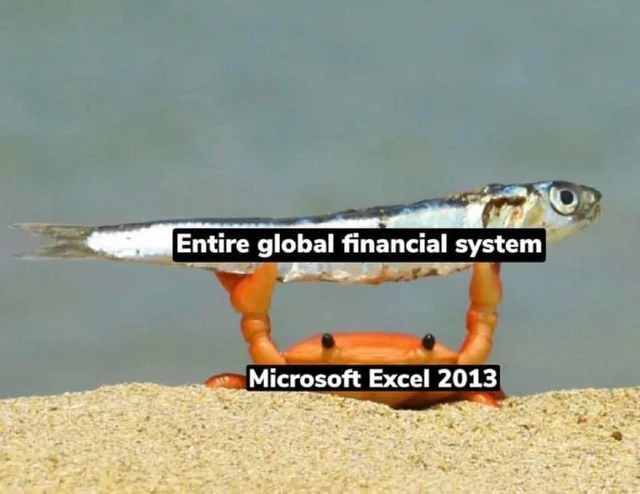
Excel holding up the Global Financial System, now with Python support

Filed under: Computer Security,Computer Software,My Thoughts,Tech Related — Suramya @ 1:12 PM

It is both impressive and scary how much of the world’s financial systems is being run using Microsoft Excel. Folks have created formulars/macros/scripts/functions etc in Excel that allows them to generate data that is used to take major financial decisions with real world impact.

In one of my previous companies we actually had a full discussion on how to get an inventory of all the Excel code in use at the company and how to archive it so that we have backups and version control on them. Unfortunately, I left before much headway was made but I did learn enough about excel use to scare me. (Especially since I am not the biggest fan of Microsoft software 😉 )

Now you might ask why so many people are using excel when there are better tools available in the market and these companies have inhouse teams to create custom software for the analyst and I asked the exact same questions when I started. I think it is probably because the tool makes it easy for folks to come up with formulas and scripts that get their work done instead of having to wait for an external team to make the changes etc that they need.

Now, a few days ago Microsoft made a surprise announcement that going forward they are going to support running Python inside an Excel file. Yikes!! In order to use this functionality you will need to be part of the Microsoft 365 Insider program and then you can type Python code directly into cells using the new =PY() function, which then gets executed in the cloud. From what I have read, this will be enabled by default and needs to be disabled via a registry key.

Since its inception, Microsoft Excel has changed how people organize, analyze, and visualize their data, providing a basis for decision-making for the millions of people who use it each day. Today we’re announcing a significant evolution in the analytical capabilities available within Excel by releasing a Public Preview of Python in Excel. Python in Excel makes it possible to natively combine Python and Excel analytics within the same workbook – with no setup required. With Python in Excel, you can type Python directly into a cell, the Python calculations run in the Microsoft Cloud, and your results are returned to the worksheet, including plots and visualizations.

We already have issues with Excel Macros being used as vectors for malware & viruses, this just opens a whole new front in that war. Now, admins will have to worry about attackers using Python in Excel to infiltrate the organization or to send data outside the org. I can see how it is useful for people working with datasets and MS is adding this functionality to keep up with other tools such as Tableau etc which are more powerful but still I feel that this is a bad move.

Another problem that folks are going to face is that now your Excel sheets have Python programs inside them, how are we supposed to version the code, how is code review done? Basically this code should be going through the standard SDLC (Software Development Life Cycle) process but wouldn’t. We also need to ensure that all changes are reviewed and monitored to protect against insider attacks but the way the system is setup this is going to be extremely difficult (We have already seen that with Macros and Formulas etc).

Lets see how folks address this risk profile.

– Suramya

August 23, 2023

ISRO’s Chandrayaan-3 Successfully lands on the Moon!!!

Filed under: Astronomy / Space — Suramya @ 6:33 PM

We did it!!!! India made it all the way to the moon on its home grown Spacecraft and successfully achieved a soft landing on the Moon! This is a proud day for India and Indian’s world wide. We achieved something that only a few other countries have achieved so far and now India’s ambition to put up our own orbital station doesn’t seem that far fetched anymore…

The Indian Space Research Organisation’s (ISRO’s) Chandrayaan-3, which takes its name from the Sanskrit word for “mooncraft”, took off onboard a Launch Vehicle Mark-III rocket from the southern state of Andhra Pradesh on 14 July and has spent six weeks covering about 380,000 kilometres en route to the moon. It was a remarkably smooth landing process to the point that it wasn’t immediately apparent that it had touched down…

The news conference is ongoing: ISRO Live Telecast

Will post a more detailed post with my thoughts later on but for now: We are on the MOON!!!

Jai Hind!

– Suramya

August 22, 2023

Getting my Pocket C.H.I.P. to finally work

Filed under: Knowledgebase,Linux/Unix Related,My Thoughts,Tech Related — Suramya @ 11:59 PM

Way back in 2016, I backed the Pocket C.H.I.P on Kickstarter opting to get 2 CHIP’s and one PocketChip. The C.H.I.P (or CHIP) was a single single-board computer costing $9 launched by Next Thing Co. It used open-source hardware running open-source software and was advertised as world’s first $9 computer as a direct competitor to the RaspberryPi . The device boasted the following configuration:

  • 1 GHz R8M/R8 (ARMv7)SoC processor
  • 512 MB DDR3 SDRAM
  • Built-in Wi-Fi 802.11b/g/n, Bluetooth 4.0
  • One USB host with type-A receptacle, one USB On-The-Go port
  • Composite video and stereo audio port via mini TRRS
  • Optional composite TRRS to RCA audio-video cable
  • Optional VGA adapter and HDMI adapter (I got both)
  • Up to 45 GPIO ports
  • Supports 1-Wire and I2C protocols, PWM output
  • Serial console and Ethernet via USB for quick headless operation
  • Power options include 5V via USB OTG, 5V via CHN pin, and by 3.7V battery
  • Onboard NAND storage, 4-8GB

The PocketChip was a handheld with a 4.3 inch 480×272 pixel resistive touchscreen, a clicky keyboard, GPIO headers on the top of the device, and GPIO soldering pads inside of the injection molded case powered by the CHIP processor. It looks clunky but is easier to connect to the device and setup using the PocketChip rather than doing it with just the CHIP.

Unfortunately the company shutdown in 2018 due to various issues. However, I was one of the lucky backers to receive the devices but once I received them I put them in a drawer and kind of forgot about them as life got busy and interesting. Over the years I did try to power on the device a couple of times but never really looked into getting it to work, so they just collected dust in my desk (literally).

Over the past weekend I decided to try getting it to work so I did some searching and with a lot of trial and error finally managed to get things to work and boot into a working OS. 🙂 The main issue was that I was expecting it to work like the RaspberryPi where the OS was installed on an SD card but in this case the OS had to be flashed on to the onboard flash chip which was a bit more complicated process than installing to a SD card. I followed the instructions at NextThingCo Pocket C.H.I.P. Flashing Guide amongst other pages to get things to work. Here I will document some of the other things I had to do to get it to work. Please note that this was on a Debian setup, things might be a bit different for other OS’s

Install the Prerequisites

First we need to install the tools required by running the following command as root:

apt-get install git android-tools-fastboot sunxi-tools u-boot-tools

Download the CHIP SDK

Download the CHIP-SDK.zip from one of the following links:

Download and extract the CHIP Tools

Download CHIP-tools.zip from one of the following sites:

Download CHIP OS Images

Download the CHIP OS image from one of the following links:

Extract flash-collection.zip

When I tried extracting the contents of the zip file I got from the first link, I got an error that the file is not a Zip file. After a lot of searching I found out that you can run the following command to extract the file instead:

jar xfv flash-collection.zip

Since that seems unnecessarily complicated. I have extracted and re-compressed the file and shared it at the second link. You can extract it using the standard zip tools.

Fix fastboot

The version of fastboot in the Debian repositories is newer than the one used in the setup scripts and if you try to flash with the version installed then fails with the following error message:

..
..
== Cached UBI located ==
Image Name:   flash server
Created:      Sun Aug 20 19:29:14 2023
Image Type:   ARM Linux Script (uncompressed)
Data Size:    1784 Bytes = 1.74 KiB = 0.00 MiB
Load Address: 00000000
Entry Point:  00000000
Contents:
   Image 0: 1776 Bytes = 1.73 KiB = 0.00 MiB
waiting for fel...OK
waiting for fastboot...fastboot: invalid option -- 'i'
.fastboot: invalid option -- 'i'

The easiest fix for this is to rollback to a previous version of the software that supports the -i parameter. You can try to search and download the older version from Debian’s repositories, but I found it easier to download the software from platform-tools_r26.0.0-linux.zip (as I was too tired to go search for it in the archives)

Once you download the file and extract the contents, follow these steps to rollback to the previous version of fastboot:

  • Backup the existing binary for fastboot
  • mv /usr/lib/android-sdk/platform-tools/fastboot /usr/lib/android-sdk/platform-tools/fastboot_old
  • Copy the extracted file from the zip file to the correct location
  • mv platform-tools/fastboot /usr/lib/android-sdk/platform-tools/fastboot

Put the CHIP in FEL mode

The FEL mode allows the software to flash the CHIP with a new firmware. This can be done by putting a jumper wire between GND and FEL. It will look something like the following:
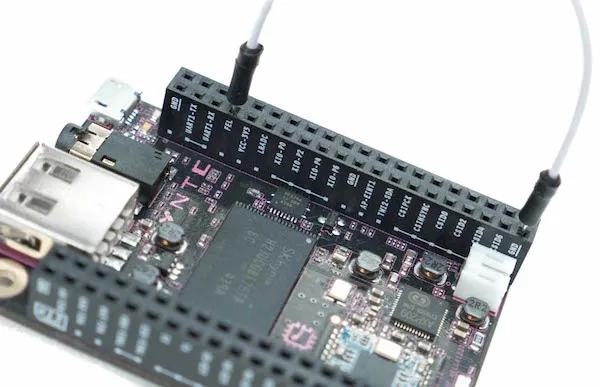

Connecting a jumper wire between GND and FEL to enter FEL Mode

Once you have entered the FEL mode, connect the CHIP to the computer using the microUSB port on the CHIP, not the fullsize USB port.

Flashing the OS to CHIP

Once you have downloaded all the files and unziped them. Follow these steps to Flash the OS to CHIP.

  • Move the CHIP-tools directory to the CHIP-SDK directory
  • mv CHIP-tools CHIP-SDK/
  • Select the Image you want to install and move it into the CHIP-SDK directory. There are 8 Images to choose from, I tested with the testing-server-b543 and testing-pocketchip-b667 images as I have 2 CHIPS to play with. 🙂
  • The original instructions on the site ask you to run the ./setup_ubuntu1404.sh script located in the CHIP-SDK directory but it failed most commands on my system. I think that you should be able to proceed without running it but haven’t tried it.
  • Switch to the CHIP-tools directory
  • cd CHIP-SDK/CHIP-tools
  • Run the firmware upgrade script, replacing Path/To/Chip/Image with the location where you extracted the Image you want to install
  • ./chip-update-firmware.sh -L ../../flash-collection/testing-server-b543/

    If you have done everything correctly and nothing is broken, you will get an output similar to the following:

    suramya@StarKnight:~/Media/Downloads/CHIP/CHIP-SDK/CHIP-tools$ ./chip-update-firmware.sh -L ../testing-pocketchip-b667/
    == Local directory '../testing-pocketchip-b667/' selected ==
    == preparing images ==
    == Local/cached probe files located ==
    == Staging for NAND probe ==
    Image Name:   detect NAND
    Created:      Sun Aug 20 20:24:50 2023
    Image Type:   ARM Linux Script (uncompressed)
    Data Size:    97 Bytes = 0.09 KiB = 0.00 MiB
    Load Address: 00000000
    Entry Point:  00000000
    Contents:
       Image 0: 89 Bytes = 0.09 KiB = 0.00 MiB
    waiting for fel...OK
    waiting for fel......OK
    NAND detected:
    nand_erasesize=400000
    nand_oobsize=680
    nand_writesize=4000
    == Cached UBI located ==
    Image Name:   flash server
    Created:      Sun Aug 20 20:24:58 2023
    Image Type:   ARM Linux Script (uncompressed)
    Data Size:    1784 Bytes = 1.74 KiB = 0.00 MiB
    Load Address: 00000000
    Entry Point:  00000000
    Contents:
       Image 0: 1776 Bytes = 1.73 KiB = 0.00 MiB
    waiting for fel...OK
    waiting for fastboot...................OK
    target reported max download size of 33554432 bytes
    sending sparse 'UBI' 1/23 (28672 KB)...
    OKAY [  2.016s]
    writing 'UBI' 1/23...
    OKAY [  2.069s]
    sending sparse 'UBI' 2/23 (28672 KB)...
    OKAY [  2.007s]
    writing 'UBI' 2/23...
    OKAY [  5.484s]
    ..
    ..
    
    sending sparse 'UBI' 22/23 (28672 KB)...
    OKAY [  1.916s]
    writing 'UBI' 22/23...
    OKAY [  9.079s]
    sending sparse 'UBI' 23/23 (16384 KB)...
    OKAY [  1.105s]
    writing 'UBI' 23/23...
    OKAY [  4.981s]
    finished. total time: 300.744s
    resuming boot...
    OKAY [  0.000s]
    finished. total time: 0.000s
    
    
    FLASH VERIFICATION COMPLETE.
    
    
       #  #  #
      #########
    ###       ###
      # {#}   #
    ###  '%######
      #       #
    ###       ###
      ########
       #  #  #
    
    
    CHIP is ready to roll!

    If you see the message that “FLASH VERIFICATION COMPLETE.” and that “CHIP is ready to roll!”, then the OS installation has completed successfully. Now you can disconnect the CHIP from the computer and remove the jumper cable.

    Booting into CHIP

    If you have the PocketCHIP, then you can just power up the device by pressing on the power button for a second (pressing it for 10 seconds shuts it down forcefully). If you just have the CHIP, you will need to connect it to a monitor and connect a keyboard as well. (I used the PocketCHIP to configure everything and then used it separately).

    The boot up process can take a minute or two, and assuming everything went well you should see the standard boot messages on the screen. Once you get to the login prompt you can log in using the username ‘chip’ (without the quotes) and ‘chip’ (without the quotes) as the password. The root account password is also ‘chip’ (without the quotes).

    Connecting to WiFi and configuring the CHIP

    The first thing that you should do now is connect the device to a WiFi network so that you can SSH into it for ease of configuration. The second thing should be to change the default passwords 🙂

    The easiest way to configure WiFi is to use the nmcli tool. Run the following command as root to connect to the WiFi. More details on the command are available at How to Connect Wi-Fi from Linux Terminal Using Nmcli Command

    nmcli dev wifi connect <SSID of The Network to Connect With> password <password for the Wifi Network> 

    Once the device is connected to the WiFi, get your IP address using the following command:

    ip address

    Then you can SSH into the device from any system using the IP address.

    CHIP is working!!!
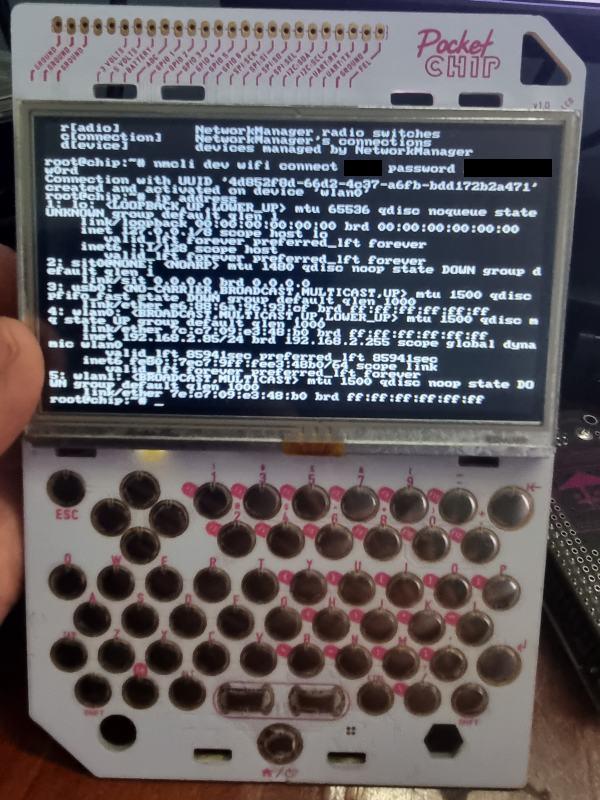

    Running Debian 8 Testing
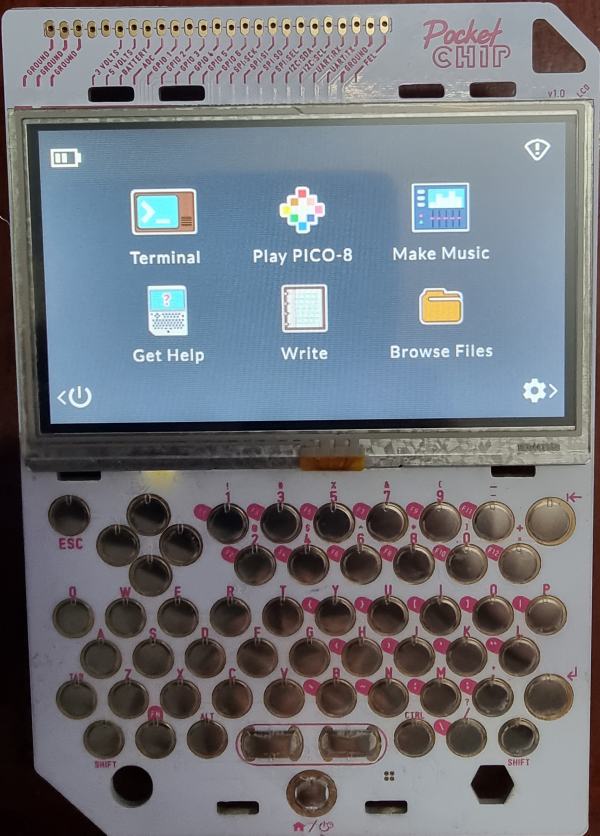

    Running the PocketCHIP customized version (Debian 8)

    Updating the OS to the latest version

    The system is running Debian 8 by default and you should upgrade it to the latest version. Unfortunately, I keep getting errors when I try to upgrade to the latest Debian version and haven’t yet fixed the problem. Basically, I think you need to update the /etc/apt/sources.list with the correct mirror details and then upgrade. Once I get some time to revisit the setup and resolve the issue I will post the fix on the blog as a followup post to this one.

    – Suramya

August 21, 2023

Workaround for paste not working in Whatsapp web on Firefox

Filed under: Computer Software,Knowledgebase — Suramya @ 10:40 PM

In the latest version of Firefox (116.0.3) something changed and due to this if you are using the Web version of Whatsapp you are no longer able to paste anything into the chat window. Ctrl-V, Right-Click -> Paste, nothing works. The issue exists on both Windows and Linux builds of Firefox. Did a search and found that others are facing the same issue and found a work around at Superuser.com: Firefox doesn’t allow to paste into WhatsApp web anymore?

In order to fix follow these steps:

  • Go to about:config
  • Search for ‘dom.event.clipboardevents.enabled’ (without the quotes)
  • Set the value to false by double clicking on the entry

The change takes effect immediately. This is not a permanent fix and once Firefox fixes the issue you should revert the change.

– Suramya

August 19, 2023

ChatGPT is not an all powerful AI it can’t even perform simple multiplications

Filed under: Artificial Intelligence — Suramya @ 9:49 PM

In my previous post I was talking about how I am usually quite skeptical of the claims being made about AI and how it is going to solve the world’s problems. There are some good usecases and there are some advantages to adding Machine Learning to the system. I have written about a few of them here.

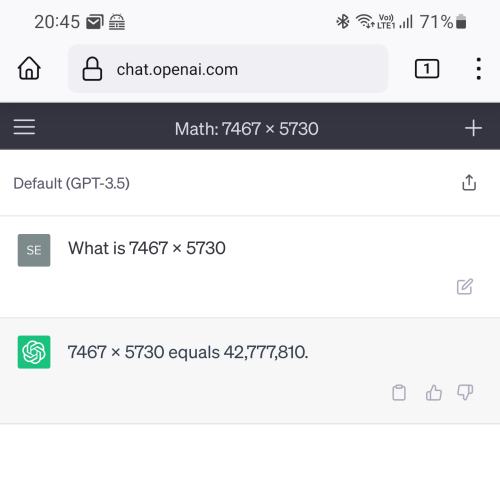
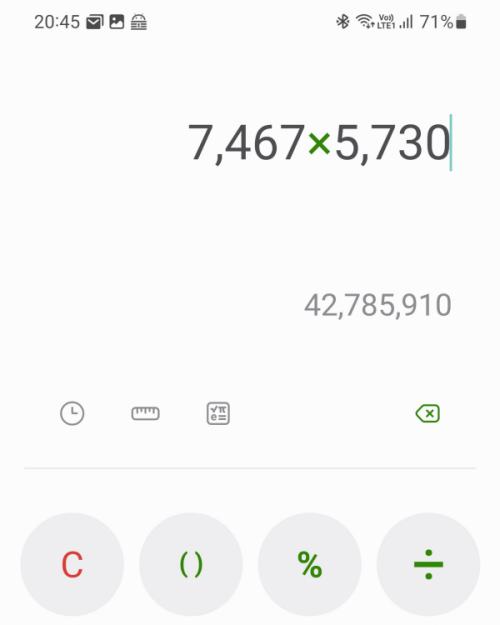
But we are nowhere close to the Singularity and most of the folks who are pushing AI right now are the same ones who where pushing NFT’s earlier and Crypto before that… Case in point, according to founder of AI is an existential threat and OpenAI ChatGPT is a showcase of how advanced AI has become. However, this ‘advanced’ AI can’t even multiply two numbers to get the correct answer. I asked ‘What is 7467*5730’ and it gave me ‘42,777,810’. Then I asked my calculator to perform the same multiplication and that gave me: (Drum roll please…) 42,785,910. (See the screenshots below)


ChatGPT can’t perform a simple multiplication

Others have faced the same issue and I rest my case about why we need to be very careful using these AI assistants because they give answers that look legitimate and correct but are completely wrong or have subtle errors that need expertise to identify.

– Suramya

August 18, 2023

The Judge by GoblinTools is a great tool to tell how written text comes across qualitatively

Readers of this blog (and those who know me) know that I am usually quite skeptical of tools that claim to judge the emotional content of text or tell how the text comes across qualitatively. However, this new site called The Judge – Goblin Tools is quite impressive. As per James over on Mastodon, the tool was created to help neurodivergent folks communicate better with the normals avoiding misunderstanding, bad assumptions about intent, etc.

I tested it out with content from my blog and I have to say that it summarized the tone and content quite nicely. For example below is the summary it gave for my post on Celebrating India’s 76th Independence day!

Emotionally, this text comes across as proud, patriotic, and reflective. It begins by acknowledging and celebrating India’s 76th Independence Day, recognizing the significance of gaining freedom from British rule. It highlights the sacrifices, bloodshed, and tears endured by many individuals who fought for India’s freedom, emphasizing that not all their names are known and that this is a tragic aspect. The text expresses a sense of frustration with the tendency to focus solely on iconic figures like Gandhi and Nehru, disregarding the efforts of numerous other freedom fighters.

As the text looks towards the future, there is a strong emotional undertone of remembrance and gratitude towards those who paved the way for freedom. It cites famous slogans from freedom fighters, adding a sense of inspiration and reverence for their contribution. The passage acknowledges the importance of remembering the sacrifices made by past generations for the betterment of the nation.

There is a shift in emotion when it proudly proclaims India’s progress and achievements in various fields, such as technology, space exploration, and healthcare. It displays a sense of national pride and triumph over past perceptions that diminished India’s image. The text mentions India’s relief efforts during the COVID-19 pandemic and positions India as a nation capable of compassionate and humanitarian actions.

Moving forward, the text acknowledges areas that still require improvement, alluding to societal customs and mindsets. It expresses a desire for growth and change while also highlighting the need for self-reflection in other countries that criticize India, pointing out their own flaws and challenges.

The passage concludes with a message of unity and inclusivity, promoting the idea that humanity should transcend differences in caste, religion, nationality, sexuality, and age. It embraces the concept of a global family and emphasizes the values of humanity and national loyalty.

Overall, this text conveys a mixture of pride in India’s accomplishments, gratitude for the sacrifices made by freedom fighters, and a sense of reflection on the challenges that still exist. It aims to inspire unity, progress, and a commitment to the values that define the nation.

It did manage to capture the exact tone I was going for so that is quite nice. According to their About Us page, the site uses AI technologies in the backend including OpenAI’s models. They are planning to move to open source alternatives as and when they become available and reliable. Keeping that in mind, I would not recommend using this to analyze any text that has private or confidential information because it might be used to train OpenAI’s models. That being said I would be keeping an eye on this software and once they go to an opensource model and allow us to run a local instance of the tool I certainly wouldn’t mind using as part of my writing toolkit.

– Suramya

August 17, 2023

Yes, It is absolutely fine to code (or work) ‘just for the money’

Filed under: My Thoughts — Suramya @ 10:16 PM

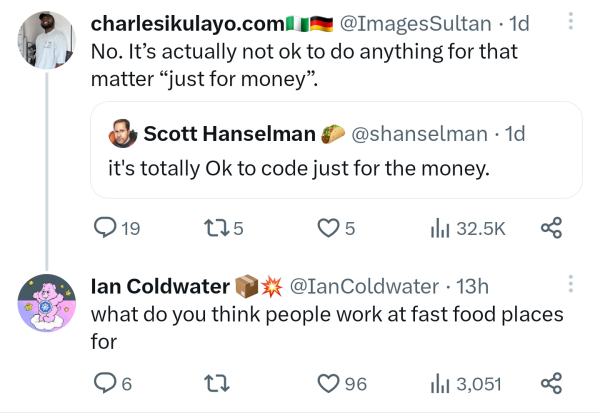
Once again we are seeing a flurry of messages on various social media sites talking about coding for money. My feed on Mastodon had a few folks post screenshots from other sites with some inspired takes and I especially love the one below (and the response):


Yes, It’s ok to code for money.

These pseudo-intellectuals who have never faced the possibility of not having enough money, mostly because they were born rich or managed to luck into a job that gives them enough money have the guts to tell people that it is not ok to code for money. They have the financial cushion to decide that they will do something for free but not everyone has that option. This is the same nonsense the artists have been getting for years now that you should paint/write/create for passion and not for money. They are told by folks who have money that if you are poor and suffering then your art is more ‘pure’. Personally I think it is just an excuse not to pay the artists.

This attitude is a leftover from the colonial thinking where it was considered crass / common for the nobility to work for a living and working was something that only the common folks did. There have been numerous documented instances where folks were actually disowned by their family because they actually worked for their living or ran a business. This was called Dérogeance and included engagement in certain professions and occupations considered to be “lowly”. In particular, it prevented the nobility from engaging in commerce and retail trade.

I love computers and am lucky that I get to work on something that is my passion. However, I know enough people in the industry who don’t like computers and are in it for the money and Guess what? that is perfectly ok. I remember in school I had a classmate who hated programming but was planning to do a degree in Computer Science. So I asked him why he was doing that even though he hated coding, and he responded saying that is where the money is. At the time we made fun of him but now that I think of it, he made money and once he was comfortably settled he switched roles and has moved on to something they enjoy doing. It is perfectly fine not to want to come home from work and start coding away on a personal project.

Long story short, telling people that it is not ok to do things ‘just for the money’ is extremely classicist / rude and frankly it is none of your business why anyone is in the industry. You are not the gatekeeper for the industry and can just buzz off…

– Suramya

August 16, 2023

ISRO’s Chandrayaan-3 successfully completed its Fifth and final orbit reduction maneuver

Filed under: Astronomy / Space — Suramya @ 6:57 PM

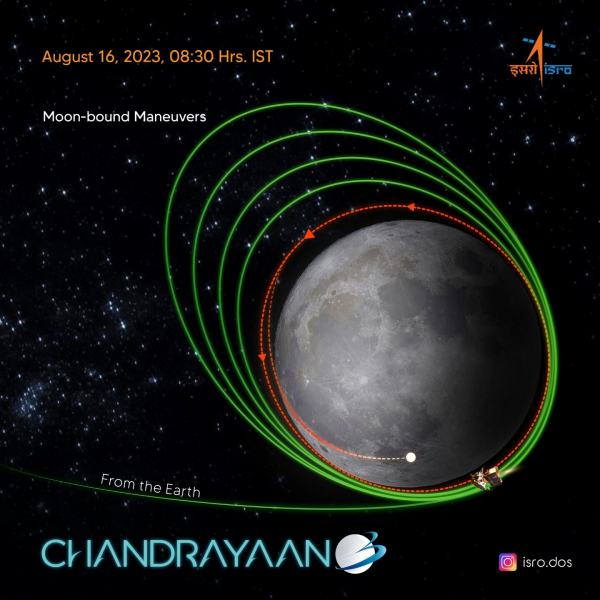
Chandrayaan-3 is the third spacecraft sent to the moon by the Indian Space Research Organisation (ISRO) and the second one to attempt a soft landing on the far side of the moon. The Chandrayaan-3 consists of a lander module (LM), a propulsion module (PM) and a rover. Earlier today the craft successfully completed its 5th firing that has put the Chandrayaan-3 into an orbit of 153 km x 163 km around the moon as intended bringing it another step closer to its moon landing attempt which is expected to happen at 5.47 p.m on August 23rd 2023.


Chandrayaan-3’s Moon-bound maneuvers

After the completion of the five orbit reduction maneuvers ISRO said that it is gearing up for the next most crucial operations which is scheduled on August 17.

“It’s time for preparations as the Propulsion Module and the Lander Module gear up for their separate journeys. Separation of the Lander Module from the Propulsion Module is planned for August 17, 2023,” the space agency said

The propulsion module will separate from the lander while in orbit.

Following that, a series of complex braking maneuvers will be executed to facilitate a soft landing in the South Polar region of the Moon on August 23. The lander is expected to touch down on the moon surface at 5.47 p.m.

I am eagerly waiting for this attempt with fingers crossed. Although I think that the mission would have been even better if it was landing on the moon on 15th Aug (India’s Independence Day). More details on the mission and the craft is available over at the IRSO’s Chandrayaan-3 site.

– Suramya

Please stop ‘reinventing’ things for clout & funding

Filed under: My Thoughts — Suramya @ 10:23 AM

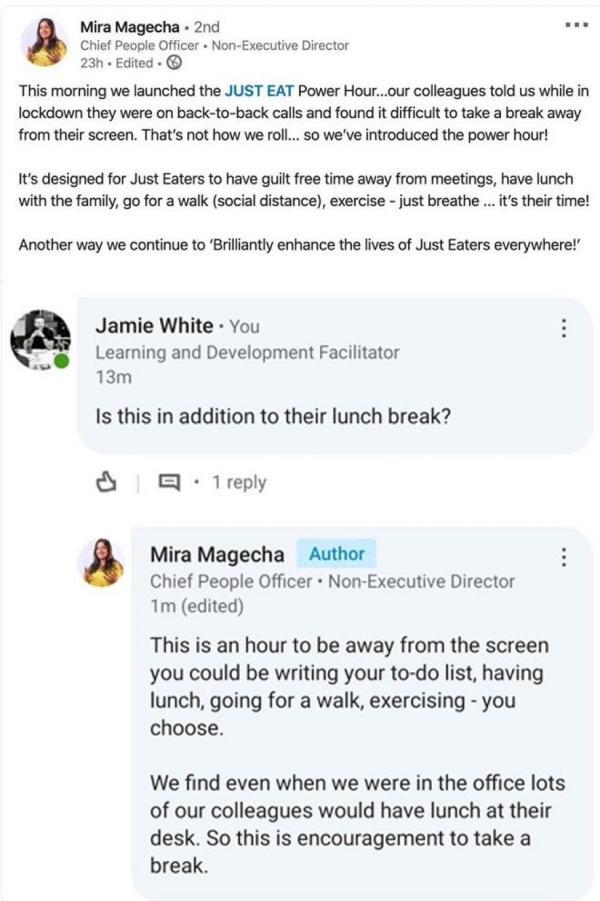
The following popped up in my feed a few days ago and it was an interesting read. Mira genuinely feels that they have come up with a new innovating approach/idea not realizing that they are just repackaging / reinventing the lunch break. We are so conditioned to treat the old ways / existing ways of doing things as obsolete and have this fascination about breaking things where we tend to ignore existing work because no one is rewarded for doing things the old way. You need to rebrand it as something innovative/ground breaking like in this case a “Just Eat Power Hour” for people to eat their lunch without working at the same time…


They re-invented the lunch break!

This is not an isolated instance, there have been multiple cases where a silicon valley bro ‘invented’ stuff that already existed. Such as Roommates. WeLive is the communal housing offshoot of WeWork where a bunch of people live in a place and share common areas. This is called “co-living” in the world of WeWork. In the real world, it’s called having roommates. Then we have MakeSpace which raised $57 million for its “cloud storage for physical stuff.” i.e. a storage locker. There are so many of these examples and they sound so obvious and have existing implementations. Unfortunately the inventors are living in their own world where they are constantly told that all their ‘inventions’ are groundbreaking where in fact they are just rebranded versions of the existing stuff.

– Suramya

August 15, 2023

Celebrating India’s 76th Independence day!

Filed under: My Thoughts — Suramya @ 7:59 PM

Today we celebrate our 76th Independence Day and start the 77th year since India gained it’s independence from the British. Gaining Independence was not an easy process and nor was it because of the non-violent movement. It took blood and tears and sacrifice. We don’t have the names of everyone who sacrificed and died to make the country free and that is the biggest tragedy. We do know some of the names like Subhash Chandra Bose, Dr. B R Ambedkar, Dr. Rajendra Prasad, Sardar Vallabhbhai Patel. Then there are like Gandhi and Nehru who some like to pretend were the only people who fought for the country. Only a partial list of the freedom fighters of India is at StudyIQ.com but we need to remember them all, the known and the unknown… The nobles and the common person, the kings and the slaves, the famous and the forgotten.

As we step into the future, we need to ensure that the sacrifices of those before us are remembered and never forgotten. Hindustan Times compiled a list of famous slogans by freedom fighters that can never be forgotten. Below are some of my favorites:

तुम मुझे खून दो, मैं तुम्हें आज़ादी दूंगा (Tum mujhe khoon do, main tumhe azaadi doonga)

– Subhash Chandra Bose

Subhash Chandra Bose founded Indian National Army (Azad Hind Fauj) and coined the slogan of ‘tum mujhe khoon do, main tumhe azaadi doonga’, that asked the people to give him blood (their lives) so that he can give them their independence.

Inqalab Zindabad

– Shaheed Bhagat Singh

The iconic freedom fighter Bhagat Singh who gave up his life for his country at the young age of 23 popularised the slogan penned by Urdu poet and freedom fighter Maulana Hasrat Mohanib. Inqalab Zindabad translates to ‘long live the revolution’.

सरफ़रोशी की तमन्ना अब हमारे दिल में है देखना है ज़ोर कितना बाज़ु-ए-क़ातिल में है (Sarfaroshi ki tamanna ab hamare dil me hai, dekhna hai zor kitna baazu-e-qaatil mein hai)….

– Ramprasad Bismil

These lines from the patriotic poem by Ramprasad Bismil became the inspiration for common folks across the country to rise up and make great sacrifices to earn their precious freedom. Literally they translate to something like: We have the desire to sacrifice ourselves (for our freedom) and we have to see the strength in our killer’s arms. The full poem is a must read. (This link has the English translation as well)

We were a great nation that was brainwashed to think we were nothing. Now we are back stronger than ever and we are no longer known as the begging bowl of the world, the nation of snake charmers, elephant-walkers, and illiterate minions but rather we are known for our technical skills and achievements. Once again the Indian flag is flying proudly; not just on earth but all the way to the Moon and Mars. ISRO’s Chandrayaan-3 mission is days away from attempting a landing on the Moon, We have the Gagaan Yaan mission in the works. Our doctors and scientists created vaccinations and medicines that were freely given to countries in need during the early stages of Covid and our relief efforts across the world have saved countless lives.

I do agree that there are areas where we still need to improve, customs and mindsets that need to change. However, we are not the only one in the world that has customs and events that shame. The world loves to point to India’s shortcomings, claim the moral high ground and preach to us but these countries should look at their own countries and what is happening inside their borders. The bigotry, the anger, the collapse of social systems. We are once again seeing the rise of religious fanaticism, fascism, discrimination across the world and we as humans need to step above that.

The Maha Upanishad’s tell us that Vasudhaiva Kutumbakam, which means “The World Is One Family”. Similarly “Yaathum Uure Yaavarum Kaeleer” is a Tamil proverb that means “Every place is my home, everyone is my kin.”… We need to grow above our petty difference such as caste, religion, nationality, sexuality, age etc and then the sky (and beyond) is the limit.. Or like the poem says:

न जियो तुम धर्म के नाम पर
न मरो तुम धर्म के नाम पर
वतन का धर्म इंसानियत ही है
बस जियो तुम वतन के नाम पर
भारत माता की जय.

Translation:

Don’t live for your religion,
Don’t die for your religion,
Remember that Humanity is the religion for India
Just live for the country
Victory/Salutations to Mother India

Happy Independence Day Everyone!

– Suramya

« Newer PostsOlder Posts »

Powered by WordPress