Suramya's Blog : Welcome to my crazy life…

October 11, 2007

UK Police Can Now Demand Encryption Keys

Filed under: Computer Security,News/Articles,Tech Related — Suramya @ 12:18 PM

Under a new law that went into effect this month, it is now a crime to refuse to turn a decryption key over to the police. So lets say you have an encrypted file on your computer and you are traveling through UK, if the cops feel like it they can force you to hand over the decryption key. If you don’t comply you face a 5 year sentence in jail if the investigation relates to terrorism or national security, or up to two years in jail in other cases.

But what they don’t seem to have considered is that sometimes people do forget passwords and keys. Back in 2003 I went through a phase where I started encrypted all my data backups (MySQL database dumps etc) using PGP for a couple of months, which was all well and good. Then I had to upgrade my OS so I formated my computer managing to loose the decryption key which was stored in my PGP keyring. I do have a physical copy of the key but thats sitting in one of the boxes in storage. So if I went to UK and they asked me for the key I can’t give it to them because I really don’t have it. But if I tell them that I will end up in jail for 2 years if the judge refuses to believe me.

So I think I am staying away from UK for the time being.

Thanks to Schneier on Security for the news.

More information available at The Register

– Suramya

October 3, 2007

Automatic session logging/monitoring with GNU screen

Filed under: Computer Security,Computer Tips,Security Tutorials,Tech Related — Suramya @ 11:10 PM

Found this good article on how to setup screen on Linux/Unix so that it automatically logs all activity made in the session. Screen is a utility that I use very often on my Linux box. Basically its a program that you start and it attaches to a specific console and if you ever get disconnected you don’t loose your work/position, all you have to do is log back in and reconnect to that screen. You can also connect to a system via ssh/telnet and start a program then disconnect from ssh then move to another location and reconnect to server and join the same session from there. I use it all the time when compiling stuff or downloading large files.

The main issue I had with screen was that it would only keep 20-30 lines in the history so if you wanted to scroll up to read the previous logs you couldn’t. Now this article explains how to set up logging so that you can do that. For the impatient here’s how you do it:

I wanted to automattically launch a screen session when somone logged in so if I happened to be on the server I could monitor them in real time. I also wanted a log of the session in case I wanted to look over it later or if I was not able to monitor the session live.

I ended up adding the following to my .bashrc

# — if $STARTED_SCREEN is set, don’t try it again, to avoid looping
# if screen fails for some reason.
if [[ “$PS1″ && “${STARTED_SCREEN:-No}” = No && “${SSH_TTY:-No}” != No ]]; then
STARTED_SCREEN=1 ; export STARTED_SCREEN
if [ -d $HOME/log/screen-logs ]; then
sleep 1
screen -RR && exit 0
# normally, execution of this rc script ends here…
echo “Screen failed! continuing with normal bash startup”
else
mkdir -p $HOME/log/screen-logs
fi
# [end of auto-screen snippet]

and add the following to your .screenrc

# support color X terminals
termcap xterm ‘XT:AF=E[3%dm:AB=E[4%dm:AX’
terminfo xterm ‘XT:AF=E[3%p1%dm:AB=E[4%p1%dm:AX’
termcapinfo xterm ‘XT:AF=E[3%p1%dm:AB=E[4%p1%dm:AX:hs:ts=E]2;:fs=07:ds=E]2;screen07′
termcap xtermc ‘XT:AF=E[3%dm:AB=E[4%dm:AX’
terminfo xtermc ‘XT:AF=E[3%p1%dm:AB=E[4%p1%dm:AX’
termcapinfo xtermc ‘XT:AF=E[3%p1%dm:AB=E[4%p1%dm:AX:hs:ts=E]2;:fs=07:ds=E]2;screen07′

# detach on hangup
autodetach on
# no startup msg
startup_message off
# always use a login shell
shell -$SHELL

# auto-log
logfile $HOME/log/screen-logs/%Y%m%d-%n.log
deflog on

Keep in mind that this is not a very secure setup. Anyone with any technical knowledge can edit the logs as they are located in the user’s home directory and are editable by them. So don’t rely on it extensively to keep a system secure.

Complete article is available here: Automatic session logging and monitoring with GNU screen for the paranoid.

Thanks,
Suramya

September 29, 2007

Joy’s of Windows XP

Filed under: Computer Software,My Thoughts,Tech Related — Suramya @ 11:47 PM

Windows XP is one of the most stable versions of Windows currently out there but it can also get to be very annoying especially to a Linux user. Things that are a snap in Linux are a pain to accomplish in XP and some things are just plain annoying. Below is a list of things that I find annoying in XP, if anyone knows a solution for any of them let me know.

1. Folder sorting doesn’t work if you add a new folder: I like my directories and files to be listed in alphabetical order sorted by file type so I have the ‘Auto Arrange’ checked with the system set to arrange icons by type. Now if I add a new folder/file to this directory it should automatically arrange the listing so that the listing is sorted, but that doesn’t happen. The file/directory ends up in the end of the directory listing. Refreshing the listing doesn’t help, I have to right click and choose ‘Arrange icongs by type’ before it sorts it correctly. This is damm annoying. In Linux (KDE) this happens automatically, at worst I have to hit F5 to refresh the screen to get the sorted listing.

2. Files/Directories get locked for no reason: I hit this one a lot. For some reason Windows randomly decides that a particular directory or file is in use (even though its not) and refuses to let me delete/rename it. It only releases the lock if I reboot the system. Which I don’t like to do often.

3. The auto-update doesn’t have a pause option: If you have Windows set for auto-updates and it decides to download a patch then you can’t pause it or cancel the download if you happen to need the bandwidth for other uses. Hit this a couple of times when Mom’s computer was downloading Windows updates and I needed to download a file on my laptop, the update was using up most of the bandwidth and my download was going really really slow but I couldn’t cancel the update.

4. The constant reboots: Windows needs to reboot for every little update that gets installed. Yesterday I switched on my mom’s computer and as soon as it started up and I logged in I got a message “An update has been installed that needs you to reboot the computer to take effect” (Don’t remember the exact words but it was something to this effect). How about that… I started up the system and it wanted me to reboot. I upgraded the Antivirus and installed the Windows updates on the system and it took a total of 7 reboots for it to make all the changes.

5. The virtual memory requirements: My laptop has a gig of RAM and usually I don’t run more than 3-4 programs at the same time (Editplus, Firefox and Thunderbird) though sometimes I also run Visual Studio and MS SQL server. invariably every few weeks I get a message stating that Windows is running out of virtual memory and is increasing the paging/virtual memory(?). I have gotten this message even when I was just running Firefox and Thunderbird. How can windows run out of a GIG of RAM when I am not running many programs? On my Linux box I run a lot more programs on a system with less RAM and still haven’t had any problems so far. I have burned DVD’s, watched a movie with 3-4 programs running at the same time without issues. Don’t dare do that on my XP system.

Ah well. Nothing is perfect. But atleast XP doesn’t crash often. I go for weeks at a time without having to reboot. Linux has its own set of annoyances but thats a story for another day/post.

Well this is all for now. Will post more later.

– Suramya

September 28, 2007

OpenDisc: Collection of open source software for download

All regular visitors of this Blog know that I like Open Source Software (OSS) and whenever I get the chance I like to spread the word about them. Today I found out about OpenDisc which is a high qualiy collection of open source software (OSS) for the Microsoft Windows operating system (Most of them are available on Linux also) that can be used instead of propitiatory software.

You don’t have to download the entire CD if you just want a few particular programs, This section of their site lists all the programs they have on the CD and links to sites where you can download them directly.

Check it out. The less pirated software you use, the less the chance of getting your computer infected with a virus/trojan. If you are paying for legal software then this will save you a lot of money. Most propitiatory software on my system has been replaced with OSS alternatives so I can vouch for most of the software.

– Suramya

September 15, 2007

Vista ‘Wow’ factor Part 2

Filed under: My Life,My Thoughts,Tech Related — Suramya @ 6:56 PM

I have spoken a bit about the Vista WOW factor in a previous post and in my last post I had mentioned that I had the opportunity to play some more with Vista on Gaurang’s laptop and had promised to log my ‘WOW’ experience in another post… So here it is. Without any further ado the Vista ‘WOW’ factor. 🙂

Gaurang had bought a new Sony Vaio laptop with is almost the top of the line, dual core, 2GB RAM and looks great. Unfortunately he got it with Vista pre-installed. I had mentioned the issues I had with Vista to him so he told me that it works ok and the automatic trouble shooter works great. According to him if a program crashed it would connect to the internet and would find a solution for the crash. So his Vista install was supposed to be very stable…. Yeah Right.

We wanted to share files between our computers so I enabled SAMBA on my Linux system and shared the folder in XP on my Laptop. I could share files without any issues between both my computers and the connection was pretty fast too. (We were both on a LAN) When I connected to my Linux box using its IP address I would get the password prompt within 2-3 seconds on Vista it would take almost 20 seconds for the password prompt to show up. WOW!

Then once he finally connected he started to copy files over but accidentally selected the wrong set so I asked him to cancel the copy and start again. It refused to cancel the copy. Once we clicked on cancel It said ‘Canceling Copy’ and sat like that for almost 5 mins… (This happened to us multiple times.) We tried killing the process but that killed explorer and we had to log out and back in so that we could see the Desktop again.

Then it kept freezing a lot. In the 1 1/2 days he was here we had to forcfully reboot his system about 10 times (Maybe more). When we applied patches and it asked us to reboot, Gaurang’s comment was “This is the first time today that I am rebooting the system normally” (This was after we had rebooted the box 5-6 times already). WOW!

Vista takes forever to reconnect to the net if you accidentally unplug the network cable. Noticed this because we had cables running all over the place and invariably one of us would pull the wrong cable and disconnect one of the laptop’s. On XP if you unplug the LAN cable and then replug it, it connects back to the net immediately. If the system is set for a dynamic IP it usually gets it within a few seconds. But Vista… If you unplug it, it took it atleast 10-15 seconds to get back on the net and this is not that we unplugged the wire and waited a min and then plugged it back it, It was me tripping on the cable and pulling it out for 1 or 2 seconds max. Talk about annoying.

Also Bit defender is one of the most annoying software ever made. Its like the Bonsai Buddy. Keeps popping up everytime making a nuisance of itself.

The best part was that my laptop is older than his, and is slower with less RAM but it is more responsive compared to his. On Vista without him running any additional programs (Except Antivirus and Firewalls) his system was using ~ 850 – 900 MB of RAM. On my system with me running 4-5 programs together the RAM usage was aprox 400 – 500 MB of RAM.

So after using it for a day I have decided that I am very Happy with Linux and if I have to use Windows I would rather use XP instead of driving myself nuts by trying to use Vista.

Have any of you had any similar experiences with Vista? Do share.

Well this is all for now. Will post more later.

Cya,
Suramya
August 8, 2007

Secure Websites Using SSL And Certificates

The following website has a good How-To on how you can Secure Websites Using SSL And Certificates on a system running Apache, Bind and OpenSSL.

– Suramya

OpenProj: An alternative to Microsoft Project

Filed under: Computer Software,Knowledgebase,Tech Related — Suramya @ 10:51 AM

Do you use MS Project to schedule your projects but dislike the costs? Or perhaps you would like to use it but are discouraged by the >$1,000 price tag. Well, the open source community has just gotten a great replacement to MS Project called OpenProj from Projity.

OpenProj is a free, open source project management solution that is a complete replacement of Microsoft Project, and other commercial project solutions. OpenProj is ideal for desktop project management and is available on Linux, Unix, Mac or Windows even opening existing Microsoft or Primavera files.

Check it out if you are interested in saving some money.

– Suramya

PS: I haven’t tried it because I don’t need a project management solution yet. But when I do I know what to look for.

June 24, 2007

Getting a 404 error in asp.net when the file exists on the server

Filed under: Computer Software,Computer Tips,Knowledgebase,Tech Related — Suramya @ 1:25 PM

Hit this issue recently on a web server that I was setting up on Windows 2003 server using IIS. Now everything was installed correctly and I had copied all the files to the server, then I created a virtual directory for my asp.net application and when I went to http://localhost/Test it would show me the directory listing (Yes I had enabled that so that I could debug). However when I clicked on the service.asmx file it would tell me that the file didn’t exist and I would get a 404 error. Now I knew that the file was there and I could see it in the directory listing but for some reason the IIS refused to show it.

The problem was caused because the server was running the 64 bit version of ASP.NET 2.0 while we were expecting the 32 bit version. Yes, it took me a couple of hours to figure that out. To fix it basically what you have to do is tell IIS that you want to use the 32 bit version for this particular Virtual Directory by changing the Script Map. The steps to change this are:

  • Open the IIS management console.
  • Expand the local computer node, expand Web Sites, and then expand Default Web Server.
  • Right-click the folder for the application, and then click Properties.
  • On the Directory tab, click Configuration.
  • The Application Configuration dialog box appears.
    On the Mappings tab, select an ASP.NET application extension, such as .asmx or .aspx.

    The Executable Path column of the dialog box lists the path to the ASP.NET ISAPI extension used by the application. By default, the ASP.NET ISAPI extension is installed in the following location:

    %system root%\Microsoft.NET\Framework\versionNumber. Browse to the appropriate directory and select the aspnet_isapi.dll file.

  • Click Ok and exit
  • Finally Stop and Start the webserver for the changes to take effect.

Now you should be able to access the files on the server without issues.

BTW, also make sure that the user IIS is running as also has permissions to read files and execute scripts in the directory where you have copied your files.

Hope fully you found this helpful.

Source for the steps to change the mapping: How to: Configure ASP.NET Applications for an ASP.NET Version

Thanks,
Suramya

June 15, 2007

Microsoft Vista WOW factor…

Filed under: Computer Related,Computer Software,My Thoughts,Tech Related — Suramya @ 1:30 PM

A lot of must have seen the advertisements on MS Vista where they talk about the wow factor. Well today I used it on a clients machine and it certainly made we go wow. Read on for the details…

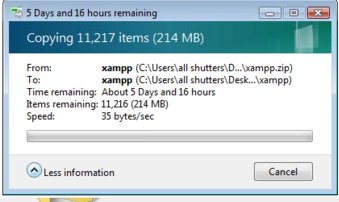
I had a 90 MB file that I needed to extract on their system (224 MB uncompressed), so I copied the file to their system,right clicked and chose extract. Then came the wow factor. Vista told me that it out need ~13 hours to extract the file. Waited for a few mins and it didn’t go down. It really was going to take it 13 hours + change to extract it. Certainly made me go wow.

I didn’t take a screen shot of it at the time, but then as I was telling my cousin about it, I decided to blog it so needed to take a screen shot. When I took the following screen shot it was telling me that it would take 5 days to extract. I waited for a couple of mins in case it was just exaggerating like Windows XP and it would show the correct time in a few mins. But alas it kept showing me the same time.

So here goes:


MS Vista WOW
MS Vista WOW!!!

BTW, just as a comparison, my Windows XP system on a 1 GZ system with 512 MB of RAM takes ~2 mins to extract this file. Haven’t timed it on Linux yet. And this vista install is a running on a new machine thats pretty powerful. And i am not the only one who saw this. Another guy was complaining about it on one of the forums that I visited. His file was taking ~15 mins to extract on vista while on Linux it took about 11 secs to extract.

Ah well. I think I can do without the wow in my life. Pretty happy with Debian and XP for my systems. Don’t think I will be upgrading to Vista anytime soon.

– Suramya

May 31, 2007

reCAPTCHA: Stop Spam, Read Books

Filed under: Computer Software,Interesting Sites,Tech Related — Suramya @ 9:50 AM

I am sure that you have heard of Captcha by now, if you haven’t then I guess you are not in the technology field. Captcha’s are those annoying images with text that you have to enter before registering for most forums and posting comments in some blogs.

Captcha’s work because they can’t be read by computers so a human is required. Here’s a website thats using this necessary evil [1] and putting it to a good use. Basically what it does is uses captcha’s to convert scanned books to text.

Why do we need to do that, Can’t we just use OCR (Optical Character Recognition) to convert the books to text you may ask? Well its like this, OCR is not perfect and it has a lot of trouble with certain kinds of words e.g. clot might get read as dot etc. So what reCAPTCHA does is that it uses sending words that cannot be read by computers in the form of CAPTCHAs for humans to decipher and then saves the converted text. So with a lot of usage books that were previously inaccessible would slowly become accessible.

If I used captcha’s I would definitely use this as it is a good cause but I don’t use Captcha’s as they don’t work with text browsers. After I had to spend 20 mins trying to download a file that was protected with a captcha on a server to which I only had ssh access (I got around it by saving the image file to the computer, copying it to my local system, viewing it and then entering the code… ) I decided that I will not use it on any of my systems/sites.

Anyways, Check out reCAPTCHA and if you have to use Captcha’s use this one instead.

– Suramya

« Newer PostsOlder Posts »

Powered by WordPress