Suramya's Blog : Welcome to my crazy life…

March 25, 2021

Fools deleting company data after being fired and how to protect against this threat

Filed under: Computer Security,My Thoughts,Tech Related — Suramya @ 4:34 PM

Over the past few years I have seen multiple news articles and stories about idiots who were unhappy with their job or were fired and decided to take revenge by deleting data, accounts or destroying company property. The common factor in all the stories was the fact that the person was subsequently arrested and jailed. The most recent story I saw was this one, where a genius decided to delete 1200 Microsoft Office accounts after being fired and ended up in jail for his troubles.

Destroying company property when you leave is a good way to ensure you are never hired again by any company. I mean if I was interviewing a candidate and I found out that the candidate had deleted critical data when they left the company I would probably never hire them. End of the day if you have demonstrated that you are not mature enough to deal with a loss but rather delete data/information then you are not a fit to work in my team. I know a lot of people will come and say that people should be given a second chance and what not but this is a serious issue. There would be a major lack of trust in play here and with that the person’s efficiency would be horrible and multiple other folks would have to keep monitoring what this person was doing on the servers which is an overhead I wouldn’t need.

So, now looking at this from the company’s side. How do you prevent something like this from happening? The basic step is to ensure that the access rights of the person are terminated as soon as they are let go. Secondly, they should not be allowed to access their system after they are fired. In one of my previous companies, the physical security team would escort a person off-premises without allowing them to log on to their computer or anything. By the time the person was off premises their accounts were already de-activated. They should also be removed from any company related mailing lists, chat rooms, telephone trees etc immediately. Any commonly known account passwords should be changed immediately and if the person had admin access a check should be made for any unauthorized accounts with admin access and for any backdoor’s being installed.

In the case of a threat where the person hasn’t been fired yet you need to have systems in place to perform regular audits of all admin/root activity. There are a lot of other steps that can be taken and out of scope for this blog post. SANS has a great paper on Protecting Against Insider Attacks and RSA has a list of best practices that you can check out as well.

If you need help securing your network/system please reach out and we can discuss in more detail.

– Suramya

March 7, 2021

Syncing data between my machines and phones using syncthing

I have talked about how my Backup strategy has evolved over the years. I am quite happy with the setup I explained in my previous post except for one minor point. I still had to manually sync the data from my laptop, Jani’s laptop and my phone to my desktop manually. Once it is there on the desktop the various backup processes make sure that it is backed up and secure. The issue is that I still had to manually sync the data between the devices.

For my laptop, I used Unison to manually check for changes and then sync them over which works great but I had to ensure that the sync happened in the correct direction. For Jani’s laptop I mounted my drive on her computer over ssh using these steps and then running robocopy to copy the files over. This worked intermittently well. For some reason the system would refuse to overwrite changed files randomly with permission denied errors even when the permission was set to 777. The only way to fix was to delete all the files on my computer and then do a fresh sync. This worked, but was not userfriendly and required me to manually kick off a backup which I did infrequently. My phone on the other hand was backed up manually to my computer using sftp. This was very crumbersome and I really disliked having to do it.

I have in the past looked into various technologies that allow multiple devices to sync data with each other. Unfortunately, all of them required an external connection with a copy of the data being stored in the cloud. Since that was a show-stopper for me, I never got around to setting up my systems to automatically sync with each other. Then a few weeks ago, I came across this great article on how to create A Simple, Delay-Tolerant, Offline-Capable Mesh Network with Syncthing (+ optional NNCP). In the article John talked about Syncthing, which allowed him to create a local serverless, peer-to-peer, open source alternative to Dropbox that allowed his machines sync directly with each other without a server. In other words a perfect fit for what I wanted and needed to do. So I spent a little bit of time researching syncthing and then decided to take the plunge and setup my laptop and desktop to sync with each other. Before starting the setup I backed up all my data so that in case something went wrong I still had a backup. Thankfully nothing did, but it is always good to have a backup.

Syncthing’s installation is pretty simple for all major operating systems, except for iPhones which are not supported. In Debian, installation just required the following steps

  • Run the following commands to add the “stable” channel to your APT sources:
  • echo "deb https://apt.syncthing.net/ syncthing stable" | sudo tee /etc/apt/sources.list.d/syncthing.list
    curl -s https://syncthing.net/release-key.txt | sudo apt-key add -
  • Once you have added it, run the following command to install syncthing
  • sudo apt-get update
    sudo apt-get install syncthing

    Once the software is installed execute the syncthing binary. On my computer it is installed in /usr/bin/syncthing. Once the software starts, it will start the web interface automatically. There is also a Desktop application, but I prefer the web-ui. Instructions on how to configure the folders and nodes are available at the Getting Started Guide over on the project website so I am not going to repeat them here. Basically, you need to define the nodes and connect them to each other, if the devices are not added on both sites then the folders will not sync.

    The software has a cool feature of discovery, which makes it easy to add devices on a given node. As soon as you connect to the same network they detect each other and give you the option of connecting both. After the devices are connected, you configure the folder you want to sync and select the devices you want it synced with. The best part is as soon as you configure one node, the other nodes will get a message stating that Node 1 is attempting to share a folder with them. Clicking on accept, allows you to configure the folder path etc on the node and that’s it. The system will detect the files which need to get synced over and will copy them quickly. You can configure the sync to be bi-directional or one way. Most of the folders in my setup are set as that, the only exception are Jani’s files which is a one-way sync because I know that I am not going to modify the files on the server.

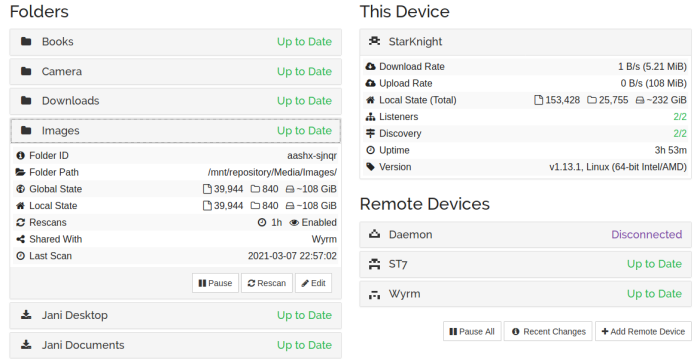
    Below is what the setup looks on my desktop, as you can see I am syncing data from 3 different computers/phones to it and the sync’s are really fast. I have copied files over to the folder on one computer and within minutes (depending on the size) they were replicated on the other computers/phone.


    My Syncthing setup

    I have the android client running on my phone as well, and it instantly syncs any new photos etc from my phone to the desktop. All I need to do is connect to the same LAN network (can be over wired or wireless) and the devices connect and sync automagically. There is an option to do so even over the WAN using relay server but since I didn’t want that I disabled it in the setup.

    Now all my data is synced to the desktop machine without me having to worry about anything or manually copying files around. Check it out if you want to sync your devices without using an external server.

    – Suramya

February 22, 2021

Should software be “classified” if it is used by government agencies?

Filed under: My Thoughts,Tech Related — Suramya @ 10:25 PM

Software should not be classified when used in government agencies except in some very rare exceptional cases. For example, software used to launch nuclear missiles and ensure they hit their targets might be an exception however, these should be an exception rather than the rule in my opinion. The reason I say that is because when a software is classified it means that a limited no of people are using it and that means only a limited no of developers are working on it as any given time. Plus, when something is classified it can not be security tested by external entities without having to sign multiple Non-Disclosure Agreements (NDA’s) and other similar hoops whereas regular software is used and tested by lots of people like corporate’s who test the solution before they implement it in their environment. This gives us multiple groups of people testing the software in various ways making it easier to identify security issues making it more secure.

Secondly, making classified versions of existing software doesn’t seem like a good use of resources to me. Why spend extra money creating a classified ‘Word’ when the commercial version (with some modification) would work perfectly well?

Coming to open source, I don’t think government should be prohibited from using Open Source. There are two ways government’s can be blocked from using opensource software. Firstly, the software license might prohibit government use. If this is the case, then the license no longer meets the requirement to be called open source since the Open Source Definition specifies that Open Source licenses may not discriminate against persons or groups. In-fact there was an attempt back in 2006 by GPU which is a Gnutella client to create a license that disallowed the use of their software by the military. It didn’t go anywhere because of strong opposition by the Open Source Initiative (OSI) to calling the license open source. Second, The government might not allow its use due to internal policy: This is primarily because they are worried about one or all of the following: Security, Cost, or licensing.

There is a misconception that opensource software is less secure than commercial software and even though majority of the servers worldwide run on opensource software (Linux, Apache etc) the detractors still persist. In every large company I have worked with so far, whenever I try promoting opensource software this point invariably comes up and I have to spend time explaining why this is not the case.

Another reason why companies might not allow OSS is because of the license the software might be under. If the software is licensed under the GPL they need to be extra careful when using it within their setup because the GPL is what is known as a viral license. It requires the source code of the entire “derived work” – i.e. the combination of GPL code and proprietary code – to be made available under the terms of the GPL publicly. Due to this most companies do not allow software licensed under the GPL to be used inside them. (Libraries licensed under GPL are fine because they don’t trigger the ‘viral’ clause). However, there are other licenses that do not have this clause and can be safely used.

Ultimately, I feel it is better if they use opensource software rather than pay ridiculous amounts of money as software licensing fees.

February 20, 2021

Fixing boinc (code=exited, status=108) error

Filed under: Computer Tips,Knowledgebase,Linux/Unix Related,Tech Related — Suramya @ 2:01 AM

Earlier today I noticed that my CPU was not as active as usual and the boinc (World Community Grid) processes were no longer active on my computer. This has happened in the past when the client crashed so I restarted the client using the following command as usual:

/etc/init.d/boinc-client restart

Unfortunately, that didn’t resolve the problem and I thought that it could be because of the recent OS update that I did to my Debian system. In the past there have been rare cases when libraries were updated that some programs act strangely till the computer is rebooted, so I restarted the machine expecting to see the process start up without issues. Sadly, that didn’t happen so I had to debug the problem and I tried all sorts of things to resolve.

First, I tried starting the program manually as the root user and that worked. So I knew it was something to do with the startup script. Then I searched for and removed all the lock files in the boinc and the boinc-client directory. That should have resolved the problem but it didn’t and then I tried running the status command which gave the following output:

root@StarKnight:/var/lib/boinc-client# /etc/init.d/boinc-client status
boinc-client.service – Berkeley Open Infrastructure Network Computing Client
Loaded: loaded (/lib/systemd/system/boinc-client.service; enabled; vendor preset: enabled)
Active: failed (Result: exit-code) since Sat 2021-02-20 01:26:50 IST; 9s ago
Docs: man:boinc(1)
Process: 7420 ExecStart=/usr/bin/boinc (code=exited, status=108)
Process: 7455 ExecStopPost=/bin/rm -f lockfile (code=exited, status=0/SUCCESS)
Main PID: 7420 (code=exited, status=108)
CPU: 19ms

Feb 20 01:26:40 StarKnight systemd[1]: Started Berkeley Open Infrastructure Network Computing Client.
Feb 20 01:26:50 StarKnight boinc[7420]: 20-Feb-2021 01:26:50 Another instance of BOINC is running.
Feb 20 01:26:50 StarKnight systemd[1]: boinc-client.service: Main process exited, code=exited, status=108/n/a
Feb 20 01:26:50 StarKnight systemd[1]: boinc-client.service: Failed with result ‘exit-code’.

This meant that the system thought that another instance of the software was running but that wasn’t the case as I verified it using ps. A search for the status=108 code on the internet returned a few results but nothing that resolved my problem. One user who faced this issue resolved it by uninstalling everything and installing back but that wasn’t a step I wanted to take without trying everything else first so I kept researching. Then I saw a post where a user was facing the same issue after they had moved the data directory to another partition and symlinked it to the original location. I had done the same thing a few weeks ago so I moved the directory back to it’s original location but that didn’t resolve anything either.

Then I thought about checking the file ownerships of the directory and they were owned by my user (suramya) and a post on the internet said that they should be owned by root. I checked on my laptop as I have the same setup there and found that the directories were owned by the ‘boinc‘ on the laptop. Then I remembered changing the ownership of all files in one of my drive partitions last night to suramya. What I didn’t realize at that time was that the boinc-client directory was also located on that partition (after I had moved it there to recover space on my root partition).

I immediately changed the ownership of both directories back to boinc:boinc using the following command

chown boinc:boinc /var/lib/boinc* -R

Then I restarted the daemon and that fixed the problem. I then moved the directory back to it’s original location (on the other partition), symlinked it to the original location and the software still worked after I restarted the process.

I am documenting this in case others hit the same issue.

– Suramya

January 11, 2021

Do young people not care about privacy because they grew up sharing personal information?

Filed under: My Thoughts,Tech Related — Suramya @ 1:03 PM

I don’t agree with statement, though there are many proponents to abolishing privacy online. Unfortunately, over the years we have been trained to give personal information in order to use services online and this is based on the principle that our data has no value and if we have nothing to hide we should be ok to share data online. This is a fallacy.

Having privacy is essential to us as humans because it gives us a judgment free space where we can be ourselves without worrying about what others might think. This allows us to explore unpopular ideas without worry or fear. Plus it is not just people who have unpopular ideas that need privacy. There is a lot of stuff that I wouldn’t want to share with everyone even if it’s nothing illegal or unpopular such as details about my health or personal finances. Privacy doesn’t mean that we don’t want to share information, it just means that I get to choose who has access to data about me.

In certain scenarios privacy helps protect us physically from stalkers or people who mean us harm, think fanatic fans or people fleeing an abusive relationship. Such people would not want their physical location broadcast to the world. There was a case a few months ago where a fan used a photo published by a star to locate her apartment and assaulted her at her apartment. This was a breach of privacy of the star and caused major distress to her. Now imagine if we could immediately find where anyone in the world is located at a given time, this will allow us to determine so much other data about that person such as their health information (if they are visiting a cardiac doctor every week, there is a high probability they are suffering from a hear problem). A few years ago Uber analyzed data from the rides people were taking using it’s service and used that to figure out who was having an affair with whom based on the rides they took and the location they were dropped. It was quite a scandal when it came out and now imagine someone taking this information and blackmailing people.

With the amount of information that we are giving to websites and companies both voluntarily and involuntarily privacy is becoming harder to maintain but that doesn’t mean that we give up and let companies do whatever they want with our data. If we do that then be prepared to have every aspect of your life dissected and analyzed for profit.

Too many people state that they have nothing to hide and have no problems with having their information public. I challenge them to stay in a house completely made of glass (including the bathrooms) and have a bot that publishes all emails/messages/transcripts from their calls publicly. I can bet there won’t be any takers. as everyone has something they wouldn’t want to be public knowledge.

– Suramya

November 28, 2020

My Backup strategy and how it has evolved over the years

I am a firm believer in backing up my data, some people say that I am paranoid about backing up data and I do not dispute it. All my data is backed up on multiple drives and locations and still I feel that I need additional backup. This is because I read the news and there have been multiple cases where people lost their data because they hadn’t backed it up. Initially I wasn’t that serious about it but when I was in college and working at the helpdesk, a phd student came in crying because her entire PHD thesis was on a Zip Drive and it wasn’t working anymore. She didn’t have a backup and was basically screwed. We tried a bunch of stuff to recover the data but didn’t manage to recover anything. That made me realize that I needed a better backup procedure so started my journey in creating recoverable backups.

My first backup system was a partition on my drive called backup where I created a copy of all my important data (This is back in 2000/2001). Then I realized that if the drive died then I would loose access to the backup partition as well, and I started looking for alternatives. This is around the time when I had bought a CD Writer so all my important data was backed up to CD’s and I was confident that I could recover any lost data. Shortly afterwards I moved to DVD’s for easier storage. However, I didn’t realize till a lot later that CD’s & DVD’s start becoming unreadable quite easily. Thankfully I didn’t loose any data but it was a rude awakening to find that the disks I had expected to keep my data safe were starting to become unreadable within a few years.

I then did a bunch of research online and found that the best medium for storing data long term is still Hard Drives. I didn’t want to store anything online because I want my data to be in my control so any online backup system was out of the question. I added multiple drives to my desktop and started syncing the data from the desktop & laptop to the backup drive using rync. This ensured that the important data was in three locations at any given time: My Desktop, My Laptop and the Backup drive. (Plus a DVD copy that I made of all my data every year)

I continued with this backup strategy for a few years but then realized that I had no way to go back to a previous version of any given document, if I deleted a file or wanted to go back to an older version of a file I only had 24 hours before the changes were synced to the backup drive before it was unrecoverable. There was a case where I ended up having to dig through my DVD backups to find the original version of a file that I had changed. So I did a bit of research and found rdiff-backup. It allows a user to back up one directory to another and generates an incremental backup. So we can recover/restore files based on date range. The best part is that the software is highly efficient, once the initial backup is done it only transmits the changes to the files in subsequent runs. Now that I have been using it I can restore a snapshot of my data going back to 2012 quite easily.

I was quite happy with this setup for a while, but while reading an article on best backup practices I realized that I was still depending only on 1 location for the backup data (the rdiff-data snapshots) and the best practices stated that you should also store it in an external drive or offsite location to prevent viruses/ransomware from deleting backups. So I bought a 5TB external drive and created an encrypted partition on the same to store all my important data. But I was still unhappy because all of this was still stored at my home so if I had a fire or something I would still end up loosing the data even though my external drive was kept in a safe. I still didn’t want to store data online but that was still the best way to ensure I had offsite backup. I initially thought about setting a server at my parents place in Delhi and backup there but that didn’t work out for various reasons. Plus I didn’t want to have to call them and troubleshoot backup issues over the phone.

Around this time I was reading about encrypted partitions and came up with the idea of creating an encrypted container file to store my data and then backup the container file online. I followed the steps I outlined in my post How to encrypt your Hard-drive in Linux and created the encrypted container. Once I finished that I had to upload the container to my webhost since I had unlimited storage space as per my contract. Initially I wasn’t able to because they had restricted my account’s quota but a call to their customer support sorted it out after a bit of argument and explaining what I was doing. The next hurdle I faced was uploading the file to the server because of the ridiculously low upload speed I was getting from Airtel. I had a 40 mbps connection at the time but the upload speed was restricted to 1 mbps because of ‘reasons’. After arguing with their support for a while, I was complaining about it at work and one of the folks suggest I check out ACT Internet. I checked out their plans and was quite impressed with the offerings so I switched over to ACT and was able to upload the container file quickly and painlessly.

Once the container was uploaded, I had to tackle the next problem in the process which was on how to update the files in the container without having to upload the entire container to the host. I experimented with a few solutions and then came up with the following solution:

1. Mount the remote partition as a local mount using sshfs. I mounted the partition locally using the following command: (please replace with the correct hostname and username before using)

/usr/sbin/runuser -l suramya -c "sshfs -o allow_other @hostname.com:. /mnt/offsite/"

2. Once the remote partition was mounted locally, I was able to use the usual commands to mount the encrypted partition to another location using the following command:

/usr/sbin/cryptsetup luksOpen /mnt/offsite/container/Enc_vol1.img enc --key-file /root/UserKey.dat
mount /dev/mapper/enc /mnt/stash/

In an earlier iteration of the code I wasn’t using the keyfile so had to manually enter the password everytime I wanted to backup to the offsite location. This meant that the backup was done randomly as and when I remembered to run the command manually. A few days ago I finally configured it to run automatically after adding the keyfile as a decryption key. (Obviously the keyfile should be protected and not be accessible to others because it allows users to decrypt the data without entering a password.) Now the offsite backup runs once a week while the local backup runs daily and I still backup the Backup partition to the external drive as well manually as and when I remember to do so.

In all I was quite happy with my setup but then I was updating the encrypted container and a network issue made be believe that my remote container had become corrupted (it wasn’t but I thought it was). At the same time I was fooling around with Microsoft One Drive and saw that I had 1TB of storage available over there since I was a Office 365 subscriber. This gave me the idea of backing up the Container to OneDrive as well as my site hosting.

I first tried copying the entire container to the drive and hit a limit because the file was too large. So I thought I would split the file into 5GB parts and then sync them to OneDrive using rclone. After installing rclone. I configured it to connect to OneDrive by issuing the following command and following the onscreen prompts:

rclone config

I then created a folder on OnDrive called container to store the split files and then tried uploading a test file using the command:

rclone copy $file OneDrive:container

Where OneDrive is the name of my provider that I configured in the previous step. This was successful so I just needed to create a script that did the following:

1. Update the Container file with the latest backup
2. Split the Container file into 5GB pieces using the following command:

split --verbose -d -b5GB /mnt/repository/Container/Enc_vol1.img /mnt/repository/Container/Enc_vol_

3. Upload the pieces to Ondrive.

for file in `ls /mnt/repository/Container/Enc_vol_* |sort`; do  echo "$file";  /usr/bin/rclone copy $file OneDrive:container -v &> /tmp/oneDriveSync.log; done

This command uploads the pieces to the drive one at a time and is a bit slow because it maxes out the upload speed to ~2mbps. If you split the uploads and run the command in parallel then you get a lot faster speed. Keep in mind that if you are uploading more than 10 files at a time you will start getting errors about too many open connections and then you have to wait for a few hours before you can upload again. It took a while to upload the chunks but now my files are stored in yet another location and the system is configured to sync to Onedrive once a month.

So, as of now my files are backed up as following:

  • /mnt/Backup: Local Drive. All changes are backed up daily using rdiff-backup
  • /mnt/offsite: Encrypted Container stored online. All changes are backed up weekly using rsync
  • OneDrive: Encrypted Container stored at Microsoft OneDrive. All changes are backed up monthly using rsync
  • External Drive: Encrypted backup stored in an External Hard-drive using rsync. Changes are backed up infrequently manually.
  • Laptop: All Important files are copied over to the laptop using Unison/rsync manually so that I can access my data while traveling

Finally, I am also considering backing up the snapshot data to BlueRay disks but it will take time so haven’t gotten around to it yet.

Since I have this elaborate backup procedure I wasn’t worried much when one of my disks died last week and was able to continue work without issues or worries about loosing data. I still think I can enhance the backups I take but for now I am good. If you are interested in my backup script an extract of the code is listed below:

function check_failure ()
{
	if [ $? == 0 ]; then
		logger "INFO: $1 Succeeded"
	else
		logger "FATAL: Execution of $1 failed"
		wall "FATAL: Execution of $1 failed"
		exit 1
	fi
}

###
# Syncing to internal Backup Drive
###

function local_backup ()
{
	export BACKUP_ROOT=/mnt/Backup/Snapshots
	export PARENT_ROOT=/mnt/repository

	logger "INFO: Starting System Backup"

	rdiff-backup -v 5 /mnt/data/Documents/ $BACKUP_ROOT/Documents/
	check_failure "Backing up Documents"

	rdiff-backup -v 5 /mnt/repository/Documents/Jani/ $BACKUP_ROOT/Jani_Documents/
	check_failure "Backing up Jani Documents"

	rdiff-backup -v 5 $PARENT_ROOT/Programs/ $BACKUP_ROOT/Programs/
	check_failure "Backing up Programs"

	..
	..

	logger "INFO: All Backups Completed Successfully."
}

### 
# Syncing to Off-Site Backup location
###

function offsite_backup
{
	export PARENT_ROOT=/mnt/repository

	# First we mount the remote directory to local
	logger "INFO: Mounting External Drive"
	/usr/sbin/runuser -l suramya -c "sshfs -o allow_other username@remotehost:. /mnt/offsite/"
	check_failure "Mounting External Drive"

	# Open the Encrypted Partition
	logger "INFO: Opening Encrypted Partition. Please provide password."
	/usr/sbin/cryptsetup luksOpen /mnt/offsite/container/Enc_vol1.img enc --key-file /root/keyfile1
	check_failure "Mounting Encrypted Partition Part 1"

	# Mount the device
	logger "INFO: Mounting the drive"
	mount /dev/mapper/enc /mnt/stash/
	check_failure "Mounting Encrypted Partition Part 2"

	logger "INFO: Starting System Backup"
	rsync -avz --delete  /mnt/data/Documents /mnt/stash/
	check_failure "Backing up Documents offsite"
	rsync -avz --delete /mnt/repository/Documents/Jani/ /mnt/stash/Jani_Documents/
	check_failure "Backing up Jani Documents offsite"
	..
	..
	..

	umount /mnt/stash/
	/usr/sbin/cryptsetup luksClose enc
	umount /mnt/offsite/

	logger "INFO: Offsite Backup Completed"
}

This is how I make sure my data is backed up. All of Jani’s data is also backed up to my system using robocopy as she is running Windows and then the data gets backed up by the scripts I explained above as usual. I also have scripts to backup my website/blog/databases but that’s done using a simple script. Let me know if you are interested and I will share them as well.

This is all for now. Let me know if you have any questions about the backup strategy or if you want to make fun of me. 🙂 This is all for now. Will write more later.

– Suramya
October 16, 2020

Response to a post that insists that you should ‘Focus on your Job not side projects’

Filed under: My Thoughts,Tech Related — Suramya @ 11:44 AM

I found this post while surfing the web, and the main point of the post is to tell people that they should stop focusing on their side projects because the recruiters would not be interested and what matters in getting a job is what your current company name is. He also recommends dropping the side projects and read “Cracking the code interview” instead to learn everything you need to know about algorithms and binary trees so that you get a job. There are so many things in the post that I disagree with that it was hard for me to figure out where to start.

Let me start off by saying that having a cool portfolio will not necessarily get you a job as there is an element of luck involved. You do need to know how to crack an interview so do read through the Cracking the Code Interview, How to Interview etc. I will not go through a list of do’s and donts for interview’s here as that is not the purpose of this post but basically you need to show that you are competent in the skill set they are looking for and not a problem person to work with. (Basically you need to leave your ego at home). That being said, there are enough candidates in the market looking for a job and you need something that will differentiate you from the rest of the crowd. That’s where your side projects come in.

I am going to quote some of the more problematic portions of the post here and then respond to make it easier for people to follow my reasoning. So lets dig in.

First, most recruiters don’t care about your personal projects or how many meetups you went during the year. What matters the most is your current company – and by that I mean the name of your current company. It was saddening me before, but now that I’m on the other side today, with a manager position, I better understand this. This is plain common sense. You can generally assume that a developer coming from a cutting-edge company has better chances to be a great developer than a developer coming from a Java 1.4 shop. He may not be smarter, but he has been hired by a company with a most demanding hiring process, and has been surrounded by some of the smartest developers.

I completely disagree with this. (I will be using recruiters to mean Tech Recruiters who are basically head hunters for a firm but not the people who will be working with you.) Recruiters are not there to talk to you about your personal projects, they are there to assess your fit into the skillset that the sourcing company is asking for, if you are a match for the skills then they will move you to the next level where you interview with the Hiring Manager or go through a Technical Interview. If you are not a fit then it doesn’t matter if you have a million side projects, they will not proceed with the interview. One way side projects help in such a scenario is to allow you to prove you have the skills in a particular domain even though you haven’t worked on it in a professional capacity.

Coming to the second point, using the current company as a hiring criteria is one of the most idiotic things I can think of for screening people. I have worked in Goldman Sachs, Sprint & Societe Generale and as with everywhere there were some employees in each company which made you think “How on earth did they get hired here?” and this is after a seriously demanding set of interviews to join the firm (I had 9 interviews for Goldman). Just because they work at a company doesn’t mean they are the best fit for your requirement. Secondly no company is uniform, so it is guaranteed that there will be parts of the company working with cutting edge while other teams will be on antique systems. In one of my previous companies (not going to name them here 🙂 ) there was a team using Git & the latest software stack for building their releases and another team that used RCS and tooling around it to build their software.

Assuming that the entire company is on the same stack is a mistake especially when talking about large companies. In small to medium companies this might not be the case always but even there, it is possible that there is a legacy system that is not changed/upgraded and people are working on it. Forget latest systems, a lot of the major banks still have Mainframes running critical portions of their software and other parts of the bank which use AI/ML for their projects.

Yes, there is a certain quality that is assumed when interviewing a person from a famous company but it is not what I am basing my hiring on, you will be hired on your skills not your past job experience. Basically in my opinion your past jobs can get you in the door for the interview but passing it is up to your skills & attitude. You should try to use the side projects as a way to showcase your skills. e.g. if you created a super cool way of doing x with a new technology it will do more to showcase your skill than stating that you did coding from 9-5.

Worse, having too many personal projects can raise a flag and be scary for the recruiter.

I have never had this happen and I was the guy with a ridiculous no of side projects through out my career. Most of the skills I have are from trying out new technology at home and since just reading a book on it doesn’t make you proficient I would end up using the tech for my next project giving me experience in working on the tech. In fact I have found my side projects to be a great benefit when interviewing because most technical interviewers are techies themselves and it can be fun to discuss such projects with them. I remember one particular interview where I mentioned one of my side projects (email to SMS bridge) during the interview and then actually spent about 20 mins talking about the applications for it and how it could be improved. It played a big part in why I was hired for the role.

If a company is scared that you are working on stuff outside their work areas then I don’t think that it is a company that you would want to work with in any case. At least I wouldn’t want to work for such a company.

My CTO experience was an anomaly, at best two lost years, at worst a sign that I was too independent, too individualistic, not a good team player. Only relatively small and ambitious startups, like the one I’m in today, were valuing this experience.

Again I must disagree. When you work in a startup you learn a lot and get to explore areas outside of what you are officially supposed to be doing. This is a great benefit when working in the normal big companies because you now know how the other parts of the software/hardware stack work and can use that to identify issues before they become a problem.

However, one point I do want to stress is that if you started a company right out of college and became a CTO in it, then it will not be given as much weightage as if you had done it after a bit of industry experience. I worked with a startup in my previous company where the entire teams combined work experience was less than mine and it was quite apparent in how they worked. For example they were very casual about releases and if they managed to finish an extra feature before the release even though it wasn’t tested they would go ahead and release it without notifying us. But the drive they brought into the project was something else. I was blown away by their push to ensure that their software did everything we asked it to.

The best way to dig a new technology is to practice it in your daily job. You’ll spend seven hours a day on it and will quickly become infinitely more proficient than if you just barely used it on nights and weekends. You may tell me that we face a chicken or egg problem here. How to get a job where you’ll work on a really attractive technology if you never used it before? Well, instead of spending nights superficially learning this technology, spend your nights preparing interviews. Read “Cracking the code interview”, learn everything you need to know about algorithms and binary trees. As we all know, the interview process is broken. Instead of deploring it, take advantage of it.

Unless you are very lucky you will hardly ever be working on cutting edge tech at your day job. Companies don’t want to experiment with new untested technologies for their production systems, they want something rock solid. If you are lucky you will get a few hours a week to try out a new tech to evaluate it and then a few months/years before they put it in production (depends on the company).

In summary I would like to say that Side projects can be a big benefit while searching for a job but you also need to ensure you don’t neglect the other parts of your profile like communication skills, leadership skills, team work etc. If you have a very strong skillset and you are using side projects to expand your skills then you should be good for most companies.

Well this is all for now. Will write more later.

– Suramya

October 14, 2020

Walking around in a Cell using Virtual Reality

Filed under: Computer Hardware,Emerging Tech,Tech Related — Suramya @ 11:59 PM

It’s hard to view 3D data on a 2D screen efficiently which is why Virtual Reality (VR) & Augmented Reality (AR) have so many fans as they allow us to interact with data in 3D, making it more intuitive and easier to process (for some use cases). Now there is another application for VR that actually makes sense and is not just hype. Researchers at University of Cambridge & Lume VR Ltd have managed to convert super-high resolution microscopy data into a format that can be visualized in VR.

Till 2014 it was assumed that we could never obtain a better resolution than half the wavelength of light. The Nobel Laureates in Chemistry 2014 managed to work around this limitation creating a new field called Super-resolution microscopy that allows us to obtain images at nanoscale. This enables us to see the individual molecules inside cells to track proteins involved in various diseases or watch fertilized eggs as they divide into embryos. Combining this with the technology from Lume VR allows us to visualize and interact with the biological data in real time.

Walking through the cells gives you a different perspective and since the data is near real time it allows us to literally watch the cell’s reaction to a particular stimuli. This will have massive implications for the Biomed/BioTech fields. Maybe we can use it to figure out why organ rejections happen or what causes Alzheimer’s.

“Data generated from super-resolution microscopy is extremely complex,” said Kitching. “For scientists, running analysis on this data can be very time-consuming. With vLUME, we have managed to vastly reduce that wait time allowing for more rapid testing and analysis.”

The team is mostly using vLUME with biological datasets, such as neurons, immune cells or cancer cells. For example, Lee’s group has been studying how antigen cells trigger an immune response in the body. “Through segmenting and viewing the data in vLUME, we’ve quickly been able to rule out certain hypotheses and propose new ones,” said Lee. This software allows researchers to explore, analyse, segment and share their data in new ways. All you need is a VR headset.”

Interestingly vLUME is available for download as an Open Source program from their Git repository. The program is free free-for-academic-use. Check it out if you are interested in how it works.

Source: New virtual reality software allows scientists to ‘walk’ inside cells

– Suramya

October 12, 2020

No Batteries or Electronics Required to power the Internet of Plastic Things

Filed under: Emerging Tech,Tech Related — Suramya @ 11:48 PM

One of the problems we face when trying to create devices that connect to each other or have built in intelligence is how do we power such devices? The trade-off has always been between portability and connectivity. Now, thanks to the efforts of Researchers at the University of Washington, we have a technique for three-dimensionally (3D) printing plastic objects that can communicate with Wifi devices without batteries or electronics. Building on top of previous work in which another research team managed to transmit their data by either reflecting (1) or not reflecting (0) a Wi-Fi router’s signals. However the problem was that they needed multiple electronic components to work, which is something that’s not always feasible. The team published their paper back in 2017 and have been hard at work enhancing their technology since then. Now after years of effort they have managed to map the Wi-Fi backscatter technology to 3D geometry and create 3D CAD Models that can be printed using standard 3D Printers. This drastically reduces the cost of implementing this technology and opens the field for 3D printed devices for any and all projects.

Printed Wi-Fi. We present the First 3D printed design that can transmit data to commercial RF receivers including Wi-Fi. Since 3D printing conventional radios would require analog oscillators running at gigahertz frequencies, our design instead leverages Wi-Fi backscatter, which is a recent advance in low-power wireless communication where a device communicates information by modulating its reflection of an incident Wi-Fi signal. The device can toggle an electronic switch to either absorb or reflect an ambient signal to convey a sequence of 0 and 1 bits. The challenge however is that existing Wi-Fi backscatter systems [Kellogg et al. 2016] require multiple electronic components including RF switches that can toggle between reflective and non-reflective states, digital logic that controls the switch to encode the appropriate data as well as a power source/harvester that powers all these electronic components. Our key contribution is to apply Wi-Fi backscatter to 3D geometry and create easy to print wireless devices using commodity 3D printers.

To achieve this, we create non-electronic and printable analogues for each of these electronic components using plastic filaments and integrate them into a single computational design. Specifically,To print the backscatter hardware, we leverage composite plastic Filament materials with conductive properties, such as plastic with copper and graphene fillings. We characterize the RF properties of these filaments and use them to design fully 3D printable antennas and RF backscatter switches (see §3).

* In lieu of digital logic electronics, we encode bits with 3D printed plastic gears. Specifically, ‘0’ and ‘1’ bits are encoded by the presence and absence of tooth on the gear respectively. To backscatter a se-
quence of bits, the gear teeth are configured to toggle the backscatter switch between reflective and non-reflective states.

* We leverage the mechanical nature of many sensors and widgets to power our backscatter design. We present computational designs that use push buttons to harvest energy from user interaction as well as a combination of circular plastic springs to store energy. Finally, we design 3D printable sensors that directly power the backscatter system, through their sensing operation.

The team basically has managed to leverage mechanical motion to power their devices. e.g. pushing a mechanical button will use the mechanical motion to provide power for it to transfer data. Another really interesting side effect of their research will be to drastically reduce the electronic waste generated because these devices will no longer require batteries to operate.

Currently they have managed to power a detergent bottle that signals when it’s empty and automatically order’s refills among other things. I can envision it being used in smart clothing in the near future to power the data transmission or powering mechanical dials & switches for digital systems that don’t need to be wired into the system. In fact there there are multiple such usecases which will benefit from this technology. Sky is the limit for this tech. In fact it might even be feasiable to use this in space missions where every gram of weight needs to be managed and removing the need for heavy batteries will have an immediate impact on cost.

I will definitely be keeping an eye out for future breakthroughs in this area.

Source: IEEE Spectrum: Here Comes the Internet of Plastic Things, No Batteries or Electronics Required

– Suramya

October 1, 2020

Windows XP and Server 2003 successfully compiled from leaked source code

Filed under: Computer Security,Computer Software,Tech Related — Suramya @ 9:39 AM

Last week in a major leak the source code for Windows XP & Windows Server 2003 was leaked on the Internet via the 4chan website. Post which it propagated like wildfire across the internet via torrents & mirrors. There were some doubts cast about the authenticity of the leak but knowledgeable folks who reviewed the code claimed that the leak looked authentic.

Now a developer who goes by the name NTDEV successfully compiled Windows XP from the leaked source code. Unfortunately it looks like the XP source code is missing some important files due to which they were unable to compile critical files such as Winlogon.exe. Which makes it impossible to install the compiled Windows XP to try it out. Fortunately they had better luck with the Windows Server 2003 source code and were able to install the compiled copy on a VM successfully.

NTDEV posted a 22 min video showcasing their journey and you can check it out here if you are interested. Their Twitter feed has more information and screenshots of their process & proof.

You can probably expect a lot more information & details on the source to be published over the next few weeks as people go over the code and then start publishing their findings.

– Suramya

« Newer PostsOlder Posts »

Powered by WordPress