Interesting to see how/when all the popular distros in Linux started in a timeline format.
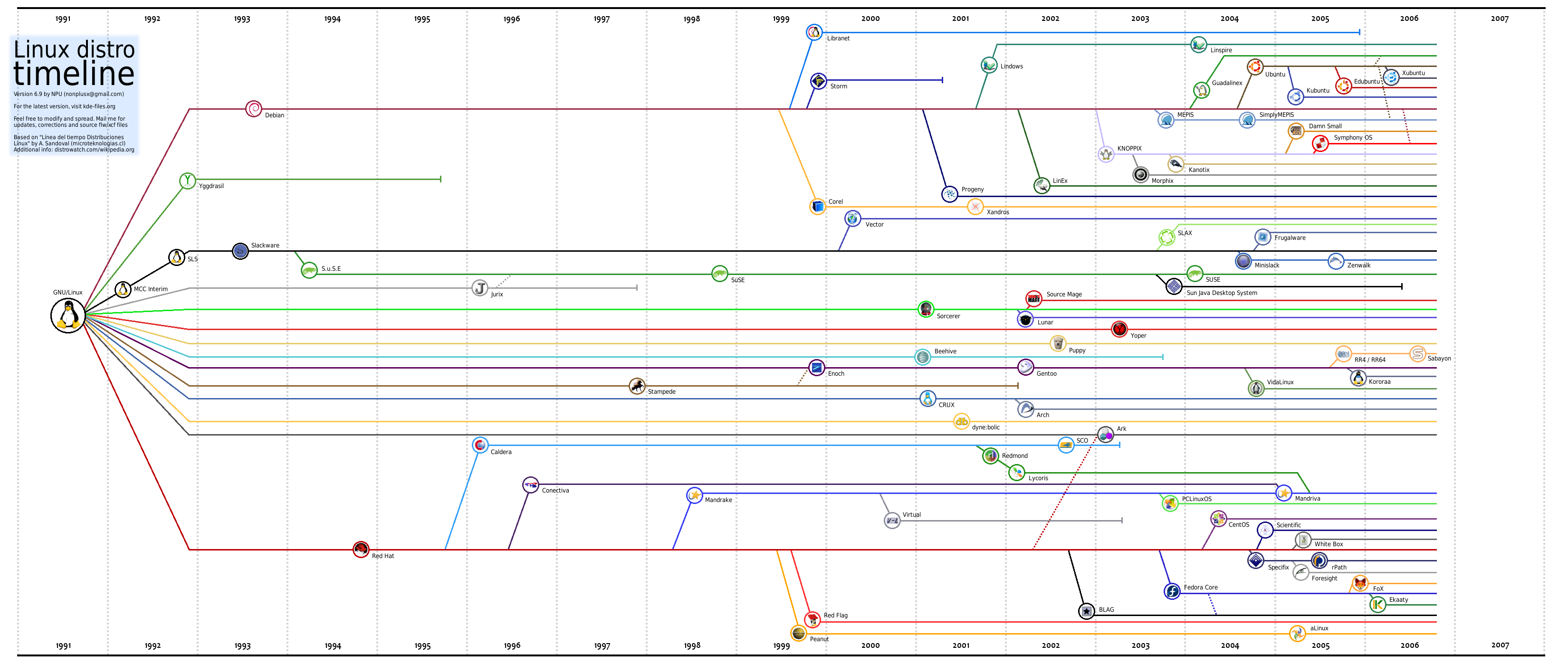
Linux Distro Timeline
Source: Linux and Open Source Blog
Thanks,
Suramya
Interesting to see how/when all the popular distros in Linux started in a timeline format.
Source: Linux and Open Source Blog
Thanks,
Suramya
Good list of Open Source Freeware. Most of these software work on both Windows and Linux desktop systems.
Check it out..
Thanks to nixcraft for the link.
– Suramya
The past few hours I have been trying to get Flash to work on my Linux system using Firefox. Specifically I wanted to be able to listen to music at Pandora.com. I tried everything I could think of including installing different versions of the Flash plugin. I even installed gnash , which is a free version of the flash player but nothing seemed to work.
The funny part was when I tried accessing the swf file directly it would open it and I would see the player initializing but since it needed info from other sections of the page it wouldn’t play anything. Finally I thought that maybe one of my extension’s was causing problems so I tried shutting off Adblock and that fixed the issue.
So now I could start the Pandora music player, but I still didn’t get any sound. The fix for that issue was thankfully simple, all I had to do was:
After I did this I can now enjoy music from Pandora without any issues. Well, almost any issues. For some reason when I play music from Pandora Firefox memory usage goes upto 70%. I am running Firefox 2.0 on a Debian Unstable system. If any of you have suggestions on how to reduce the CPU usage please let me know.
Well this is all for now. Hope this helps someone else also.
– Suramya
Interesting concept. Haven’t tired it out but it looks promising.
SSLBridge is an AJAX and DHTML enhanced web application for viewing and accessing shared files and folders in a network. SSLBridge uses Samba and an SSL connection to create a VPN tunnel into a corporate network. Basically a Samba web client.
Check it out: Here
Thanks to nixCraft for the link.
– Suramya
I guess even aliens prefer using firefox… 🙂 Actually it was the work of OSU Linux Users Group in Oregon.
From project wiki:
“The Firefox Crop Circle project shows that we have so much passion for Firefox that we want it to be visible from space! Planned in under two weeks and completed in under 24 hours, the crop circle had a final diameter of 220 feet. We constructed the circle in an oat field near Amity, Oregon, where it was completely invisible from the road but unmistakable from the sky.â€
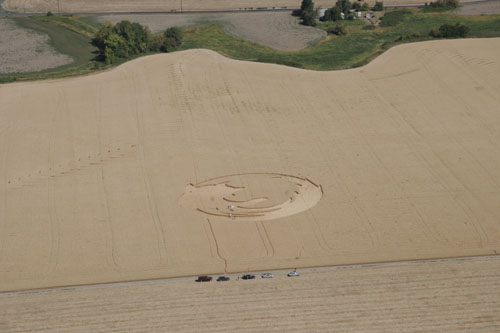
More details: Linux Users Group – Oregon State University
Thanks to nixCraft for the link.
– Suramya
Created this a couple of weeks ago but forgot to mention it here. This is a debian package installer (.deb) for GimpShop Ver 2.2.11. I tried it on my system and it worked and I haven’t gotten any complaints so far… So I guess it works 😉 Let me know if you have some trouble with it.
Get it from: GIMPShop Debian Package Installer (Ver 2.2.11 Port) [Note: The package is not working at this time. Will fix it and update soon – Sur]
I am also in the process of updating the GimpShop installation guide (To install it from source) but you will have to wait for it a little bit longer…
– Suramya
Now this is a really cool software/system that allows you to create a CD/DVD with video/audio etc on it that any system can boot off and play the video. So you no longer have to worry about sending someone the codecs to view a movie/video you created. No more worrying that you might have forgotten to include the codec’s on the CD you gave to the president with your brain wave etc. All they have to do is pop the disk in the drive and reboot the system (while you pray that the system is set to allow booting from the CD-ROM)
I havn’t tried it out yet but it looks good and easy to create.
From the Website:
If you are like me and do all your video recording in Linux, you may wonder how you can share the TV shows, personal videos, and other multimedia content with friends and family who don’t use Linux. How can you get the video from your hard disk to the people you care about in a way that you know they can play it?
Well, instead of just hoping they have a way to play your favorite video format, why not give them your home movie with a player that you know can play it? In fact, why not give them the whole operating system with it so you know that your player will run?
Complete Article: Making Bootable Movies with eMoviX
Thanks,
Suramya
A good introductory tutorial on awk. I have heard a lot about it, even used it a couple of times in shell scripts but never programmed using it. Check this article to learn more about it.
Synopsis:
The awk programming language often gets overlooked for Perl, which is a more capable language. Out in the real world, however awk is found even more ubiquitously than Perl. It also has a smaller learning curve than Perl does, and awk can be used almost everywhere in system monitoring scripts, where efficiency is key. This brief tutorial is designed to help you get started in awk programming.
The awk language is a small, C-style language designed for the processing of regularly formatted text. This usually includes database dumps and system log files. It’s built around regular expressions and pattern handling, much like Perl is. In fact, Perl is considered to be a grandchild of the awk language.
Complete Article: An Introduction to awk
– Suramya
Hi Everyone,
I have released Ver 2 of my DFS (Debian From Scratch) install guide. This version covers the installation of dfs-0.6.19
Article URL: How to install and configure DFS.
Thanks,
Suramya
This is a really good program that combines volunteer work with computer education with helping underprivilidged get computer access.
Free Geek volunteers are a part of one of two programs, the Adoption Program or the Build Program. The Adoption Program gives each person, after 24 hours of volunteer service, a FreekBox, consisting of a rebuilt computer running Linux, as well as basic software, a monitor, keyboard, mouse, one year of tech support and classes on how to use it all. For the Build Program, which takes about 100 hours, volunteers build five computers and get to keep the sixth one, leaning more towards an educational focus.
They also have a couple of other projects you can help with. Check out How to Volunteer for details.
Unfortunately most of the projects require you to be in the Portland, OR area which kind of sucks as I would have loved to help out with this project. Luckily they do have a Coder section that lets people who are located remotely help out with the project. I am joining this mailing list as a volunteer, lets see how much fun/interesting its going to be. I will keep you posted.
URL: Free Geek: Home
Some media Coverage: Designtechnica.com
– Suramya
Powered by WordPress