Suramya's Blog : Welcome to my crazy life…

November 9, 2006

Thinkature – Real-time collaboration for the web

Filed under: Interesting Sites,Tech Related — Suramya @ 11:24 PM

I like the concept of realtime collaboration over the web and I have used a couple of tools for this earlier but didn’t find any that I really liked. Until now. I really like Thinkature as its pretty easy to use and intuitive.

Thinkature has a couple of features that I really like:

  • Its free. (Duh..)
  • It doesn’t use Flash. (I am not a fan of flash, I know it lets you do stuff that you couldn’t do without it but I still don’t like it.)
  • The interface is simple and clutter free.

The parts I am not a big fan of are:

  • Its a visual collaborative tool, You cant use it to collaborate on coding or development. Though you can use it for designing presentations and flow charts.
  • There doesn’t seem to be any official privacy policy (That I could find…) on the site. Who owns the content I create on the site? Do I still maintain ownership?

    I have emailed their support about it, lets see what they say,

  • They don’t have any export/import feature (Though it looks like they are working on it.)

Over all a good tool. Check it out over here: Thinkature – Real-time collaboration for the web

Thanks to OpenDotDotDot for the link.

– Suramya
October 25, 2006

SSLBridge AJAX based samba and windows shares

Filed under: Computer Security,Linux/Unix Related,Tech Related — Suramya @ 11:26 PM

Interesting concept. Haven’t tired it out but it looks promising.

SSLBridge is an AJAX and DHTML enhanced web application for viewing and accessing shared files and folders in a network. SSLBridge uses Samba and an SSL connection to create a VPN tunnel into a corporate network. Basically a Samba web client.

Check it out: Here

Thanks to nixCraft for the link.

– Suramya

October 18, 2006

How I broke Windows XP Genuine Advantage test and then fixed it

Filed under: Computer Related,Computer Tips,Tech Related — Suramya @ 11:50 PM

A couple of days ago I had a slight problem with my internet connection, basically what was happening was that I couldn’t access google.com and associated sites (Orkut, gmail etc) but I could access everything else with issues so I spoke to a Comcast representative and she told me to run the following command on my Windows XP laptop (I told her I was using XP because I didn’t want to get into an argument with her that the problem was because I was using Linux.):

regsvr32 softpub.dll

I ran the command and it didn’t fix the issue. So I decided to un-register the dll using the following command:

regsvr32 /u softpub.dll

as I wasn’t sure what this dll did and didn’t want to register random stuff on my system. I ran the command and everything was fine for a couple of days, I could browse the net without issues and everything seemed to work.

Then all of a sudden after a couple of days I get an error message stating that my version of windows could not be validated so I must be running a pirated version of XP. The funny part was that I had installed WGA two months ago on the laptop and it had validated the license and the license is valid. So I went to the Windows update site and tried to validate my copy but ActiveX refused to run. It told me to try a manual check where it downloaded the ActiveX and then tried to run it but that also failed… Finally I tried a check using an executable I downloaded but that validated my license as valid. Now I was confused and tried to force a validation test but every time the system would refuse to run ActiveX and the validation would fail.

After beating my head on the issue for a little while I finally remembered the dll that I had unregistered a while ago so I went through my command history and found the command to re-register it and went ahead and registered it. Then I had to reboot the box and when it came back up I was finally able to run the online validation tool which verified my version of windows was valid. After it verified it I had to reboot again and that fixed the issue.

Moral of the story: If you don’t know what a dll does then don’t uninstall it.
Second Moral of the story: Its a good habit to keep a log of all the commands you run, and any changes you make to the system. Having this will save you a lot of time an energy when something gets messed up.

This is all for now, will post more about my experiments with computers and the messes I caused later.

– Suramya

October 17, 2006

Microsoft Restricts Vista Transfers

Filed under: Computer Related,My Thoughts,Tech Related — Suramya @ 12:09 PM

As some of you know Vista is supposed to come out next year and its going to require a big upgrade for most of the users. Now in a move to alienate even more of its customers MS has changed its licensing terms, limiting the number of times that Windows Vista can be transfered to, to ONE. Thats right One, Uno. In the older versions of windows if you bought a new computer you could install your old version of windows on it provided you uninstalled it from the old computer. With the new licensing you can only do it once so if you upgrade your computer more than once you need a new Vista license.

Hows that for utter stupidity. It is supposed to restrict piracy but the only thing its going to do is annoy regular users. A lot of people upgrade their computers a lot and if MS thinks it can force people to buy a new license every time they upgrade its sadly mistaken. Its going to be a pain for everyone involved and the only people it won’t affect are the software pirates as the pirated version will probably have this check disabled.

I know I transfered my windows XP license from my original 350 Mhz system to a 1.1 ghz system to another system before it got its final home in the machine its on now (All the older systems are now running Linux).

If I had vista I would have had to spend additional money to install an OS that I have a license for on a system that I am going to be using. You know what, I think I will stick with Linux and XP for now. I wasn’t planning to upgrade anyways but with news like this I have even less incentive to try it out.

Original Article: Microsoft Restricts Vista Transfers

Update: Some more thoughts on the new MS Licensing: Lxer.com

– Suramya

October 13, 2006

Microsoft Vista feature presentation on a Mac

Filed under: Funny News,Tech Related — Suramya @ 12:31 PM

Somebody took the audio from a Microsoft Vista “we’re so brilliant, we’ve invented all this new stuff” shill session and overlaid it on a video of themselves doing it all on their OS/X desktop.

Pretty amusing stuff. The best part is that I can do most of it on my Linux box as well.

Check it out at: Here

Thanks to Ben Okopnik for the link.

– Suramya

August 4, 2006

Upside-Down-Ternet

Filed under: Funny News,Tech Related — Suramya @ 4:12 PM

What do you do when you find someone else stealing bandwidth from your wireless network and you don’t like it? You Lock it down correct? This person didn’t do that, he decided to have a little fun at the expense of the unauthorized user…

So he ran squid with a trivial redirector that downloads images, uses mogrify to turn them upside down and serves them out of it’s local webserver. So the visitor gets websites that look something like:

Check out Upside-Down-Ternet for rest of the crazy things he did.

– Suramya

August 1, 2006

CD-Sextant: Build your own sextant using old CD’s

Filed under: Interesting Sites,Tech Related — Suramya @ 5:56 PM

This cool DIY (Do It Yourself) project teaches you how to make your own sextant to experiment with celestial navigation using the following items:

  • A CD with box (you can use those free AOL disks).
  • A4 Sticker paper (full page, without label cuts. For printing the scale on inkjet or laser printer)
  • 2 small glass mirrors ( 40 mm x 22 mm x 3 mm thick ).
  • 1 2×4 Lego brick
  • 2 2×1 Lego plates
  • 1 2×2 Lego brick
  • 1 2×2 Lego plate
  • A couple more Lego bricks for the shade support (depends on your design)
  • Cyanoacrylate glue (Loctite Superbonder).
  • Paper cutter (Olfa cutter)
  • Ruler
  • Scissors

As you can see you only need some commonly available items and the instructions don’t look that hard to follow. Might try making this one of these days…

Check it out: Here

Update (4th Aug 2006):

Since a couple of people got confused and this post was an OHT (Over Head Transmission) for someone here are a couple of links with more info on Sextants:

* Define Sextants
* Wikipedia entry of Sextant
* The Sextant
* How to use a Sexton

– Suramya

July 31, 2006

ScatterChat: A secure instant messaging client.

Filed under: Computer Security,My Thoughts,Security Tools,Tech Related — Suramya @ 5:15 PM

Now this is a cool software. It allows a user to encrypt all communications using end-to-end encryption and routing based on Tor (Tor Overview)

The program is a ‘friendly’ fork of the Gaim project. In case you are wondering what a fork is, a project fork or branch happens when a developer (or a group of them) takes a copy of source code from one software package and starts to independently develop a new package.

The software itself is pretty cool, but its likely to come under heavy fire from various govt and ‘spy’ agencies because the design of the software makes it really hard for anyone to eavesdrop on anyone. They will claim that this will allow terrorists and child pornographers to communicate anonymously.

It might be used by a terrorist but then so can a car (used as a getaway vehicle), a cell phone (used as a communication tool), watch (to sync timed attacks)… does this mean all of them should be banned as well? Any technology developed can be used for good as well as bad purposes.. starting with fire all the way upto a nuclear reaction… now that the genie is out of the bottle you can’t stuff it back in.

I think it will be useful for all sorts of people including:

Spies, to let them communicate with the home office, report anonymously
Corporate whistle blowers: they can report wrongs/broken laws without getting into trouble
People behind the great firewall of china, where you can be arrested for disagreeing with the government.

Check out the software: ScatterChat

Thanks to Schneier on Security for the link.

– Suramya

PS: I haven’t tried the software yet so don’t know how stable it is. Though I will be installing it shortly so will let you know how it goes.

July 28, 2006

Behaviour : Using CSS selectors to apply Javascript behaviours

Filed under: Computer Software,Interesting Sites,Tech Related — Suramya @ 10:26 PM

This is really cool stuff. It lets you use AJAX (asynchronous javascript and xml) without cluttering your HTML code with javascript tags. So essentially you are separating javascript and html making it easier to maintain code. The best part is that the process looks really simple to use. I am thinking of trying it out for a couple of test pages and see how it works.

Check out Behaviour’s Extended Demo page to see an example of what all you can do with it.

The main problem I have with 100% javascript controlled pages is that if the visitor has JavaScript turned off all your flashy jazz is of no use to him. Plus with all the new hacks/exploits that are coming out that use javascript more and more people are browsing the net with it disabled… So no I won’t be converting suramya.com or my photogallery to something javascript driven or flash driven anytime in the near future.

Check it out: Behaviour : Using CSS selectors to apply Javascript behaviours

– Suramya

Why can’t Microsoft make their messages more specific and meaningful

Filed under: Computer Software,My Thoughts,Tech Related — Suramya @ 3:03 PM

I don’t have anything against Microsoft. Their software has its uses and while I do use Linux on my primary system and on all the servers I run/manage I also have windows XP on one of my systems and on my laptop and am happy with it as It doesn’t crash as often as earlier versions of windows and mostly does what I want it to do. Now that being said, lets move on to the topic of my rant.

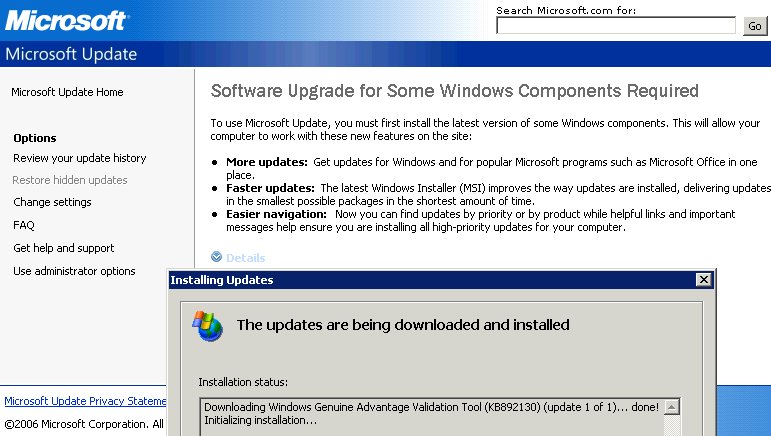
I was updating windows using the Windows update tool and I got the following message:

“To use microsoft update, you must first install the latest version of some Windows components. This will allow your computer to work with these new features on the site:”

(Emphasis mine)

Could they have made the message any more vague? Can you figure out what it wants to update? I couldn’t and guess what this latest version of some Windows component was? What, No idea? It was Windows Genuine Advantage(WGA) verification tool. Now my question is, why couldn’t they just say that you need to install WGA verification tool before you download updates? Why did they have to be so vague?

You know what the best part is? WGA is not a default part of windows, its a new software that MS is pushing out to detect pirated copies of windows, so doesn’t this make their message about it being the latest version of a windows component false and misleading?

Below is a screen shot I took of this interesting message and what was actually installed:

Vague Windows message

I have the same issue with other portions of MS update. They almost never tell what a particular update is for, I know they give the Knowledge Base number, but why can’t they tell you right over there exactly what issue a particular update fixes? Having that info over there would help me/other users decide if a particular patch needs to be installed immediately or can be installed later in a regularly scheduled update cycle.

Well this is all from my side.

– Suramya

« Newer PostsOlder Posts »

Powered by WordPress