Suramya's Blog : Welcome to my crazy life…

March 29, 2015

Rosetta Stone for Unix/Linux

Filed under: Knowledgebase,Linux/Unix Related,Tech Related — Suramya @ 9:53 PM

If you have been in the industry for a while then you have been in a situation where you need to do something on the server but have no idea what the appropriate command is because you always worked on a different variant/version of the Operating System. Think having to work on Solaris or Linux when all you have worked on is the Mac OS. To make things easier for the poor admins that have to keep switching OS’s, Bruce Hamilton has created a site he calls the ‘Rosetta Stone: A Sysadmin’s Universal Translator‘. This site has a list of tasks and the corresponding command that you would have to run for each of the OS’s. The Stone supports the following OS’s:

  • AIX
  • A/UX
  • DG/UX
  • FreeBSD
  • HP-UX
  • IRIX
  • Linux
  • Mac OS X
  • NCR Unix
  • NetBSD
  • OpenBSD
  • Reliant
  • SCO OpenServer
  • Solaris
  • SunOS 4
  • Tru64
  • Ultrix
  • UNICOS

and covers tasks in the following categories:

  • hardware
  • firmware
  • devices
  • disks
  • kernel
  • boot
  • files
  • networking
  • security
  • software
  • patching, tracing, logging

Check it out, bookmark it. It will save you some grief down the line the next time you are in this situation.

– Suramya

January 8, 2015

Microsoft Office now available for Android tablets

Filed under: Computer Software,Tech Related — Suramya @ 11:35 PM

MS is spending a lot of time and effort trying to overcome the cloud of their previous actions where they did their level best to eradicate their competitors by any means necessary, even if they were morally in a grey area. The latest volley in this effort is their move to make MS Office available on the Android tablets for free. They have MS Word, MS Excel and MS Powerpoint available and the reviews so have have been very good even though the apps are technically still in Preview mode.

Today, we are excited to announce that we are further expanding the preview. We want more feedback from more users to ensure that Office apps work well on a range of different Android tablets before launching the official apps. To participate in the preview, you can use an ARM-based Android tablet running KitKat or Lollipop, with a screen size between 7″ and 10.1″. Starting today, anyone can go to Google Play and download the Word, Excel and PowerPoint preview apps. No waitlist. No requesting access. Just go and download the apps!

Office apps are one of the apps that need to be there on every OS. I have tried a lot of the alternatives like OpenOffice and other clones but I keep coming back to MS Office because of the stability and compatibility that it gives me with other Office users. On my Linux machine I use Crossover to have a native install of Office and it works great. When I get some time and restore Android to my Tablet (I am trying to install Kali Linux on it) I will try Office out on it even though I don’t see myself editing a lot of documents on the tablet.

Well this is all for now. Will write more later.

– Suramya

Source: androidcentral.com and Microsoft Blog Announcement

January 7, 2015

Over 2,400 classic DOS games now playable in your web browser for free

Filed under: Computer Software,Interesting Sites,Tech Related — Suramya @ 11:28 PM

Last year the Internet arcade released over 900 classic arcade games playable in a browser to the public. Not satisfied with that accomplishment they topped it by releasing the over 2400 classic DOS games to the public and as before they are all playable in your web browser. The list of games include classics like Prince of Persia, The Oregon Trail, Castle Wolfenstein and many many more. This collection sure brings back a lot of memories for me.

If you’re a PC gamer of a certain age (cough), you’ve probably lamented that many of the titles you played as a kid are hard to use on modern systems without downloading emulators or waiting for special re-releases. Well, it just got a lot easier to relive your gaming glory days. The Internet Archive’s growing collection of web-based retro games now includes roughly 2,400 MS-DOS classics

I think I am going to be spending some time ensuring that the games function correctly in a browser. Purely for verification of the work done here of-course 🙂

– Suramya

Source: engadget.com

December 28, 2014

Update/Patch multiple Windows software in one shot

Filed under: Computer Software,Tech Related — Suramya @ 11:53 PM

One of the many downsides of using Windows is that there is no central way of updating all software installed on the computer in one shot. In Debian I can do an ‘apt-get upgrade’ and it will upgrade all the software installed on the system to the latest versions available. Patch my PC attempts to give you the same functionality on a Windows system. It has support for around 100 different applications and it can install or update them automatically when you run a scan.

I haven’t tried it out because I don’t have a Windows machine, but it is recommended by the folks at Lifehacker so it should be stable and work as advertised.

However please use it at your own risk, I am not responsible if this manages to destroy your computer or summon an imp.

– Suramya

December 26, 2014

Writing A Virtual Machine In Excel

Filed under: Computer Software,My Thoughts,Tech Related — Suramya @ 6:03 PM

Microsoft Excel should soon be classified as an Operating System. In the past we have seen a 3D shoot them up Doom Clone, a Flight Simulator and other games included in it as Easter eggs. Then we saw people using it to watch movies at work, and now here’s the latest entry that forces Excel way outside its comfort zone…

A programmer named Ádám was participating in a contest where he had to solve a problem in Excel but the official rules prohibited the use of Excel macros so he went and created an assembly interpreter for Excel and used it to solve the problem instead. Talk about overkill. The idea is quite interesting. However the thought process required to imagine this as a possibility and then actually going ahead and implementing this is mind boggling.

This is a virtual Harvard architecture machine without writable RAM; the stack is only lots and lots of IFs. The instructions – mostly load, MOV, JNZ, INC, and CMP solves this problem, examining two inputs to see if they multiples of each other. If you’re wondering, an example cell from [Ádám]’s Excel sheet looks like this:

=F6
   INDEX($C$2:$C99999,$G2,1),
   IF(AND(INDEX($B$2:$B99999,$G2,1)="JZ",$I2=0),
      INDEX($C$2:$C99999,$G2,1),
         IF(AND(INDEX($B$2:$B99999,$G2,1)="JNZ",$I2<>0),
         INDEX($C$2:$C99999,$G2,1),
         G2+1
         )
      )
   )
)

You can check out Adam’s solution at Hackaday.io if you are interested. I think I am going to go find my excel for Dummies book now and get just a little bit more proficient in it.

Thanks to hackaday.com for the original article.

-Suramya

December 14, 2014

Cleaning your Linux computer of cruft and duplicate data

When you use a computer and keep copying data forward everytime you upgrade or work with multiple systems it is easy to end up with multiple copies of the same file. I am very OCD about organizing my data and still I ended up with multiple copies of the same file in various locations. This could have happened because I was recovering data from a drive and needed a temp location to save the copy or forgot that I had saved the same file under another directory (because I changed my mind about how to classify the file). So this weekend I decided to clean up my system.

This was precipitated because after my last system reorg I didn’t have a working backup strategy and needed to get my backups working again. Basically I had moved 3 drives to another server and installed a new drive on my primary system to serve as the Backup drive. Unfortunately this required me to format all these drives because they were originally part of a RAID array and I was breaking it. Once I got the drives setup I didn’t get the chance to copy the backup data to the new drive and re-enable the cron job that took the daily backup snapshots. (Mostly because I was busy with other stuff). Today when I started copying data to the new Backup drive I remembered reading about software that allowed you to search for duplicate data so thought I should try it out before copying data around. It is a good thing I did because I found a lot of duplicates and ended up freeing more than 2 GB of space. (Most of it was due to duplicate copies of ISO images and photos).

I used the following software to clean my system:

Both of them delete files but are designed for different use cases. So let’s look at them in a bit more detail.

FSlint

FSlint is designed to remove lint from your system and that lint can be duplicate files, broken links, empty directories and other cruft that accumulates when a system is in constant use. Installing it is quite easy, on Debian you just need to run the following command as root

apt-get install fslint

Once the software is installed, you can either use the GUI interface or run it from the command line. I used the GUI version because it was easier to visualize the data when seen in a graphical form (Yes I did say that. I am not anti-GUI, I just like CLI more for most tasks). Using the software was as easy as selecting the path to search and then clicking on Find. After the scan completes you get a list of all duplicates along with the path and you can choose to ignore, delete all copies or delete all except one. You need to be a bit careful when you delete because some files might need to be in more than one location. One example for this situation is DLL files installed under Wine, I found multiple copies of the same DLL under different directories and I would have really messed up my install if I had blindly deleted all duplicates.

Flossmanuals.net has a nice FSlint manual that explains all the other options you can use. Check it out if you want to use some of the advanced features. Just ensure that you have a good backup before you start deleting files and don’t blame me when you mess up your system without a working backup.

BleachBit

BleachBit is designed for the privacy conscious user and allows you to get rid of Cache, cookies, Internet history, temporary files, logs etc in a quick and easy way. You also have the option to ensure that the data deleted is really gone by overwriting the file with random data. Obviously this takes time but if you need to ensure data deletion then it is very useful. Bleachbit works on both Windows and Linux and is quite easy to install and use (at least on Linux, I didn’t try it on Windows). The command to install it on Debian is:

apt-get install bleachbit

The usage also is very simple, you just run the software and tick the boxes relevant to the clutter that you want gone and BleachBit will delete it. It does give you a preview of the files it found so that you can decide if you actually want to delete the stuff it identifies before you delete it.

Well this is all for now. Will write more later.

Thanks to How to Sort and Remove Duplicate Photos in Linux for pointing me towards FSlint and Ten Linux freeware apps to feed your penguin for pointing me towards BleachBit.

– Suramya
December 12, 2014

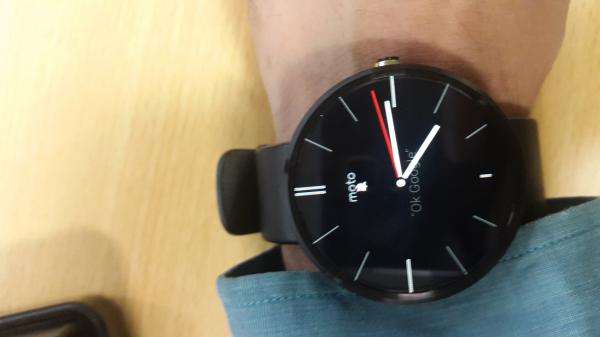
My new toy: the Moto 360 smart watch

So I have a new toy that I am super excited about and It is a birthday gift from me to myself. 🙂 I have been wanting to get a smartwatch since last year when the Samsung gear came out but when I saw the gear I didn’t like the way it looked so ended up not buying it. Now that I have bought the Moto 360, I am glad I didn’t buy the gear because it beats the Gear hands down, no questions asked. I have been using it for 3 days now and I love it.


The Moto 360 with the default Face

The initial setup of the watch was easy, I just had to download an app on my phone and follow the prompts, took me about 2 mins (excluding the time to download the app) to complete the pairing and setup. Once the app was installed the watch downloaded the latest firmware and upgraded automatically after I charged the battery which was surprisingly very fast. Once the upgrade completed it was connected to my S5 and has been working like a charm.

The default apps on the 360 are the Fitness apps, ability to receive any notifications on the watch and control the music app and the Google camera app from the watch. It has built in voice recognition which works fantastically great and is integrated with Google Now. Tonight we tried it out in a restaurant where we had gone out for a team outing and it had no trouble with the voice recognition even with the background noise. In addition to the default apps so far I have also installed a flashlight app, a dictation app and another camera app that lets me use the watch as a viewfinder for the camera on my phone. I keep finding cool new apps for the watch every day so will probably be installing a lot more stuff on it in the near future.

As I said earlier Voice recognition works for most of the things I would want to do on the watch, like use to to initiate a call or dictate a reply to an SMS, start an app etc. For the rest the touch screen works fine. Took me a bit of time to figure out how to run the new apps I installed because that isn’t really intuitive initially (or maybe I was just sleep deprived) but once I figured that out I was good to go. I think it would have made sense for them to put this in the help section.

The watch is not bulky at all and is lighter than my other watch. Lots of folks have complained about its size online but I didn’t find that to be an issue. However the battery life could have been better. In my daily use I am down to about 35% charge by the time I am ready to sleep after starting with a full charge in the morning. The charger looks nice and the charging is fast, however since the watch has a custom charger it means that I have to make sure that I carry it with me when I am traveling because none of my other chargers work with it. Sure, I can buy another charger for the office but it’s a pain.

The other issue that I noticed with it is that the heart rate sensor is crap. Every single time I have tried to check my heart rate (using both fit and the Moto software) it has failed with a sensor time out message, although Vinit did manage to get it to work once so I know the sensor works.

For the most part I have been using the watch to read my SMS/Whatsapp/Email messages without having to pull out my phone and monitoring my step count. Apparently I walk around a lot more than I thought which is good. 🙂 Also the ability to decline calls with a message from the watch is very handy when your phone is at your desk and you are at another desk working on something or in a meeting.

I am planning on installing the Analog keyboard for Android that I blogged about earlier but that will be over the weekend when I have some breathing room to experiment. I will share my findings and experiences going forward so if you are interested do keep an eye on the blog for new posts.

Well, this is all for now. It’s time for me to crash for the night. Will post more later.

– Suramya

November 23, 2014

Presenting hack.summit a virtual dev conference Dec 1st – 4th

Filed under: Interesting Sites,Tech Related — Suramya @ 11:55 PM

Developer conferences are a great way to meet developers and learn about the latest and greatest technologies and programming skills etc. However most of them happen in places where they are not accessible to a majority of the people in the world, primarily because of cost and time taken to travel there which is quite unfortunate. I know there have been multiple conferences that I wanted to attend but couldn’t because they were in the US or Europe while I was in India.

To fix that problem the nice folks at hack.hands() have created a free, live, online event from Dec 1 – Dec 4th where top speakers from their fields will be available to answer questions and have their brains picked. You can register for the event for free by visiting their website.

The hack.summit() conference is a live, global event put on by the fine folks behind real-time programming assistance service hack.hands(). From December 1 to December 4, a wide range of speakers will present and answer democratically popularized questions over Crowdcast via Google+ Hangouts. Speakers in attendance include wiki inventor and Design Patterns pioneer [Ward Cunningham], Codeacademy founder [Ryan Bubinski], Google Glass creator [Tom Chi], Python Software Foundation’s [Alex Gaynor], and even the inimitable [Jon Skeet].

The goals for this conference are simple and admirable: to educate developers of all stripes about best practices, to encourage mentorship in the programming community, and to spread the joy of coding by supporting coding non-profits.

Thanks to hackaday.com for the story.

– Suramya

November 17, 2014

Microsoft launches free Visual Studio Community 2013

Microsoft is on a roll recently and is becoming more and more active in the open source community by releasing many of it’s core tools and programs as open source, making them free and cross platform. Earlier this week news came out that MS had released a significant portion of their .NET framework under a permissive opensource license on Github. Before everyone had even finished digesting this news MS posted news that it is releasing Visual Studio Community 2013 as a free download for individual and small business use (teams of up to five people).

This is a brilliant move on their part to keep their market share. One of the major issues people had when developing software for Windows using Visual studio was the cost associated with the licenses. When I was in school and wanted to get a licensed copy of Visual Studio for my use I was told to go buy a pirated copy because the original cost was way too high (Rs 60,000 if you want to know). Keep in might that this is before the Dot com and Tech boom so that amounted to a couple of months of salary for most folks. As you can imagine most people went for the pirated version instead which costed Rs 100 or so. Now fast forward a few years to when open-source started taking off, now the development environment could be downloaded off the internet legally for free. A lot of folks including me switched to open source development tools. The only people still using MS Studio were either using their work/university licenses or were on pirated copies.

Now with .NET opensourced and available for use on Linux, Mac and windows, making a free version of Visual Studio available makes it easier for people to start working on and building software in the MS ecosystem.

I know of a few people who will find this news exciting. For the rest of us, this doesn’t impact us directly but definitely shows which way the wind is blowing in the software world and highlights the fact that FOSS is here to stay. 🙂

Official Announcement: Microsoft Blog
Via Betanews.com

– Suramya

PS: I know that Visual Studio express has been around for a while but it was a severely limited version as opposed to the Community version just released.

November 8, 2014

Be careful of software claiming to hide your data on your Phone

Filed under: Computer Security,My Thoughts,Tech Related — Suramya @ 11:59 PM

Yesterday (well, technically today) I was trying to find some data on my old phone to copy to my new phone so I decided to copy over all the folders from the phone to my desktop to make it easier to look through it. While I was going through the data I found a folder called .keepsafe under the Android/data folder so I looked in it cause I got curious and found some interesting data. Actually before I tell you what I found lets take a step back and go over what Keepsafe is: It is an app for both iOS and android that allows you to hide photos/files on your phone and then only people with the correct PIN can view them. From their site: “You lock your rings in a jewelry box. You lock your certificates in a cabinet. Now KeepSafe makes sure your personal files are locked down and hidden, using privacy features such as PIN Pad and Fake PIN.” I had installed this version of Keepsafe a few years ago to try it out but had since uninstalled it as I didn’t find it useful.

Coming back to the folder and what I found. It had two files under it: .local and .email. The .email file had my email address in it but the contents of the .local file were shocking. It had my ‘secret pin’ in clear-text in the file. So anyone with some idea of how apps store data and access to a file browser would have been able to get my pin and view images/data that was supposed to have been protected.

Since this was an older version of the software I downloaded and installed the latest version on my S5 to see if the issue was still there. Thankfully someone at the company figured out that storing the data in clear-text was extremely stupid and in the latest version of the software the same two files are still there but the data is encrypted. Not sure how strong the encryption is because I don’t have the knowledge/skill set to try to figure that out. I did however identify where the files are being stored (they are all encrypted as well) so someone with the original image and an encrypted copy could potentially reverse engineer the encryption and assuming they are using a static encryption key decrypt the remaining files as well.

Moral of the story is that if you want to ‘hide’ data on your phone be very careful of the software you use to do it. Ideally you should avoid storing any data that is sensitive on the phone. There are plenty of ways to get access to the data if someone is interested and has time. This is not an isolated case of a badly written software, There are other cases as well where other software was found to have similar amazing security. So be careful out there.

I did find some more interesting data on the phone that I will take a stab at when I get some time.

Well this is all for now. Will write more later.

– Suramya

« Newer PostsOlder Posts »

Powered by WordPress