Suramya's Blog : Welcome to my crazy life…

August 30, 2020

How to write using inclusive language with the help of Microsoft Word

Filed under: Computer Software,Knowledgebase,My Thoughts,Tech Related — Suramya @ 11:59 PM

One of the key aspects of Inclusion is Inclusive language, and its very easy to use non-inclusive/gender specific language in our everyday writings. For example, when you meet a mixed gender group of people almost everyone will say something to the effect of ‘Hey Guys’. I was guilty of the same and it took a concentrated effort on my part to change my greeting to ‘Hey Folks’ and other similar changes. Its the same case with written communication and most people default to male gender focused writing. Recently I found out that Microsoft Office‘s correction tools, which most might associate with bad grammar or improper verb usage, secretly have options that help catch non-inclusive language, including gender and sexuality bias. So I wanted to share it with everyone.

Below are instructions on how to find & enable the settings:

  • Open MS Word
  • Click on File -> Options
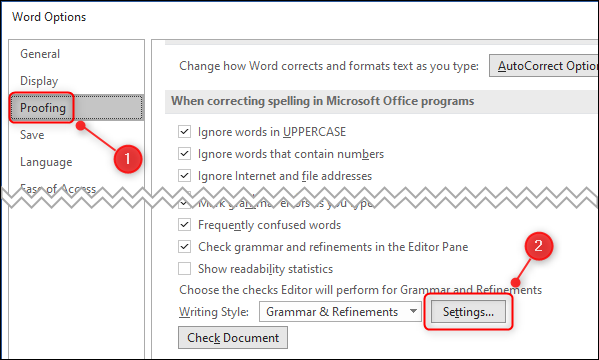
  • Select ‘Proofing’ from the menu in the left corner and then scroll down on the right side to ‘Writing Style’ and click on the ‘Settings’ button.
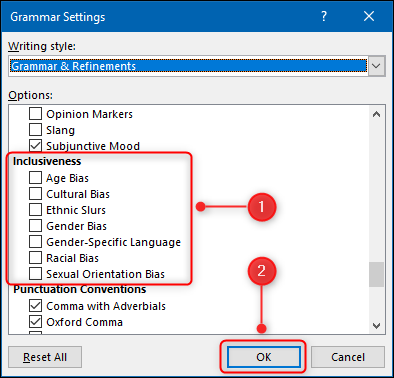
  • Scroll down to the “Inclusiveness” section, select all of the checkboxes that you want Word to check for in your documents, and click the “OK” button. In some versions of Word you will need to scroll down to the ‘Inclusive Language’ section (its all the way near the bottom) and check the ‘Gender-Specific Language’ box instead.
  • Click Ok

It doesn’t sound like a big deal when you refer to someone by the wrong gender but trust me its a big deal. If you don’t believe me try addressing a group of men as ‘Hello Ladies’ and then wait for the reactions. If you can’t address a group of guys as ladies then you shouldn’t refer to a group of ladies as guys either. I think it is common courtesy and requires minimal effort over the long term (Initially things will feel a bit awkward but then you get used to it).

Well this is all for now. Will write more later.

– Suramya
August 29, 2020

You can be identified online based on your browsing history

Filed under: Computer Related,Computer Software,My Thoughts,Tech Related — Suramya @ 7:29 PM

Reliably Identifying people online is a bedrock of the million dollar advertising industry and as more and more users become privacy conscious browsers have been adding features to increase the user’s privacy and reduce the probability of them getting identified online. Users can be identified by Cookies, Super Cookies etc etc. Now there is a research paper (Replication: Why We Still Can’t Browse in Peace: On the Uniqueness and Reidentifiability of Web Browsing Histories) that claims to be able to identify users based on their browsing histories. It is built on top of previous research Why Johnny Can’t Browse in Peace: On the Uniqueness of Web Browsing History Patterns and re-validates the findings of the previous paper and builds on top of it.

We examine the threat to individuals’ privacy based on the feasibility of reidentifying users through distinctive profiles of their browsing history visible to websites and third parties. This work replicates and

extends the 2012 paper Why Johnny Can’t Browse in Peace: On the Uniqueness of Web Browsing History Patterns[48]. The original work demonstrated that browsing profiles are highly distinctive and stable.We reproduce those results and extend the original work to detail the privacy risk posed by the aggregation of browsing histories. Our dataset consists of two weeks of browsing data from ~52,000 Firefox users. Our work replicates the original paper’s core findings by identifying 48,919 distinct browsing profiles, of which 99% are unique. High uniqueness hold seven when histories are truncated to just 100 top sites. Wethen find that for users who visited 50 or more distinct do-mains in the two-week data collection period, ~50% can be reidentified using the top 10k sites. Reidentifiability rose to over 80% for users that browsed 150 or more distinct domains.Finally, we observe numerous third parties pervasive enough to gather web histories sufficient to leverage browsing history as an identifier.

Original paper

Olejnik, Castelluccia, and Janc [48] gathered data in a project aimed at educating users about privacy practices. For the analysis presented in [48] they used the CSS :vis-ited browser vulnerability [8] to determine whether various home pages were in a user’s browsing history. That is, they probed users’ browsers for 6,000 predefined “primary links” such as www.google.com and got a yes/no for whether that home page was in the user’s browsing history. A user may have visited that home page and then cleared their browsing history, in which case they would not register a hit. Additionally a user may have visited a subpage e.g. www.google.com/maps but not www.google.com in which case the probe for www.google.com would also not register a hit. The project website was open for an extended period of time and recorded profiles between January 2009 and May 2011 for 441,627 unique users, some of whom returned for multiple history tests, allowing the researchers to study the evolution of browser profiles as well. With this data, they examined the uniqueness of browsing histories.

This brings to mind a project that I saw a few years ago that would give you a list of websites from the top 1k websites that you had visited in the past using javascript and some script-fu. Unfortunately I can’t find the link to the site right now as I don’t remember the name and a generic search is returning random sites. If I find it I will post it here as it was quite interesting.

Well this is all for now. Will post more later.

– Suramya

August 28, 2020

Got my first bot response to a Tweet and some analysis on the potential Bot

Filed under: Humor,My Thoughts,Tech Related — Suramya @ 10:21 PM

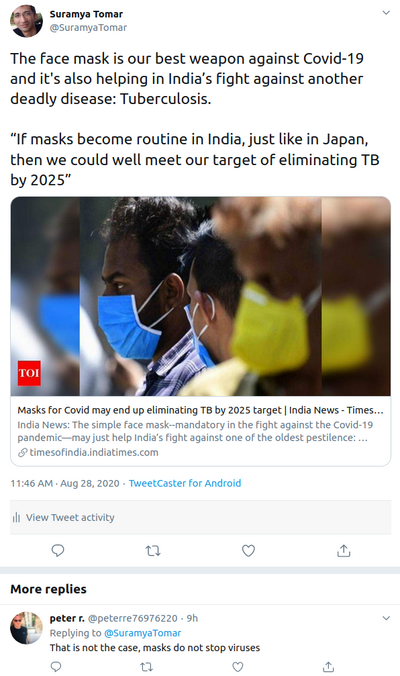
Today I achieved a major milestone of being on the internet, 🙂 I finally had a bot/troll (potential) respond to one of my Tweets with the usual nonsense. Normally I would ignore but it was just so funny to see this response that I had to comment on it. The reply was to my Tweet about how we could potentially achieve our target of eradicating Tuberculosis by 2025 because of the masks we are wearing due to Covid-19. You see TB bacteria are spread through the air from one person to another and just like Covid TB bacteria are put into the air when a person with TB disease of the lungs or throat coughs, speaks, or sings infecting people nearby when they breathe in these bacteria. Now that wearing a mask is becoming the new normal in most parts of the world (except for some morons who don’t understand/believe science or believe that politics is stronger than science) there is a high chance that it will also reduce the spread of other illnesses spread through air.


My Tweet & the response to it

Once I saw the response, I clicked on the profile and scrolled through the posting history and saw that a majority of the posts (atleast for the amount I was able to stomach while scrolling down) were retweets of Anti-Masker, Covid denial, Pro-Trump, anti vaccine nonsense. As I needed a distraction I decided to spend a bit of time to try and identify if the account was just a stupid person or a clever bot and did a little bit of investigation on the account.

Looking at the account a couple of things stood out right from the start, the first was that the account was created in July 2020 and the username had a bunch of numbers in it which is usually the case for automatically created accounts. So I ran a query on the account via Botometer® by OSoMe which gave me a whole bunch of data on the account and there was a bunch of data that made it stand out as being a potential bot. In just over a month (5 weeks and a day to be exact) the account had tweeted 6,197 times and 2,000 times in just the past 7 days which equates to about 12 tweets every hour every day. The other data point that stood out was that the account tweeted at almost the same time every day which is usually indicative of a Bot.

Interestingly the Botometer does give the account a low possibility of being a fully automated bot but that could be just because the person running it is manually feeding the responses and having the system spray it out. Or it could be a bored person doing it for LOL’s, which is code for morons who don’t know better and think they are being ‘cool’ or ‘edgy’ or whatever. But if that’s the case then they really need to get a better hobby.

Well this is all for now. Wear a mask when you go out and stay safe.

– Suramya

PS: I have no paitience for the anti-masker/anti-vaccine/anti-science nonsense so will be deleting any comments/responses or making fun of the comments depending on my mood at the time.

August 27, 2020

Optimizing the making of peanut butter and banana sandwich using computer vision and machine learning

Filed under: Computer Related,Computer Software,Tech Related — Suramya @ 12:42 AM

The current Pandemic is forcing people to stay at home depriving them of activities that kept them occupied in the past so people are getting a bit stir-crazy & bored of staying at home. Its worse for developers/engineers as you never know what will come out from the depths of a bored programmer’s mind. Case in point is the effort spent by Ethan Rosenthal in writing Machine Learning/Computer Vision code to Optimizing the coverage of the banana slices on his peanut butter & Banana sandwich so that there is the same amount of banana in every mouthful. The whole exercise took him a few months to complete and he is quite proud of the results.

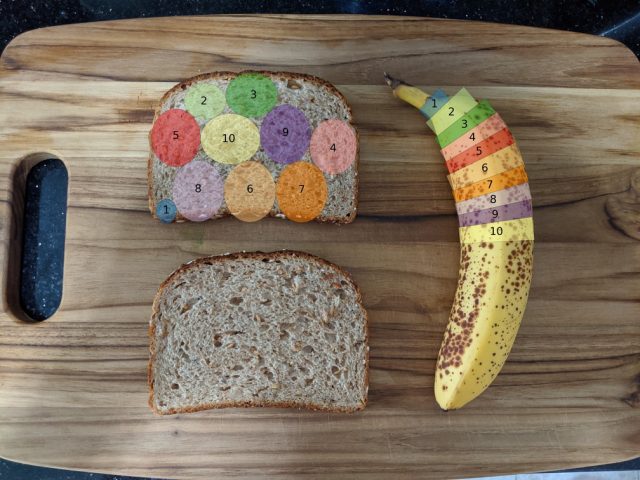
It’s really quite simple. You take a picture of your banana and bread, pass the image through a deep learning model to locate said items, do some nonlinear curve fitting to the banana, transform to polar coordinates and “slice” the banana along the fitted curve, turn those slices into elliptical polygons, and feed the polygons and bread “box” into a 2D nesting algorithm
[…]
If you were a machine learning model (or my wife), then you would tell me to just cut long rectangular strips along the long axis of the banana, but I’m not a sociopath. If life were simple, then the banana slices would be perfect circles of equal diameter, and we could coast along looking up optimal configurations on packomania. But alas, life is not simple. We’re in the middle of a global pandemic, and banana slices are elliptical with varying size.

The problem of fitting arbitrary polygons (sliced circular banana pieces) in a box (the bread piece) is NP-hard so the ideal solution is practically uncomputable and Rosenthal’s solution is a good approximation of the optimal solution in a reasonable time frame. The final solution is available as a command-line package called “nannernest” which takes a photo of the bread piece & banana as its argument and returns the an optimal slice-and-arrange pattern for the given combination.


Sample output created by nannernest

Check out the code & the full writeup on the project if you are interested. Even though the application is silly it’s a good writeup on using Machine Learning & Computer Vision for a project.

Source: Boing Boing

– Suramya

August 25, 2020

Using Bioacoustic signatures for Identification & Authentication

We have all heard about Biometric scanners that identify folks using their fingerprints, or Iris scan or even the shape of their ear. Then we have lower accuracy authenticating systems like Face recognition, voice recognition etc. Individually they might not be 100% accurate but combine one or more of these and we have the ability to create systems that are harder to fool. This is not to say that these systems are fool proof because there are ways around each of the examples I mentioned above, our photos are everywhere and given a pic of high enough quality it is possible to create a replica of the face or iris or even finger prints.

Due to the above mentioned shortcomings, scientists are always on lookout for more ways to authenticate and identify people. Researchers from South Korean have found that the signature created when sound waves pass through humans are unique enough to be used to identify individuals. Their work, described in a study published on 4 October in the IEEE Transactions on Cybernetics, suggests this technique can identify a person with 97 percent accuracy.

“Modeling allowed us to infer what structures or material features of the human body actually differentiated people,” explains Joo Yong Sim, one of the ETRI researchers who conducted the study. “For example, we could see how the structure, size, and weight of the bones, as well as the stiffness of the joints, affect the bioacoustics spectrum.”

[…]

Notably, the researchers were concerned that the accuracy of this approach could diminish with time, since the human body constantly changes its cells, matrices, and fluid content. To account for this, they acquired the acoustic data of participants at three separate intervals, each 30 days apart.

“We were very surprised that people’s bioacoustics spectral pattern maintained well over time, despite the concern that the pattern would change greatly,” says Sim. “These results suggest that the bioacoustics signature reflects more anatomical features than changes in water, body temperature, or biomolecule concentration in blood that change from day to day.”

Interestingly, while the setup is not as accurate as Fingerprints or Iris scans it is still accurate enough to differentiate between two fingers of the same hand. If the waves required to generate the Bioacoustic signatures are validated to be safe for humans over long term use, then it is possible that we will soon see a broader implementation of this technology in places like airports, buses, public area’s etc to identify people automatically without having to do anything. If it can be made portable then it could be used to monitor protests, rallies, etc which would make it a privacy risk.

The problem with this tech is that it would be harder to fool without taking steps that would make you stand out like wearing a vest filled with liquid that changes your acoustic signature. Which is great when we are just talking about authentication/identification for access control but becomes a nightmare when we consider the surveillance aspect of usage.

Source: The Bioacoustic Signatures of Our Bodies Can Reveal Our Identities

– Suramya

August 24, 2020

India has the cheapest Mobile Internet in the world

Filed under: Interesting Sites,My Thoughts,Tech Related — Suramya @ 2:58 PM

Internet services were launched in India on 15th August, 1995 by Videsh Sanchar Nigam Limited and in November, 1998, the Government opened up the sector for providing Internet services by private operators. This year marks the 25th anniversary of the Internet’s launch in India and its astounding how much the landscape has changed in the past 25 years. My first net connection in 1998 was a blazing 33.3kbps dial-up connection that cost Rs 15,000 for 250 hours, this allowed you to use graphical tools to browse the internet like Netscape (which was the precursor for Firefox). For students there was a discount pricing for Rs 5,000 for 250 hours but they only got access to text/shell based browsing.

Now, 25 years later the landscape is completely different. Internet connections costs in India are the cheapest in the world as per a recent study done for The Worldwide broadband speed league by Cable.co.uk in association with M-Lab.

Five cheapest packages in the world

The five cheapest countries in terms of the average cost of 1GB of mobile data are India ($0.09), Israel ($0.11), Kyrgyzstan ($0.21), Italy ($0.43), and Ukraine ($0.46).

Conversely to the most expensive, none of these countries are islands. Further, they all either contain excellent fibre broadband infrastructure (Italy, India, Ukraine, Israel), or in the case of Kyrgyzstan rely heavily on mobile data as the primary means to keep its populace connected to the rest of the world.

This is based on sampling done in Feb 2020

Rank Name Plans measured Average price of 1GB (local currency) Currency Conversion rate (USD) (Frozen 27/04/2020) Average price of 1GB (USD) Cheapest 1GB (Local currency) Cheapest 1GB for 30 days (USD) Most expensive 1GB (Local currency) Most expensive 1GB (USD) Sample date
1 India 60 6.66 INR 0.01 0.09 1.63 0.02 209.09 $2.75 14/02/2020

If you compare the costs to prices in the US, you will notice that Internet (data) is significantly more expensive in the US as opposed to India.

Rank Name Plans measured Average price of 1GB (local currency) Currency Conversion rate (USD) (Frozen 27/04/2020) Average price of 1GB (USD) Cheapest 1GB (Local currency) Cheapest 1GB for 30 days (USD) Most expensive 1GB (Local currency) Most expensive 1GB (USD) Sample date
188 United States 29 8.00 USD 1.00 8.00 2.20 2.20 2.20 $60.00 24/02/2020

The cheap internet data connections in India is completely due to Reliance Jio. Till Jio launched their services in September 2016 the cost for 1GB of data was Rs 249 for 1GB (Airtel/Idea) & Rs. 251 for 1GB (Vodaphone). After Jio launched all other ISP’s starting loosing customers to Jio at an astronomical rate and had to cut prices in order to stay in business. Now, 4 years later we have the cheapest data in the world at ~Rs 6 per GB. 🙂 This proves that healthy competition is the best way to get good service at a competitive pricing. If there was a monopoly then they can choose the pricing as per their desire and since folks don’t have an alternate option they have to use their services.

Check out the full report at: Worldwide mobile data pricing: The cost of 1GB of mobile data in 228 countries.

– Suramya

August 23, 2020

Mozilla Thunderbird has a ‘Link Mismatch Detection’ feature to protect from Phishing & Scams

Filed under: Computer Software,Tech Related — Suramya @ 10:03 PM

Yesterday I was trying to register for a new service and as always I had to share my email address and wait for the confirmation/validation email to verify that the email address I had provided was a valid one. Once I finally got the email it had a clickable link to validate my email address that looked like the screenshot below:


Clickable link for email address validation

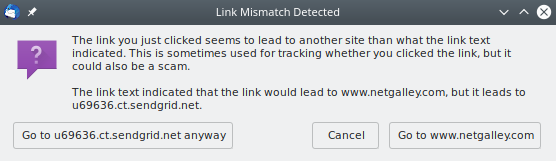
Since this was an email I was expecting and wanted to create an account, I clicked on the link and got a surprise. Instead of immediately taking me to the link I had clicked on Thunderbird popped up the following pop-up telling me that the link was taking me to another website than what the link text was indicating. This is new behavior that I believe was implemented in Thunderbird 68 but haven’t found the release notes confirming it. (I didn’t really spend a lot of time searching to be honest)


Link Mismatch Detected

In this case it was a benign reason because the link was taking me to a tracking site before redirecting to the email confirmation page. But the benefits are immediately obvious as this would flag the links on the phishing/scam emails that pretend to come from a bank/email provider/facebook but redirect users to a Phishing site and prompt users to verify if they are going to the correct site.

Unfortunately the fix is not perfect and needs more work as this would include all links in newsletters etc that include tracking links (which is pretty much all of them). If users constantly get the popup then there is a high probability that they will get conditioned to click on the First button to go the site the link is taking you to without reading the text fully.

Some of the users will find this to be annoying and want to disable it, so below are the steps to disable the Phishing checks in Thunderbird (not recommended). Only make this changes if you are absolutely sure of what you are doing and take full responsibility of the fact that you disabled the Phishing checks. I will not be responsible if you disable the checks and then end up with an empty bank account after having your account Phished. Also, I found the instructions on the Mozilla Forum but haven’t tried them myself so like anything else you find on the internet please validate the steps and only follow if you are sure that they are safe :).

There are four phishing preferences.

* mail.phishing.detection.enabled

i.e. Tools > Options > Security > Email Scams > Tell me if the message I’m reading is a suspected email scam

* mail.phishing.detection.ipaddresses
* mail.phishing.detection.mismatched_hosts
* mail.phishing.detection.disallow_form_actions

Try setting the mail.phishing.detection.mismatched_hosts preference to false in the about:config window, then restart and test again.

It’s great that the Thunderbird team is adding more and more features to make email safer. Looking forward to more such features in TB.

Well this is all for now. Will post more later.

– Suramya

August 21, 2020

Emotion detection software for Pets using AI and some thoughts around it (and AI in general)

Filed under: Computer Software,Emerging Tech,Humor,My Thoughts,Tech Related — Suramya @ 5:32 PM

Pet owners are a special breed of people, they willingly take responsibility for another life and take care of them. I personally like pets as long as I can return them to the owner at the end of the day (or hour, depending on how annoying the pet is). I had to take care of a puppy for a week when Surabhi & Vinit were out of town and that experience was more than enough to confirm my belief in this matter. Others however feel differently and spend quite a lot of time and effort talking to the pets and some of them even pretend that the dog is talking back.

Now leveraging the power of AI there is a new app created that analyses & interprets the facial expressions of your pet. Folks over at the University of Melbourne decided to build an Convolutional Neural Networks based application called Happy Pets that you can download from the Android or Apple app stores to try on your pet. They claim to be able to identify the emotion the pet is feeling when the photo was taken.

While the science behind it is cool and a lot of pet owners who tried out the application over at Hacker News seem to like it, I feel its a bit frivolous and silly. Plus its hard enough for us to classify emotions in Humans reliably using AI so I would take the claims with a pinch of salt. The researchers themselves have also not given any numbers around the accuracy percentage of the model.

When I first saw the post about the app it reminded me of another article I had read a few days ago which postulated that ‘Too many AI researchers think real-world problems are not relevant’. At first I thought that this was an author trolling the AI developers but after reading the article I kind of agree with him. AI has a massive potential to advance our understanding of health, agriculture, scientific discovery, and more. However looking at the feedback AI papers have been getting it appears that AI researchers are allergic to practical applications (or in some cases useful applications). For example, below is a review received on a paper submitted to the NeurIPS (Neural Information Processing Systems) conference:

“The authors present a solution for an original and highly motivating problem, but it is an application and the significance seems limited for the machine-learning community.”

If I read this correctly then basically they are saying that this AI paper is for a particular application so its not interesting enough for the ML community. There is a similar bias in the theoretical physics/mathematics world where academics who talk about implementing the concepts/theories are looked down upon by the ‘purists’. I personally believe that while the theoretical sciences are all well & good and we do need people working on them to expand our understanding, at the end of the day if we are not applying these learnings/theorems practically they are of no use. There will be cases where we don’t have the know-how to implement or apply the learnings but we should not let that stand in the way of practical applications for things we can implement/use.

To quote a classic paper titled “Machine Learning that Matters” (pdf), by NASA computer scientist Kiri Wagstaff: “Much of current machine learning research has lost its connection to problems of import to the larger world of science and society.” The same year that Wagstaff published her paper, a convolutional neural network called AlexNet won a high-profile competition for image recognition centered on the popular ImageNet data set, leading to an explosion of interest in deep learning. Unfortunately, the disconnect she described appears to have grown even worse since then.

What do you think? Do you agree/disagree?

Source: HackerNews

– Suramya

August 20, 2020

Transparent Solar Panels hit Record 8.1% Efficiency

Filed under: Emerging Tech,My Thoughts,Tech Related — Suramya @ 5:24 PM

Solar panels for electricity are awesome, however the major issue with deploying solar panels is that you need a lot of space for them. Although the efficiency of the panels has been going up reducing the space requirements but its still a non-trivial amount of space to generate enough power to be useful to power a house, Portable solar panels are well and good but they are slow and expensive. I tried to figure out a way to power my apartment via solar power but it wasn’t possible without having panels setup on the apartment roof.

Which is where the Transparent Solar panels come into play as they allow you to replace your existing windows for solar panel which would make them ideal for Apartments & office buildings. Because you don’t need extra space for the panels and just need to replace the windows. The transparent solar panels were created in 2014 by researchers at Michigan State University (MSU) however the efficiency of the panels was quite low compared to the traditional panels making it less productive and more expensive than the traditional panels so since then the race has been on to make the panels more efficient.

The researches from University of Michigan have made a significant break through in the manufacturing of color-neutral, transparent solar cells achieving 8.1% efficiency by using a carbon-based design rather than conventional silicon. The created cells do have a slight greenish tinge like sunglasses but for the most part appear to be usable as a window pane. More details are available in their release here.

The new material is a combination of organic molecules engineered to be transparent in the visible and absorbing in the near infrared, an invisible part of the spectrum that accounts for much of the energy in sunlight. In addition, the researchers developed optical coatings to boost both power generated from infrared light and transparency in the visible range—two qualities that are usually in competition with one another.

The color-neutral version of the device was made with an indium tin oxide electrode. A silver electrode improved the efficiency to 10.8%, with 45.8% transparency. However, that version’s slightly greenish tint may not be acceptable in some window applications.

Transparent solar cells are measured by their light utilization efficiency, which describes how much energy from the light hitting the window is available either as electricity or as transmitted light on the interior side. Previous transparent solar cells have light utilization efficiencies of roughly 2-3%, but the indium tin oxide cell is rated at 3.5% and the silver version has a light utilization efficiency of 5%.

The researchers are still working on improving the efficiency further and I am looking forward to the new breakthroughs in the field. Hopefully soon we will have panels efficient enough that I will be able to replace my apartment’s windows with Solar panel and break even in a reasonable amount of time. 🙂

Source: Slashdot.org

– Suramya

August 19, 2020

Convert typed text to realistic handwriting

Filed under: Computer Related,Computer Software,Tech Related — Suramya @ 6:45 PM

There are some tools or projects that really don’t make any practical sense but are a lot of fun to use or just impressive in how they implement technology. The Handwritten.js project by ‘alias-rahil’ is one such project. Basically what it does is take any Plain Text document and convert it into a realistic looking handwritten page. I tried it out on a few sample documents (logs) and it worked great. The programs does coredump if you try converting a 5MB file, but other than that it worked as expected.

Below is a sample file with some quotes that I converted as a test :

* Mountain Dew and doughnuts… because breakfast is the most important meal of the day

* Some days you’re the dog; some days you’re the hydrant.

* He who smiles in a crisis has found someone to blame.

* Marriage is one of the chief causes of divorce

* Earth is 98% full…please delete anyone you can.

* I came, I saw, I decided to order take out.

* F U CN RD THS U CNT SPL WRTH A DM!

* Work hard for eight hours a day, and eventually you may become a
boss and be able to work twelve.

* Quitters never win, and winners never quit, but those who never quit AND never win are idiots.

* What’s the difference between a bad golfer and a bad skydiver?

A bad golfer goes, WHACK! “Damn.”
A bad skydiver goes, “Damn.” WHACK!

* Beware of the light at the end of the tunnel. It could be an oncoming train.

* A girl is like a road. The more curves she has the more dangerous she is!

* A woman who dresses to kill probably cooks the same.

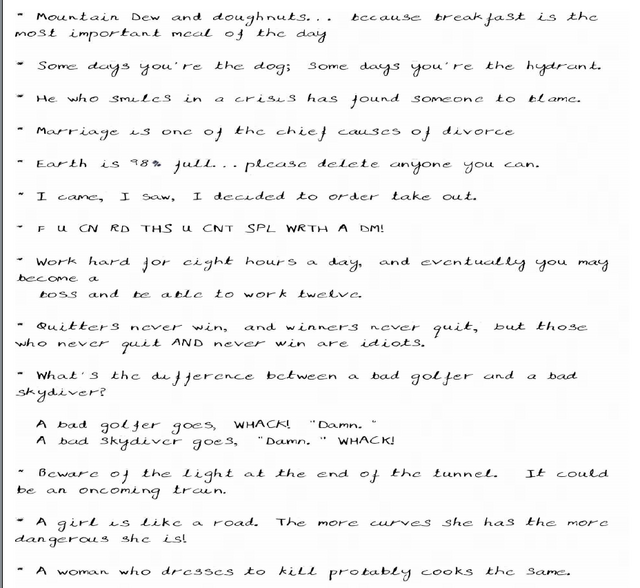
The script is fast and didn’t take more than a few seconds to process the file and create a PDF file with the output. The output for my test run is as below:


Output generated by Handwritten.js

I did also try converting a word file with the software but it didn’t take the content of the file for the conversion, instead it converted the XML & Code from the file. One suggestion for improvement I have is to enhance the script to support word files. It would be awesome if it could also convert any of the diagrams, tables etc to look like they were drawn by hand.

Maybe if I have some time I will look into this and see how easy it is to enhance the script. But no promises as I have a ton of other things I need to take complete first. 🙂

Source: Hacker News

– Suramya

« Newer PostsOlder Posts »

Powered by WordPress