Suramya's Blog : Welcome to my crazy life…

January 23, 2022

Some thoughts on Crypto currencies and why it is better to hold off on investing in them

Filed under: Computer Related,My Thoughts,Tech Related — Suramya @ 1:26 AM

It seems that every other day (or every other hour if you are unlucky) someone or the other is trying to get people to use Crypto currency because they claim that it is awesome and not at all dependent on government regulations and thus won’t fluctuate that much. Famous people are pushing it, others like New York City Mayor Eric Adams are trying to raise awareness of the product and have decided to convert his first paycheck to Crypto, El Savador started accepting crypto currency as legal tender etc. However, the promises made by crypto enthusiasts don’t translate into reality as the market remains extremely volatile.

I see people posting on twitter that Crypto currencies are better because they are stable, but in my opinion if a currency can drop 20% because Elon Musk tweeted a Broken heart emoji then it is not something I want to use to store my savings. Earlier this week the entire Bitcoin market dropped over 47% from it’s high back in Nov 2021. Mayor Adams paycheck which was converted to crypto is now worth ~1/2 of what it was when he invested it, and that is a massive drop. Imagine loosing 50% of your savings in one shot. You might suddenly have no way to pay rent or emergency repairs/hospitalization etc. Even El Savador has seen its credit become 4 times worse than it was before it moved to Bitcoin. People there are complaining that the promised reduction in cost for conversion to/from international currencies is a myth as they are paying more than what they were paying earlier as transaction costs.

Another major issue with crypto currency is the ecological hit caused by the mining. According to research done by University of Cambridge, globally Bitcoin uses more power per year than the entire population of Argentina. The recent Kazakhsthan unrest and protests were sparked off due to surging fuel prices that were caused by the migration of Bitcoin miners to the country after China banned them. This caused a lot of strain on the electricity grid and required an increase in the prices which kicked off a massive protest that has caused untold no of deaths. There are multiple folks coming up with new crypto-currencies that claim to be carbon neutral but so far none of them have delivered on the promise.

Bitcoin is thought to consume 707 kwH per transaction. In addition, the computers consume additional energy because they generate heat and need to be kept cool. And while it’s impossible to know exactly how much electricity Bitcoin uses because different computers and cooling systems have varying levels of energy efficiency, a University of Cambridge analysis estimated that bitcoin mining consumes 121.36 terawatt hours a year. This is more than all of Argentina consumes, or more than the consumption of Google, Apple, Facebook and Microsoft combined.

Check out this fantastic (though very long – 2hr+) video on economic critique of NFTs, DAOs, crypto currency and web3. (H/t to Cory Doctorow)

In summary, I would recommend against investing in crypto currencies till the issues highlighted above are resolved (if they are ever resolved).

– Suramya

January 22, 2022

Malware can now Intercept and fake an iPhone reboot

Filed under: Computer Security,Computer Software,My Thoughts,Tech Related — Suramya @ 1:50 AM

Rebooting the system has always been a good way to clean start your system (phone or computer). Some of the phone malware specifically don’t have the ability to persist so can be removed just by rebooting the phone (Especially on the iPhone). Now, researchers from the ZecOps Research Team have figured out how to fake a reboot on an iPhone. Which allows malware/surveillance software to spoof the shutdown / reboot of a phone. As you can imagine, this has massive security impact. The first problem is that we can’t be sure that the phone has been rebooted so malware can’t be removed. Secondly, some of the folks shutdown their phones while discussing sensitive information. Using this technique the attackers can pretend that the phone is switched off, while it is still on and eavesdrop using the phone’s camera and mic.

We’ll dissect the iOS system and show how it’s possible to alter a shutdown event, tricking a user that got infected into thinking that the phone has been powered off, but in fact, it’s still running. The “NoReboot” approach simulates a real shutdown. The user cannot feel a difference between a real shutdown and a “fake shutdown.” There is no user-interface or any button feedback until the user turns the phone back “on.”

The problem is exacerbated due to there not being any physical method of powering the device off. Earlier phone models had removable batteries which allowed a user to physically remove the battery when they wanted to secure the device. Now the battery is built in and there is no way to remove it without dismantling the device and voiding your warranty in the process. I have discussed this with various folks over the years that it is impossible to ensure a device is powered off when we shut it down because we can’t remove the battery.

A silver lining around this is that it looks like hard reboots are harder to spoof so if you want to be sure that your phone is actually off, you can shut it down using a hard-reboot. Another solution is to carry a Faraday bag with you and put your phone inside when you need to be off-grid.

Source: Schneier’s Blog: Faking an iPhone Reboot

– Suramya

January 21, 2022

nerd-dictation: A fantastic Open Source speech to text software for Linux

After a long time of searching I finally found a speech to text software for Linux that actually works well enough that I can use it for dictating without having to jump through too many hoops to configure and use. The software is called nerd-dictation and is an open source software. It is fairly easy to setup as compared to the other voice-to-text systems that are available but still not at a stage where a non-tech savvy person would be able to install it easily. (There is effort ongoing to fix that)

The steps to install are fairly simple and documented below for reference:

  • pip3 install vosk
  • git clone https://github.com/ideasman42/nerd-dictation.git
  • cd nerd-dictation
  • wget https://alphacephei.com/kaldi/models/vosk-model-small-en-us-0.15.zip
  • unzip vosk-model-small-en-us-0.15.zip
  • mv vosk-model-small-en-us-0.15 model

nerd-dictation allows you to dictate text into any software or editor which is open so I can dictate into a word document or a blog post or even the command prompt. Previously I have used tried using software like otter.ai which actually works quite well but doesn’t allow you to edit the text as you’re typing, so you basically dictate the whole thing and the system gives you the transcription after you are done. So, you have to go back and edit/correct the transcript which can be a pain for long dictations. This software works more like Microsoft dictate which is built into Word. Unfortunately my word install on Linux using Crossover doesn’t allow me to use the built in dictate function and I have no desire to boot into windows just so that I can dictate a document.

This downloads the software in the current directory. I set it up on /usr/local but it is up to you where you want it. In addition, I would recommend that you install one of the larger dictionaries/models which makes the voice recognition a lot more accurate. However, do keep in mind that the larger models use up a lot more memory so you need to ensure that your computer has enough memory to support the larger models. The smaller ones can run on systems as small as a raspberry pi, so depending on your system configuration you can choose. The models are available here.

The software does have some quirks, like when you are talking and you pause it will take it as a start of a new sentence and for some reason it doesn’t put a space after the last word. So unless you’re careful you need to go back and add spaces to all the sentences that you have dictated, which can get annoying. (I started manually pressing space everytime I paused to add the space). Another issue is that it doesn’t automatically capitalize the words when you dictate such as those at the beginning of the sentence or the word ‘I’. This requires you to go back and edit, but that being said it still works a lot better than the other software that I have used so far on Linux. For Windows system Dragon Voice Dictation works quite well but is expensive. I tested it out by typing out this post using it and for the most part it does work it worked quite well.

Running the software again requires you to run commands on the commandline, but I configured shortcut keys to start and stop the dictation which makes it very convenient to use. Instructions on how to configure custom shortcut keys are available here. If you don’t want to do that, then you can start the transcription by issuing the following command (assuming the software is installed in /usr/local/nerd-dictation):

/usr/local/nerd-dictation/nerd-dictation begin --vosk-model-dir=/usr/local/nerd-dictation/model  --continuous

This starts the software and tells it that we are going to dictate for a long time. More details on the options available are available on the project site. To stop the software you should run the following command:

/usr/local/nerd-dictation/nerd-dictation end

I suggest you try this if you are looking for a speech-to-text software for Linux. Well this is all for now. Will post more later.

Thanks to Hacker News: Nerd-dictation, hackable speech to text on Linux for the link.

– Suramya

January 20, 2022

Impact of Google Hacking and Data Collection using Search Engines on CyberSecurity

Filed under: Article Releases,Computer Security,My Thoughts,Tech Related — Suramya @ 1:58 AM

The modern search engines scan most of the public sites on a regular basis and unlike the legacy search engines also have the capability of finding and indexing data or files that are not linked to from any other sources. This allows the search engine to index data/files that could have sensitive data or details on vulnerabilities. Using publicly available information attackers can perform searches for such information without touching the target system directly leaving little trace for the defenders to watch for to be alerted. Most organizations are not aware of the information being leaked by such means and how it is compromising their cyber security. The availability of the Google Hacking Database allows even minimally skilled attackers to search for information quickly and efficiently.
This poses a high risk to the organizations leaking sensitive data. There are no sure shot solutions to this problem and even the most careful organizations will expose data that when combined with other sources allow attackers a look at the organizations digital assets and systems.

The popular image of a hacker involves an attacker sitting in a dark room typing commands in a terminal to gain access and usually is completed in a very short period of time. In real life attackers spend a lot of time performing reconnaissance on the target before even engaging with the target system. One of the popular ways of performing reconnaissance is to use search engines like Google to find data, this technique is called Google Hacking and was introduced to public in 2004 by Johnny Long. He defined it as “the art of creating complex search engine queries in order to filter through large amounts of search results for information related to computer security” (Johnny, 2004). Attackers use Google Hacking to uncover sensitive information about a company or uncover potential security vulnerabilities.

The modern search engines scan most of the public sites on a regular basis and unlike the legacy search engines also have the capability of finding and indexing data or files that are not linked to from any other sources. This allows the search engine to index data/files that could have sensitive data or details on vulnerabilities.

The Google Hacking Database (GHDB) is a consolidated database of queries that have been collected over the years thanks to contributions by researchers, hackers and general public that can be used to find sensitive data on websites such as files containing passwords, configurations, sensitive data, financial information, error messages, firewall logs and other such data. (Google Hacking Database, 2021) The database is in an easy to consume format and allows users to search for queries that will return specific types of data.

This database gives attackers the queries to be used to specific types of data, leveraging the indexing powers of Google for finding information that should not have been exposed to the public.

How Google Hacking Works

Google allows a user to search for information using search keywords and a combination of search operators to limit the search results. With the information available in the Google Hacking Database an attacker can search for specific information and limit the search to a given target domain. There are multiple kinds of queries available that target specific kinds of information. Some of the categories of information available using this are:

  • Advisories and vulnerabilities: Queries that allow us to locate vulnerable servers based on product or version-specific setups with known vulnerabilities..
  • Sensitive directories: Allow us to find directories with files that contain sensitive information
  • Files containing passwords: Locate files containing passwords.
  • Pages containing login portals: Locate login pages for various services
  • Error messages: Find files with errors messages that may contain details about the system.

Below are examples of the various queries that are available and the kind of data they expose.

Searching for passwords stored in files

Users sometimes store passwords in plain text files or excel databases that are accidentally uploaded to a public site. These are then indexed by Google (or other search engines) and can be found using specific queries. For example:

allintext:"*.@gmail.com" OR "password" OR "username" filetype:xlsx

searches for all Excel files that have gmail.com in the text along with “password”. This will find all files containing any of the search terms provided. If required we can limit the search to a specific site using the “site:” search parameter.

Search for Log files

Log files contain a lot of sensitive information if exposed to public. Error logs, access logs can expose information such as PHP version you are running, CMS version details, Operating system details etc. If firewall logs or system logs are exposed it can reveal information such as usernames, firewall version and configuration details etc. Similarly SQL logs can expose sensitive data as well. This information combined with other information can give an attacker a foothold in the system. For example:

allintext:username filetype:log

This query will give results that include the text username inside all *.log files and the following query will return all directories where logfiles are publicly accessible:

intitle:"index of" errors.log

SSH private keys

SSH private keys are used to encrypt/decrypt data exchanged during SSH connections. They also allow users to authenticate to servers without the use of passwords. If they are exposed anyone can impersonate that user and if passwordless login’s are enabled the key will allow the attacker to login to the server without a password. The following query will return all directories with publicly accessible private key:

intitle:index.of id_rsa -id_rsa.pub

Login Portals

A lot of times organizations expose their development or staging systems to the internet for testing and depend on the obscurity of the system for protection. These systems are vulnerable because development systems often don’t have the same protections and controls applied on them as production systems do. In addition, there are often systems that were not meant to be pubic such as router login pages, CMS admin sections etc that increase the attack surface of the organization. A sample query to find login pages for CISCO email security appliance is listed below:

intitle:"Cisco Email Security Virtual Appliance" inurl:csrfkey=

SQL dumps

Sometimes sites require SQL datadumps to be made for backup or restoration purposes and these dumps often have a lot of sensitive data in them. Using a search query similar to the one listed below attackers can find these dumps and explore the data:

ext:sql | ext:txt intext:"-- phpMyAdmin SQL Dump --" + intext:"admin"

There are many more queries that are available in the database to search for specific data and more are added everyday.

Famous attacks that used Google Hacking/Google Dorks
Attacks using Google Hacking/Google Dorks are difficult to identify due to the passive nature of the attacks. However, even with that restriction there have been a few cases of note where the attacker’s used this technique to attack an organization’s system and some of them are listed below.

N.Y. Dam attack from Iran, 2013

Between 2011 and 2013, Hamid Firoozi from Iran gained access to the Bowman Avenue Dam in Rye Brook, New York by finding an unprotected computer that controlled the dam’s sluice gates using Google Searches. (Matthews, 2016). The issue is rampant enough that the Department of Homeland Security and FBI jointly released a warning about Google dorking. “By searching for specific file types and keywords, malicious cyber actors can locate information such as usernames and passwords, e-mail lists, sensitive documents, bank account details, and website vulnerabilities,” (FBI, 2014)

Detection of Google Hacking Attacks

Detection of these attacks is difficult due to the passive nature of the attack. However, one of the technique that is quite successful is to use a Honey Pot approach. Organizations can store files with fake information that looks authentic and important such as username and password combinations or SSH private keys that belong to non-existent accounts. Because these accounts do not exist no one should be attempting to log in to them for legitimate purposes so when a login attempt is made to these accounts or when the files are accessed we know that a Google Hacking attack is in progress and the IP address etc can be flagged for followup or blocking. We can also lure the system into a fake network which is monitored to identify what information they are looking for in the network.

Using that information, we can take further preventive measures to protect the system.

Prevention Techniques for Google Hacking attacks

There are a few steps that we can take to avoid leaking sensitive data to attackers using Google Dorks as listed below:

  • Protect sensitive data with authentication for private information
  • Don’t expose development systems to internet, if that is not possible restrict access using IP based restriction.
  • Run regular vulnerability scans on your website/domain. A lot of the scanners now incorporate checks for popular Google Dork queries
  • Run manual dork queries against your site to locate leaks before attackers do
  • Add checks to your servers to find sensitive files in public directories such as any file with an extension other than a php/asp/html. These can we potential leaks
  • If you find sensitive content exposed, you can request its removal by using the Google Search Console.

Conclusion

Google Hacking allows an attacker to perform reconnaissance against your organization in a passive way allowing them to collect information that can then be combined with other sources to give them a foot hold. Preventing such information leaks is a good way to protect the organizational systems and the techniques listed above can help with that. We can also subscribe to services that perform these checks on your behalf.

We covered some of the techniques available to detect and prevent Google Hacking attacks in the paper and while the techniques discussed will not protect against all attacks, they will reduce the attack surface and protect you against most attackers.


Note: This was originally written as a paper for one of my classes at EC-Council University in Q2 2021, which is why the tone is a lot more formal than my regular posts.
August 7, 2021

Bypass of Facial Recognition made possible by creating Master faces that impersonate 40% of population

Filed under: Computer Security,Emerging Tech,My Thoughts,Tech Related — Suramya @ 9:00 PM

Over the years, there has been a lot of push for Image recognition systems and more and more companies are entering the field each with their own claims of supernatural accuracy. Plus, with all the amazing ‘tech’ being showcased in the movies and on TV people are primed to expect that level of accuracy. Unfortunately, reality is a lot more weird and based on research its pretty simple to fool image recognition systems. In the past people have tricked systems to misidentifying a banana as a toaster by modifying parts of the image. There was another recent event where the Tesla self navigation system kept thinking the moon was a Yellow light and insisted on slowing down. There are so many of these ‘edge’ cases that it is not even funny.

A specific use case for image recognition is Facial recognition and that is a similar mess. I have personally used a photo of an authorized user to get a recognition system to unlock a door during testing. We have cases where wearing glasses confuses the system that it locks you out. Now according to research conducted by the Blavatnik School of Computer Science and the school of Electrical Engineering it is possible to create a ‘master’ face that can be used to impersonate multiple ID’s. In their study they found that the 9 faces created by the StyleGAN Generative Adversarial Network (GAN) could impersonate 40% of the population. Testing against the University of Massachusetts’ Labeled Faces in the Wild (LFW) open source database they were able to impersonate 20% of the identities in the database with a single photo.

Basically, they are exploiting the fact that most facial recognition systems use broad sets of markers to identify specific individuals and StyleGAN creates a template containing multiple such markers which can then be used to fool the recognition systems.

Abstract: A master face is a face image that passes face-based identity-authentication for a large portion of the population. These faces can be used to impersonate, with a high probability of success, any user, without having access to any user-information. We optimize these faces, by using an evolutionary algorithm in the latent embedding space of the StyleGAN face generator. Multiple evolutionary strategies are compared, and we propose a novel approach that employs a neural network in order to direct the search in the direction of promising samples, without adding fitness evaluations. The results we present demonstrate that it is possible to obtain a high coverage of the population (over 40%) with less than 10 master faces, for three leading deep face recognition systems.

Their paper has been published and is available for download here: Generating Master Faces for Dictionary Attacks with a Network-Assisted Latent Space Evolution.

With more and more companies pushing for AI based recognition systems as fool proof systems (looking at you Apple, with your latest nonsense about protecting kids by scanning personal photos) it is imperative that more such research is conducted before these systems are pushed into production based on the claims in their marketing brochures.

Thanks to Schneier on Security: Using “Master Faces” to Bypass Face-Recognition Authenticating Systems

– Suramya

July 1, 2021

Never used foo/bar/baz as variable names, can I still call myself a programmer?

Filed under: Humor,My Thoughts,Tech Related — Suramya @ 4:14 PM

Just realized today that in my 24+ years of programming I have never named a variable foo, bar or baz. These are the goto names for placeholders in code & metaphysical variables and have decades of history behind them. Most programmers use them for temporary variables or place holders. Since I have never used them, can I still call myself a programmer? 😀

Jokes aside, you should use good variable names in your code that are meaningful, easy to read and concise. Some guidelines on how to do that are below:

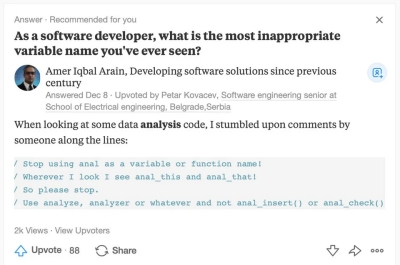
Also, another point to keep in mind is to avoid acronyms that can have a different meaning in a different language or resemble rude words etc. See the screenshot below for an example of a ‘bad’ variable name:

Example of a bad variable name

Well this is all for now. Will post more later.

– Suramya

June 14, 2021

New technique Lets Users Preview Files Stored in DNA Data Storage

Filed under: Computer Hardware,Emerging Tech,Science Related,Tech Related — Suramya @ 7:45 AM

Using DNA for storage is an idea that has been around for a while with the initial idea of DNA storage being postulated by Richard P. Feynman in 1959. It was mostly a theoretical exercise till 1988, when researchers from Harvard and the artist Joe Davis stored an image of an ancient Germanic rune representing life and the female Earth in the DNA sequence of E.coli. After that In November 2016 (Lot more stuff happened between the two dates and you can read it all on the Wiki page), a company called Catalog encoded 144 words from Robert Frost’s famous poem, “The Road Not Taken” into strands of DNA. Pretty soon after that in June 2019, scientists reported that all 16 GB of text from Wikipedia’s English-language version have been encoded into synthetic DNA.

DNA storage has been becoming easier and cheaper as time goes on with more and more companies getting on the bandwagon. Even Microsoft has a DNA Storage Research project. However, even with all the advances so far there is a lot more work required before this becomes stable, cheap and reliable enough to be a commercial product. One of the problems that we faced with the storage in the past was that it wasn’t possible to preview the data stored in DNA. You had to open the entire file if you wanted to know what was in it. Think of trying to browse an image gallery without thumbnails, you would have to open each file to see what it was when trying to find a particular file.

Researchers from North Carolina State University have developed a way to provide previews of a stored data file similar to how a thumbnail works for image files. Basically they used the fact that when files have similar file names then the system will copy pieces of multiple data files. Till now this was a problem but the researchers figured out how to use this behavior to allow them to either open the entire file or a subset.

“The advantage to our technique is that it is more efficient in terms of time and money,” says Kyle Tomek, lead author of a paper on the work and a Ph.D. student at NC State. “If you are not sure which file has the data you want, you don’t have to sequence all of the DNA in all of the potential files. Instead, you can sequence much smaller portions of the DNA files to serve as previews.”

Here’s a quick overview of how this works.

Users “name” their data files by attaching sequences of DNA called primer-binding sequences to the ends of DNA strands that are storing information. To identify and extract a given file, most systems use polymerase chain reaction (PCR). Specifically, they use a small DNA primer that matches the corresponding primer-binding sequence to identify the DNA strands containing the file you want. The system then uses PCR to make lots of copies of the relevant DNA strands, then sequences the entire sample. Because the process makes numerous copies of the targeted DNA strands, the signal of the targeted strands is stronger than the rest of the sample, making it possible to identify the targeted DNA sequence and read the file.

However, one challenge that DNA data storage researchers have grappled with is that if two or more files have similar file names, the PCR will inadvertently copy pieces of multiple data files. As a result, users have to give files very distinct names to avoid getting messy data.

“At some point it occurred to us that we might be able to use these non-specific interactions as a tool, rather than viewing it as a problem,” says Albert Keung, co-corresponding author of a paper on the work and an assistant professor of chemical and biomolecular engineering at NC State.

Specifically, the researchers developed a technique that makes use of similar file names to let them open either an entire file or a specific subset of that file. This works by using a specific naming convention when naming a file and a given subset of the file. They can choose whether to open the entire file, or just the “preview” version, by manipulating several parameters of the PCR process: the temperature, the concentration of DNA in the sample, and the types and concentrations of reagents in the sample.

The new technique is compatible with the DNA Enrichment and Nested Separation (DENSe) system that enables us to make DNA storage systems more scalable. The researchers are looking for industry partners to explore commercial viability. If things work out then maybe in the near future we could start storing data in biological samples (like spit). Although, it does sound gross to be handling spit and other bio matter when searching for saved data.

Source: New Twist on DNA Data Storage Lets Users Preview Stored Files
Paper: Nature.com: Promiscuous molecules for smarter file operations in DNA-based data storage

– Suramya

June 12, 2021

Linus educates anti-vaxxer on Linux Kernel Mailing list

Filed under: Interesting Sites,My Thoughts,Tech Related — Suramya @ 4:36 AM

There have been times in the past when Linus’s posts on the Linux Kernel mailing list have been less than polite and he was in fact asked to stop abusing colleagues on mailing lists. He then took a break from maintaining the kernel and took empathy training. Since then his responses have been pretty restrained and polite (for the most part). However, a few days ago someone named “Enrico Weigelt” posted a typical anti-vaxxer message on the Linux Kernel Mailing list:

> And I know *a lot* of people who will never take part in this generic
> human experiment that basically creates a new humanoid race (people
> who generate and exhaust the toxic spike proteine, whose gene sequence
> doesn’t look quote natural). I’m one of them, as my whole family.

This was in response to folks asking if the rising number of vaccinated people meant that the “Maintainers / Kernel Summit 2021″ would be an in-person event or if it would remain a virtual one for now. Linus responded to his message with his customary wit and technical response (though not as ‘colorful’ as his past responses).

I love that he started off his response with a blunt statement:

Please keep your insane and technically incorrect anti-vax comments to yourself.

You don’t know what you are talking about, you don’t know what mRNA
is, and you’re spreading idiotic lies. Maybe you do so unwittingly,
because of bad education. Maybe you do so because you’ve talked to
“experts” or watched youtube videos by charlatans that don’t know what
they are talking about.

Then he went on to explain what mRNA does and how it doesn’t stay in your body for more than a couple of days. You can read the full response below. I am posting a copy here so that I can refer people who send me anti-vaxx nonsense to it. Vaccines save lives. That is a fact. The study that links vaccines to autism has been debunked so many times that it is not even funny. But still there are people who fall for the trap. The problem is that the science is complicated enough that people don’t understand it and the denialist’s use simple language that is easy to understand (even though it is wrong). This makes it easy for people to think they understand the science behind it and become rabid anti-vaxxers.

Dealing with conspiracy theorists is difficult and I usually end up ignoring them or yelling at them. The lovely @OkieSpaceQueen has a great thread on talking to conspiracy theorists that I found very useful, along with their earlier thread focusing on how to talk to Flat Earther’s. They are a lot more patient than what I usually am and I am going to try to use the techniques in the thread going forward.

All that being said, I just want to close with a request to get vaccinated as quickly as possible. It can and does save lives.

On Thu, Jun 10, 2021 at 11:08 AM Enrico Weigelt, metux IT consult
wrote:
>
> And I know *a lot* of people who will never take part in this generic
> human experiment that basically creates a new humanoid race (people
> who generate and exhaust the toxic spike proteine, whose gene sequence
> doesn’t look quote natural). I’m one of them, as my whole family.

Please keep your insane and technically incorrect anti-vax comments to yourself.

You don’t know what you are talking about, you don’t know what mRNA
is, and you’re spreading idiotic lies. Maybe you do so unwittingly,
because of bad education. Maybe you do so because you’ve talked to
“experts” or watched youtube videos by charlatans that don’t know what
they are talking about.

But dammit, regardless of where you have gotten your mis-information
from, any Linux kernel discussion list isn’t going to have your
idiotic drivel pass uncontested from me.

Vaccines have saved the lives of literally tens of millions of people.

Just for your edification in case you are actually willing to be
educated: mRNA doesn’t change your genetic sequence in any way. It is
the exact same intermediate – and temporary – kind of material that
your cells generate internally all the time as part of your normal
cell processes, and all that the mRNA vaccines do is to add a dose
their own specialized sequence that then makes your normal cell
machinery generate that spike protein so that your body learns how to
recognize it.

The half-life of mRNA is a few hours. Any injected mRNA will be all
gone from your body in a day or two. It doesn’t change anything
long-term, except for that natural “your body now knows how to
recognize and fight off a new foreign protein” (which then tends to
fade over time too, but lasts a lot longer than a few days). And yes,
while your body learns to fight off that foreign material, you may
feel like shit for a while. That’s normal, and it’s your natural
response to your cells spending resources on learning how to deal with
the new threat.

And of the vaccines, the mRNA ones are the most modern, and the most
targeted – exactly because they do *not* need to have any of the other
genetic material that you traditionally have in a vaccine (ie no need
for basically the whole – if weakened – bacterial or virus genetic
material). So the mRNA vaccines actually have *less* of that foreign
material in them than traditional vaccines do. And a *lot* less than
the very real and actual COVID-19 virus that is spreading in your
neighborhood.

Honestly, anybody who has told you differently, and who has told you
that it changes your genetic material, is simply uneducated. You need
to stop believing the anti-vax lies, and you need to start protecting
your family and the people around you. Get vaccinated.

I think you are in Germany, and COVID-19 numbers are going down. It’s
spreading a lot less these days, largely because people around you
have started getting the vaccine – about half having gotten their
first dose around you, and about a quarter being fully vaccinated. If
you and your family are more protected these days, it’s because of all
those other people who made the right choice, but it’s worth noting
that as you see the disease numbers go down in your neighborhood,
those diminishing numbers are going to predominantly be about people
like you and your family.

So don’t feel all warm and fuzzy about the fact that covid cases have
dropped a lot around you. Yes, all those vaccinated people around you
will protect you too, but if there is another wave, possibly due to a
more transmissible version – you and your family will be at _much_
higher risk than those vaccinated people because of your ignorance and
mis-information.

Get vaccinated. Stop believing the anti-vax lies.

And if you insist on believing in the crazy conspiracy theories, at
least SHUT THE HELL UP about it on Linux kernel discussion lists.

Linus

Original thread Linus’s response on Linux Kernel mailing list to Anti-vaxxer message

– Suramya

June 11, 2021

Dangers of online ‘free’ html editing services: Your site is now part of SEO scam for shady services

Filed under: Computer Tips,My Thoughts,Tech Related — Suramya @ 10:52 PM

There are a lot of free services available online for various tasks that historically required you to download and install software. For example, if you want to convert a .doc file to pdf or if you wanted to edit your image or even clean up / optimize your HTML files, you can use online free services for it. As with anything you need to take a look at who is running the site before you decide to upload your personal data to it. In addition it might be a good idea to take a look at the privacy policy & data retention policy of any such sites before you use them. If a site doesn’t have a privacy policy/data retention policy and wants you to upload your private data/files to it then it is a red flag.

Most recent case of such a misuse came into my notice a few days ago, where a few of the highly-ranked online tools for editing / cleaning your html code were secretly injecting scam/spam links into the code being edited to push themselves and their affiliated sites up the search engine rankings. SEO or Search Engine Optimization gives extra weight to sites that are linked to from other legitimate sites and when a html cleaner program adds links to their solutions into each site/page that they are editing they get a leg up on every other product because their have a lot more weighted links than their competition. (Links to the site are not the only thing SEO use to raise their profile but SEO optimization is a huge topic that I won’t be covering here in this post).

Caspar over at casparwre.de found this out while trying to figure out why he couldn’t be the top result for ‘online scoreboard’ on Google. You can check out the full write up here

For instance, I saw a blog post from the German Football Association containing a link to Scorecounter. The word that was linked was “score” – yet having a link here made absolutely no sense in the context of the article. What was going on? 🤔

Here are some more examples of links I found on random domains (you need to search for “score” on the page).

Macworld Shop
NBC Washington
RICE University (The link has now been removed)
Intuit Quickbooks (The link has now been removed)


So that was the secret: the creators of Scorecounter also made an online HTML editor which injects links for certain keywords. The beauty of this scam is that by injecting links to their own HTML editor, they have created a brilliant positive feedback loop: the higher the editor rises in the search rankings, the more people use it and the more secret links they can inject.

In one way this is a fantastic (if shady) way to ensure that your product is at the top of any search for a given text/question. But usually it is only a matter of time before people figure it out and then you loose a lot of goodwill and get a reputation for shady practices. How many people will continue to use their product if they knew that their site will be used to hawk products that they personally have not selected/validated?

I took a look at the privacy policy and the general website over at: html-cleaner.com and they don’t have any note letting people know that the site introduces links to it’s own services and other sites into your text. This is shady behavior. Some of the reputable sites that I have seen in the past, let you know that they will be adding a subtext or a note at the bottom of the page being edited stating that it was created using xyz service. Adding the links into the text of the site makes it seem that the owner of the site is endorsing the service, which obviously isn’t the case here.

To close the post, I just want to say you need to be careful where you upload data or what program you are using to edit/create things because if it is created by people with bad ethics they can and often do steal your private data or modify your data or use it for purposes other than what you intended when uploading it.

– Suramya

June 10, 2021

Using Graphene layers to store 10 times more data in Hard Disks

Filed under: Computer Hardware,Emerging Tech,Tech Related — Suramya @ 5:39 PM

The requirement for data storage has been going up exponentially over the past few years. At the start of 2020 it was estimated that the amount of data in the world was approximately 44 zettabytes (44,000,000,000,000,000,000,000 bytes), by 2025 this number will have grown to 175 zettabytes of data (Source). This means that we need better storage media to store all the information being generated. Imagine having to store this much data on floppy disks with their 1.4MB of storage or the early hard-disks that stored 10MB of data.

New research carried out in collaboration with teams at the University of Exeter, India, Switzerland, Singapore, and the US have replaced the carbon-based overcoats (COCs) which are basically layers on top of hard disk platters to protect them from mechanical damage with 2-4 layers of Graphene. Since we have reduced the thickness of the COC layer the platters can be placed closer together allowing us to have a greater storage density per inch and basically multiply the storage capacity by a factor of ten. Another advantage of using Graphene is that it reduces the corrosion of the platters by 2.5 times thereby making drives more reliable and increasing their lives.

HDDs contain two major components: platters and a head. Data are written on the platters using a magnetic head, which moves rapidly above them as they spin. The space between head and platter is continually decreasing to enable higher densities. Currently, carbon-based overcoats (COCs) — layers used to protect platters from mechanical damages and corrosion — occupy a significant part of this spacing. The data density of HDDs has quadrupled since 1990, and the COC thickness has reduced from 12.5nm to around 3nm, which corresponds to one terabyte per square inch. Now, graphene has enabled researchers to multiply this by ten.

The Cambridge researchers have replaced commercial COCs with one to four layers of graphene, and tested friction, wear, corrosion, thermal stability, and lubricant compatibility. Beyond its unbeatable thinness, graphene fulfills all the ideal properties of an HDD overcoat in terms of corrosion protection, low friction, wear resistance, hardness, lubricant compatibility, and surface smoothness. Graphene enables two-fold reduction in friction and provides better corrosion and wear than state-of-the-art solutions. In fact, one single graphene layer reduces corrosion by 2.5 times. Cambridge scientists transferred graphene onto hard disks made of iron-platinum as the magnetic recording layer, and tested Heat-Assisted Magnetic Recording (HAMR) — a new technology that enables an increase in storage density by heating the recording layer to high temperatures. Current COCs do not perform at these high temperatures, but graphene does. Thus, graphene, coupled with HAMR, can outperform current HDDs, providing an unprecedented data density, higher than 10 terabytes per square inch.

The research was published in Nature: Graphene overcoats for ultra-high storage density magnetic media and has a lot of promise but is still in research phase so it might be a little while before we see consumer products with Graphene layers. A more userfriendly / less technical overview is available at: Phys.org: Ultra-high-density hard drives made with graphene store ten times more data

– Suramya

« Newer PostsOlder Posts »

Powered by WordPress