Suramya's Blog : Welcome to my crazy life…

August 12, 2022

Multiple Linux Live CDs on a single USB Drive

Filed under: Computer Tips,Linux/Unix Related,Tech Related — Suramya @ 6:55 PM

Portable Boot disks are a life saver for a techie and I usually carry one with me most of the time (Its part of my keychain 🙂 ) However, the issue I would face was that I could only carry one live CD at a time on a USB stick and if I wanted another one then I would either have to search for the pendrive where I had already installed it or burn another one to the drive which was annoying, especially when I had to switch between OS’s frequently.

So I started searching for an alternative, something similar to the Ultimate Boot CD that allowed you to have multiple diagnostic tools on a CD but for Live Distros and installation media. Tried a bunch of ways but the easiest way I found was to use Ventoy to create a bootable USB.

You can download Ventoy from their GitHub Releases page, and the installation of the tool is as easy as extracting the file to a folder on your system and then running the correct executable for your system (They have executable’s for all architectures). Once you run the file as root, select the USB disk you want to use and click install. It takes about a minute for the software to install on the drive and once completed, it creates two partitions on the disk. The first partition named VTOYEFI is reserved for the boot files by Ventoy so ensure that you don’t change anything in that partition.

The second partition called Ventoy, is an exFAT partition and this is where we will copy all the ISO files for the distributions we want the disk to support. Installing a new OS/Tool/CD is as simple as copying the ISO file for the CD on to the partition. Once we have copied the files to the partition all you have to do is unmount the partition and your new disk is ready to use.

I installed the Debian Installer, Kali Live CD and Kali Installed on a 8GB drive with no issues. When I boot from the disk, I get a menu asking me to select the ISO I want to boot into and then the system boots into the boot menu for that image. So now I can carry one pen-drive with all the OS’s I would need to troubleshoot a system or reinstall the OS. I think you should be able to boot into windows installer as well using this method but I haven’t tried it yet so can’t confirm for sure.

Well, this is all for now. Will post more later.

– Suramya

August 8, 2022

Using Behavioral Biometrics for User Authentication as added security measures – Advantages and Disadvantages

Filed under: Article Releases,Computer Security,My Thoughts — Suramya @ 11:59 PM

In this paper we explore how users can be uniquely identified using biometrics other than fingerprints, facial recognition, iris recognition etc on a continuous basis. We explore the use to techniques such as typing style, computer use style to see if we can create a model to uniquely identify a user based on the way they type and use the computer. As this method allows a system to constantly reauthenticate a user based on characteristics that are almost impossible to fake we look at the complexity of how this can be integrated as a security measure for secure systems. We also look at the pros and cons of implementing this authentication mechanism and explore potential problems this system generates for the user and administrators. Specifically, we look at how the system would deal with users who are sick, under medication or stress that could change their usage patterns and is it worth the expense and privacy issues to implement such a system.

Introduction and background

User authentication is the process of verifying the identify of a user or process trying to access a system, online service, connected device, infrastructure resources etc. Traditionally authentication is done by having the user provide one or more of the following:

  • Something they know
  • Something they have
  • Something they are

Let’s look at each of these one by one. The oldest way of authentication to computer systems is using usernames and passwords. The first password protection system was implemented in 1961 by Fernando J. Corbató at MIT (Workos, 2020). This allowed the system to identify users based on a secret password that only they knew. The first set of passwords were stored in plain text, but then password encryption was implemented so that users could not read the passwords for other users.

However, passwords can be leaked or guessed. In the past few years there have been major leaks of authentication data which have been decrypted and sophisticated password crackers have been created that can crack passwords based on dictionary attacks and brute force attacks. To safeguard against this attack vector another authentication mechanism was created that authenticates users based on something they have with them. This can include hardware keys, smartcards etc and these hardware devices would contain an embedded certificate that can be used to uniquely identify the holder.

The final method of authentication is something you are, which is provided by Biometric authentication. Some of the biometric methods that can be used are fingerprints, hand geometry, retinal or iris scans, face scans, and voice analysis. Fingerprints, Face Scans and iris scans are the most widely used biometric method in use today.

Multifactor Authentication
When a system uses a combination of one or more of the authentication methods described in the previous section the system is said to be using Multi-factor Authentication (MFA). The key point to remember is that a system is only considered to be using MFA if the authentication factors are in at least two of the categories. So if the authentication mechanism uses a password and a second pin to authenticate, it won’t count as MFA because both are things that you know.

Weaknesses in the current User Authentication methods

The current user authentication methods have several weaknesses that make it easy for attackers to compromise and bypass the checks. Complex passwords are harder to crack or guess than simple passwords, but they are harder for users to remember. So, users tend to use the same passwords across multiple sites or use passwords that are simple to remember. Unfortunately, passwords that are simple to remember are also easy to guess.
Another risk is that an attacker can compromise a site or server using vulnerabilities in the OS, services or applications running on it. Once they have access, they can gain access to the stored passwords for all users and depending on the encryption scheme used the passwords for user accounts can be guessed quickly. This is an attack vector that has been seen frequently over the past few years with password lists for major sites such as LinkedIn (Morris, 2021) and Yahoo (Goel & Perlroth, 2016) etc being compromised and leaked.

Hardware tokens or smart cards can be cloned, copied or stolen. If the card is not deactivated when it is lost or stolen an attacker can use it to gain access to restricted resources. Tools to create copies of smartcards are available easily in the market (Benchoff, 2016) using which an attacker can clone the cards quickly.

Biometrics was touted as an authentication mechanism that is almost impossible to bypass but unfortunately the hype didn’t match reality. Fingerprint authentication systems have been compromised using copies of fingerprints lifted from glasses, door knobs etc transferred to jello, Glycerin and gelatin. (Barral & Tria, 2009)

Facial recognition systems have been fooled by photographs and cosmetics. Researchers have also used the StyleGAN Generative Adversarial Network (GAN) to create master faces that can be used to impersonate 40% of the population. (Shmelkin et al., 2021)

Voice authentication systems have been bypassed using voice recordings and AI based ‘deep fake’ technologies. Amazon recently showcased technology that allows Alexa to impersonate the voices of people based on a few minutes long voice recording of the person being impersonated.

Similar bypasses have been found for all authentication mechanisms in use currently and thus researchers have been exploring new authentication mechanisms which would be harder to bypass and fool. One such field being explored in behavioral biometrics and we will explore the field, it’s implications, the pros and cons of the tech in this paper.

Introduction to Behavioral Biometrics

Behavioral biometrics is the study and use of uniquely identifying and measurable patterns in human activities that can include keystroke dynamics, gait analysis, mouse use characteristics, signature analysis etc. The field postulates that a user can be identified based on these characteristics just as uniquely as they can be using physical biometrics.

Another advantage of using Behavioral Biometrics over physical biometrics is that it doesn’t require specialized equipment to collect the data. Data can be collected using existing hardware and only requires software analysis and processing which makes it cheaper to implement to a certain extent and we will look at this in more detail later in the paper.

Behavioral Biometrics can include the following:

Keystroke Dynamics:

According to the studies, if a group of users is asked to type the paragraph of text, each of them will type the text slightly differently with different delays between each character being typed, and different rhythms for the text. This allows a system to identify the user based on how they type including criteria such as:

  • The user’s typing speed
  • Time elapsed between each consecutive keystroke
  • The time that each key is held down
  • The frequency with which the number pad keys are used
  • The timing and sequence of the keys used to type a capital letter
  • The Error Rate in typing, such as using the Backspace keys and words repeatedly mistyped by the user.

As each person would type the password slightly differently the system can use it to identify the authorized user and block attackers who might have gained the password for a given user.

Cursor Movement:

This uses the tracking speed, clicks and path taken by the mouse cursor movement during use to create a profile for the active user. This would be useful if the user uses the same set of applications frequently, if they are using a varied set of applications that keep changing then this would not be accurate.

Finger pressure on keypad:

This analyses the pressure on the keyboard to create a user profile. This is a lot more relevant for mobile devices and other devices with a touchscreen interface as the allow us to capture pressure details easily without extra hardware.

Posture:
Every person has a different way of standing and a sufficiently trained system can look for differences in how the person sits in front of the computer and their posture while using the system.

Gait:

Gait analysis attempts to identify a person based on their walking style, which includes movements such as stride length, posture, and speed of travel etc.

Each of the methods we listed above can potentially be used to continuously re-validate a logged in user.

Historical use of Behavioral Biometrics for authentication

Historically, behavioral biometrics have been in use since the 1860s when experienced telegraph operators were able to identify individual operators by the way they would send the signals. In World war II allied officers used it to validate the authenticity of messages they received based on how they were sent. (Das, 2020) Similarly, other organizations used this ability as well as an extra validation layer when communicating instructions over telegraph.

The Military has also used gait recognition to identify imposters in their base who are trying to impersonate authorized personnel to gain access to sensitive information.

Current state & the Future for Behavioral Biometrics

The behavioral biometrics market revenue totaled ~US$ 1.1 Bn in 2020, according to Future Market Insights (FMI). The overall market is expected to reach ~US$ 11.2 Bn by 2031, growing at a CAGR of 23.6% for 2021 – 31. (Future Market Insights, 2021)

As we can see, an increasing number of institutes, financial companies, website owners are using behavioral biometrics in their systems to detect fraudulent usage. The Royal Bank of Scotland uses it to monitor visitors to their websites and apps, others use it in their applications to monitor and authenticate users as an extra verification layer. (PYMNTS.com, 2018)

With the increase in processing capacity, sensor sensitivity and processing algorithms systems can make more accurate identifications of individual users. This allows systems to detect bots, password sharing/compromise.

Ecommerce sites have increasingly started incorporating this technology into their setup to prevent fraud. It can also potentially allow systems to make an educated judgment about the visitor’s gender and age to show appropriate products.

Considering the advantages and minimal hardware investment we will only see an increase in the use of Behavioral Biometrics for authentication in the future.

Advantages of using Behavioral Biometrics for authentication

Behavioral Biometrics have the following advantages that make them attractive for companies and institutes to implement:

  • Flexibility: The data being analyzed is not limited to currently identified sets that we have discussed so far. Since most of the processing being done is on the software side the organization can easily add additional behavioral data to be analyzed and processed.
  • Convenience: This a major plus point for the technology is that it is a passive layer of security. This allows it to work without interfering with the user workflows. This removes a major obstacle in incorporating security into the system as the traditional security setups decrease the usability of the system.
  • Efficiency: They can be applied in real-time to detect fraudulent use and the system can be run against historic data as well to detect improper use after fact.
  • Security: Behavioral characteristics are hard to replicate and thus incorporating this additional layer of security improves the security of the system.

Disadvantages of using Behavioral Biometrics for authentication

As with all systems there are some disadvantages of using a Behavioral Biometric system for authentication as well. If we are using the Keystroke analysis then the text being entered has to be long enough for the system to generate a profile and match it so if we are only using it as an additional validation step during password entry and the user’s password is too short, then the system might not be able to create and match a profile.

Another problem is that a user’s behavior can change drastically due to various valid reasons and that can cause access issues when the algorithm is unable to account for the changes. Some of the reasons can include:

  • Illness or Injury: If a person is injured or unwell then their usage patternswill change
  • Stress
  • Pregnancy
  • Sleep deficiency
  • Caffeine deficiency or overindulgence
  • Tiredness: If a user logs back in after a session in the gym their usage patterns are going to differ from the pattern before their gym session
  • Time of day: Some people are more active during certain times of day so their usage patterns will vary based on the time of the day.
  • Distractions: If the user is distracted while working , or example, if they are on a call and working at the same time. Their behavior patterns will be different.
  • Location: If the person logs in from a different location and are working with a different setup their metrics are going to be different. For example the profile when using an egronomic keyboard in office vs using a laptop keyboard while working remotely will be drasticly different and the system will have a hard time creating a consolidated profile for such users.

Another major issue with this technology is the Privacy implications. If we are implementing a system that monitors every keystroke and mouse movement and logs it for analysis then that has a serious privacy implication as sensitive data that shouldn’t be logged such as medical information, personal account passwords, other sensitive information etc can get logged as well. Once the data is logged there is a possibility of data leaks or a breach of the security system which would expose the collected information to an attacker.

Depending on the user’s location collection of this kind of data can be illegal due to rules such as the GDPR (Krausová, 2018), the California Consumer Privacy Act (CCPA) and other such rules. They will also limit the information that can be transmitted across state & country boundaries which can be a concern for multinational companies.

Finally incorporating the processing required for behavior analysis on the local system can be resource intensive which might make the setup infeasible for older machines. If the processing of the data is consolidated at a central location then the usage data would need to be transmitted to the location over the network that can potentially max out the bandwidth and depending on network congestion cause unacceptable delays in the processing and access.

Results and Recommendations

Based on our review of the current state of Behavioral Biometrics in the industry and the technological state of the system/algorithms we find that the technology does help increase the security of the system by adding an additional layer of security to the system. However, it is not yet mature enough to deploy for general commercial implementation and should only be used for securing highly sensitive systems and infrastructure where the security considerations outweigh the limitations identified earlier in the paper.
Once the technology is more mature and the issues identified earlier have been mitigated it can slowly be incorporated in the general computing world as an optional additional layer of security. At no point should this be used as the only layer of security for any system.

Conclusion

Behavioral Biometrics as a security measure is a technology still in its early stages of use and implementation and while it does add an additional layer of security the current limitations do not justify a general release and implementation in general use computing. The system should only be implemented in systems such as classified military systems, critical corporate servers containing highly sensitive information etc where the benefits or security concerns outweigh the disadvantages of using a technology that still needs to mature more.
 
References

Alzubaidi, A., & Kalita, J. (2016). Authentication of smartphone users using behavioral biometrics. IEEE Communications Surveys & Tutorials, 18(3), 1998–2026. https://doi.org/10.1109/comst.2016.2537748

Araujo, L. C. F., Sucupira, L. H. R., Lizarraga, M. G., Ling, L. L., & Yabu-Uti, J. B. T. (2005). User authentication through typing biometrics features. IEEE Transactions on Signal Processing, 53(2), 851–855. https://doi.org/10.1109/tsp.2004.839903

Banerjee, S. P., & Woodard, D. (2012). Biometric authentication and identification using Keystroke Dynamics: A survey. Journal of Pattern Recognition Research, 7(1), 116–139. https://doi.org/10.13176/11.427

Barral, C., & Tria, A. (2009). Fake fingers in fingerprint recognition: Glycerin supersedes gelatin. Formal to Practical Security, 57–69. https://doi.org/10.1007/978-3-642-02002-5_4

Benchoff, B. (2016, January 18). Emulating and cloning smart cards. Hackaday. Retrieved June 27, 2022, from https://hackaday.com/2016/01/18/emulating-and-cloning-smart-cards/

Bo, C., Zhang, L., Li, X.-Y., Huang, Q., & Wang, Y. (2013). Silentsense. Proceedings of the 19th Annual International Conference on Mobile Computing & Networking – MobiCom ’13. https://doi.org/10.1145/2500423.2504572

Das, R. (2020, October 14). A behavioral biometric – keystroke recognition. A Behavioral Biometric – Keystroke Recognition. https://resources.infosecinstitute.com/topic/a-behavioral-biometric-keystroke-recognition/
Future Market Insights. (2021, October). Behavioral biometrics market. Future Market Insights. https://www.futuremarketinsights.com/reports/behavioral-biometrics-market

Goel, V., & Perlroth, N. (2016, December 14). Yahoo says 1 billion user accounts were hacked. The New York Times. https://www.nytimes.com/2016/12/14/technology/yahoo-hack.html

Krausová, A. (2018). Online behavior recognition: Can we consider it biometric data under GDPR? Masaryk University Journal of Law and Technology, 12(2), 161–178. https://doi.org/10.5817/mujlt2018-2-3

Morris, C. (2021, June 30). LinkedIn data theft exposes personal information of 700 million people. Fortune. https://fortune.com/2021/06/30/linkedin-data-theft-700-million-users-personal-information-cybersecurity/

PYMNTS.com. (2018, August 15). What’s behind the rise of behavioral biometrics? PYMNTS.com. Retrieved June 27, 2022, from https://www.pymnts.com/fraud-prevention/2018/behavioral-biometrics-uk-banks-authentication-security-privacy/

Shmelkin, R., Friedlander, T., & Wolf, L. (2021). Generating master faces for dictionary attacks with a network-assisted Latent Space evolution. 2021 16th IEEE International Conference on Automatic Face and Gesture Recognition (FG 2021). https://doi.org/10.1109/fg52635.2021.9666968

Workos. (2020, September 5). A developer’s history of authentication – WorkOS. A Developer’s History of Authentication. https://workos.com/blog/a-developers-history-of-authentication


Note: This was originally written as a paper for one of my classes at EC-Council University in Q2 2022.

– Suramya

August 7, 2022

Winamp is back in action (!) after 9 years of no releases

Filed under: Computer Software,My Thoughts — Suramya @ 11:59 PM

Anyone who was using computers in the late 90’s and 2000’s knows that the best MP3 player of all time was Winamp, it really whips the llama’s ass. First released back in 1997, it spread like wildfire. I used it as my primary music player till I switched to Linux and even then I used a player that was skinned to look and work like Winamp.

Development for the player was paused back in 2013 and then resumed in 2018. It took 4 years of hard work and the Winamp 5.9 Release Candidate 1 is now available for download. Most of the changes in this version as in the backend as the code was migrated from Visual Studio 2008 to Visual Studio 2019. This modernizes the whole setup and the next release will focus on new features.

The only downside of this is that it is not available for Linux so I still have to use some other software rather than the original. I wonder if it would work over Wine/Crossover? If so then that would be awesome. Let me go try that out and see if that works (I will update this post if it actually works).

Well this is all for now. Will post more later.

Update (8/8/2022): It Works on Linux! I downloaded and installed the latest RC on Linux using Crossover and it works flawlessly. (Although the preset names are in Chinese for some reason)

– Suramya

August 6, 2022

Post Quantum Encryption: Another candidate algorithm (SIKE) bites the dust

Filed under: Computer Security,Computer Software,Quantum Computing — Suramya @ 8:23 PM

Quantum Computing has the potential to make the current encryption algorithms obsolete once it gets around to actually being implemented on a large scale. But the Cryptographic experts in charge of such things have been working on Post Quantum Cryptography/Post Quantum Encryption (PQE) over the past few years to offset this risk. SIKE was one of KEM algorithms that advanced to the fourth round earlier this year and it was considered as an attractive candidate for standardization because of its small key and ciphertext sizes.

Unfortunately while that is true researchers have found that the algorithm is badly broken. Researchers from the Computer Security and Industrial Cryptography group at KU Leuven published a paper over the weekend “An Efficient Key Recovery Attack on SIDH” (Preliminary Version) that describes a technique which allows an attacker to recover the encryption keys protecting the SIKE Protected transactions in under an hours time using a single traditional PC. Since the whole idea behind PQE was to identify algorithms that are stronger than the traditional ones this immediately disqualifies SIKE from further consideration.

Abstract. We present an efficient key recovery attack on the Supersingular Isogeny Diffie–Hellman protocol (SIDH), based on a “glue-and-split” theorem due to Kani. Our attack exploits the existence of a small non-scalar endomorphism on the starting curve, and it also relies on the auxiliary torsion point information that Alice and Bob share during the protocol. Our Magma implementation breaks the instantiation SIKEp434, which aims at security level 1 of the Post-Quantum Cryptography standardization process currently ran by NIST, in about one hour on a single core.

The attack exploits the fact that SIDH has auxiliary points and that the degree of the secret isogeny is known. The auxiliary points in SIDH have always been an annoyance and a potential weakness, and they have been exploited for fault attacks, the GPST adaptive attack, torsion point attacks, etc.

This is not a bad thing as the whole testing and validation process is supposed to weed out weak algorithms and it is better to have them identified and removed now than after their release as then it becomes almost impossible to phase out systems that use the broken/compromised encryption algorithms.

Source: Schneier on Security: SIKE Broken

– Suramya

August 5, 2022

Happy to report that I have successfully cleared the Certified Network Defender exam

Filed under: My Life — Suramya @ 4:42 PM

I am really happy to report that I have cleared my Certified Network Defender exam. This is the second Cyber Security certification that I have done (I have 3 more pending) as they were included in my Cyber Security degree. It was a lot more interesting and had less stuff to memorize than the CSA exam but required a lot more study.


Certification Number Certification Name Issue Date Expiry Date
ECC1609574283 Certified Network Defender July 28, 2022 July 27, 2025

I will be completing the rest of the certifications shortly. Well this is all for now, will write more later.

– Suramya

– Suramya

August 4, 2022

Microsoft needs to fix their Windows registration/Activation system as it doesn’t work

Filed under: My Thoughts,Tech Related — Suramya @ 11:59 PM

A lot of people claim that Windows is easier to use than Linux and I think that is because they never had to install windows on their system as it is almost always preinstalled. Based on my experience it feels like Microsoft is almost trying to make sure that people pirate their software because their systems suck, especially their license activation process. Over the past few months I have spent almost 48+ hours trying to get my installation of Windows to accept my Windows Pro license key that is part of my MS account and yesterday I spent 6.3 hours on call with their support with absolutely nothing to show for it.

Some background, I purchased a license for Windows 10 Pro back in 2020 so that I have a fully functional windows system that I can use for my Testing and research. This was the second license key that I purchased for Windows 10 because the previous one I had that I got from Amazon was locked to my old computer and as per the support there was no way to migrate to a new system as it was not purchased from MS directly (Which is very strange and doesn’t make sense at all). So, they told me that I needed to get the license from their online store so that it would be associated with my MS account and that way it could be moved to a new computer without issues. (Yeah right!)

I got the license, used it on my old system for a bit and then switched to a new laptop. I unregistered the key from the old laptop and tried registering it on the new laptop. It absolutely refused to work. Even though it was connected to my MS Account and the license was being validated using the digital license it was still working as a Windows Home Single user.

Spoke to the support and while they were super nice they couldn’t solve the issue. We tried reinstalling, upgrading, other license keys but nothing worked. Got escalated to senior folks but same issue. I had just about given up and was actually considering just downloading a pirated copy as that would be easier to install when I thought I should give it one last try. So I reinstalled Windows again and then didn’t connect it to my online account, instead I tried changing the product key using the key given to me by the support team to upgrade and that finally worked. My copy of Windows finally was upgraded to Windows Pro. After that the system upgraded to the latest version that took forever and a ton of reboots.

The same issue is there in their other software, MS Teams refuses to open when you click on a meeting link in Firefox on your mobile, but when I copy the same like to Chrome it works. Why do I have to use Chrome when all it is doing is launching a native application when I click on the link. Other applications like Zoom, GotoMeeting etc manage to do this without issues, but MS with their super smart team of people have hard coded it to work only with Chrome/Edge. LinkedIn is another major mess and I will post about it in a different post as that is a long story as well.

You need to make it easy for users to install/register licensed software else if using pirated software is easier/faster then people will just use that. I mostly use open source products along with a few Linux licensed software but they are so much easier to use/register.

In any case I now have a licensed version of Windows Pro running after wasting days of my life trying to get it to work. Ask any end use to do registration and then they will feel differently about how easy Windows is to use.

Well this is all for now. Will post more later.

– Suramya

July 30, 2022

Identifying the least used packages on Debian

My main system was running low on disk space in the root partition and I wanted to clean out some of the unused software from the system. In order to do that I thought that I should find out what the least used applications on my system were and then remove them. Unfortunately I couldn’t find any existing way of doing this so it was a dead end. However, the problem remained stuck in my head and I came up with a quick and dirty way of identifying the packages and when they were last used.

The way it works is:

  • Get a list of all files on the system (using locate, since its already there so why duplicate effort)
  • For each file figure out what package it belongs to using dpkg-query -S
  • If the file belongs to a package, get the last access time (using stat) and log it
  • Once we do this for all files, sort the results.

This gives us a list of packages and the latest access date for each package (based on the latest access date for any of the files in it). Since this is a quick and dirty implementation, it is slow as molasses, doesn’t have any error checking or anything but still gets the job done. Would love to get some feedback. The code is available at: https://github.com/suramyatomar/leastUsedPackage.

The output of the script looks like:

...
...
xz-utils | 2022-07-18
yelp-xsl | 2022-04-05
youtube-dl | 2022-07-17
zim | 2022-07-17
zip | 2022-07-17
zlib1g-dev | 2022-07-17
zstd | 2022-07-18

Feel free to try it out if you have a similar usecase. Let me know if you have any suggestions on improving the script or if you found it useful.

– Suramya

July 10, 2022

It’s a wrap: Done with my Cyber Security Degree!

Filed under: My Life — Suramya @ 6:12 AM

After a bit more than a year and half of studying, I have completed my Degree in Cyber Security from EC Council University. The course was quite interesting and I learned a lot during the classes.

I am happy to tell you that I graduated Magna Cum Laude from the course along with being on the President’s list.


Final score

Now that things are done, it’s the beginning of a new chapter in life for me to work on some new and interesting things.

– Suramya

July 9, 2022

Some lesser known Useful Linux commands

Filed under: Computer Tips,Knowledgebase,Linux/Unix Related,Tech Related — Suramya @ 7:15 AM

In this post I am sharing some useful Linux commands originally posted by Traw on Twitter. As it is almost impossible to find stuff on Twitter (even if you favorite it) I am consolidating the entire thread here as a blog post for my reference:

lsmem:

lsmem lists the ranges of available memory with their online status. The listed memory blocks correspond to the memory block representation in sysfs. The command also shows the memory block size, the device size, and the amount of memory in online and offline state. The output looks like:

suramya@StarKnight:~$ lsmem
RANGE                                  SIZE  STATE REMOVABLE  BLOCK
0x0000000000000000-0x00000000cfffffff  3.3G online       yes   0-25
0x0000000100000000-0x000000052fffffff 16.8G online       yes 32-165

Memory block size:       128M
Total online memory:      20G
Total offline memory:      0B

lsusb

lsusb lists all the USB buses in the system and the associated devices connected to them. A good way to figure out what USB devices are connected and what the vendor ID and the product ID associated with them. The output looks like:

suramya@StarKnight:~$ lsusb
Bus 006 Device 001: ID 1d6b:0003 Linux Foundation 3.0 root hub
Bus 005 Device 032: ID 03f0:3b17 HP, Inc LaserJet M1005 MFP
Bus 005 Device 029: ID 8564:4000 Transcend Information, Inc. microSD/SD/CF UHS-II Card Reader [RDF8, RDF9]
Bus 005 Device 001: ID 1d6b:0002 Linux Foundation 2.0 root hub
Bus 004 Device 001: ID 1d6b:0003 Linux Foundation 3.0 root hub
Bus 003 Device 002: ID 0b05:18f3 ASUSTek Computer, Inc. AURA LED Controller
Bus 003 Device 001: ID 1d6b:0002 Linux Foundation 2.0 root hub
Bus 002 Device 001: ID 1d6b:0003 Linux Foundation 3.0 root hub
Bus 001 Device 005: ID 8087:0029 Intel Corp. AX200 Bluetooth
Bus 001 Device 004: ID 05e3:0610 Genesys Logic, Inc. Hub
Bus 001 Device 003: ID 413c:2113 Dell Computer Corp. KB216 Wired Keyboard
Bus 001 Device 002: ID 0951:16bc Kingston Technology HyperX Pulsefire FPS Gaming Mouse
Bus 001 Device 001: ID 1d6b:0002 Linux Foundation 2.0 root hub

lsb_release

The lsb_release command displays LSB (Linux Standard Base) information about your specific Linux distribution, including version number, release codename, and distributor ID. The output looks like:

suramya@StarKnight:~$ lsb_release -a
No LSB modules are available.
Distributor ID: Debian
Description:    Debian GNU/Linux bookworm/sid
Release:        testing/unstable
Codename:       n/a

lsfd

lsfd is a replacement for lsof and lists the file descriptors On Linux systems, it is tailored to the Linux kernel and supports Linux-specific features such as namespaces etc. The output looks like:

suramya@StarKnight:~$ lsfd |more
COMMAND            PID    USER  ASSOC MODE TYPE              SOURCE MNTID      INODE NAME
syncthing         1134 suramya    exe  ---  REG                sda5     0     265927 /usr/bin/syncthing
syncthing         1134 suramya    cwd  ---  DIR                sda5     0          2 /
syncthing         1134 suramya    rtd  ---  DIR                sda5     0          2 /
syncthing         1134 suramya cgroup  ---  REG                 0:4     0 4026531835 cgroup:[4026531835]
syncthing         1134 suramya    ipc  ---  REG                 0:4     0 4026531839 ipc:[4026531839]
syncthing         1134 suramya    mnt  ---  REG                 0:4     0 4026533012 mnt:[4026533012]
syncthing         1134 suramya    net  ---  REG                 0:4     0 4026531840 net:[4026531840]
syncthing         1134 suramya    pid  ---  REG                 0:4     0 4026531836 pid:[4026531836]
syncthing         1134 suramya  pid4c  ---  REG                 0:4     0 4026531836 pid:[4026531836]
syncthing         1134 suramya   time  ---  REG                 0:4     0 4026531834 time:[4026531834]
syncthing         1134 suramya time4c  ---  REG                 0:4     0 4026531834 time:[4026531834]
syncthing         1134 suramya   user  ---  REG                 0:4     0 4026531837 user:[4026531837]
syncthing         1134 suramya    uts  ---  REG                 0:4     0 4026531838 uts:[4026531838]
syncthing         1134 suramya    mem  r-x  REG                sda5     0     265927 /usr/bin/syncthing
syncthing         1134 suramya    mem  r--  REG                sda5     0     265927 /usr/bin/syncthing
syncthing         1134 suramya    mem  rw-  REG                sda5     0     265927 /usr/bin/syncthing

lsof

The command lsof stands for List Of Open Files. This command displays a list of files that have been opened. Essentially, it provides information to determine which files are opened by which process. The output looks like:

root@StarKnight:/tmp# lsof |more
COMMAND      PID    TID TASKCMD               USER   FD      TYPE             DEVICE    SIZE/OFF       NODE NAME
systemd        1                              root  cwd       DIR                8,5        4096          2 /
systemd        1                              root  rtd       DIR                8,5        4096          2 /
systemd        1                              root  txt       REG                8,5     1841792     277271 /usr/lib/systemd/systemd
systemd        1                              root  mem       REG                8,5      161864     280226 /usr/lib/x86_64-linux-gnu/libgpg-error.so.0.33.0
systemd        1                              root  mem       REG                8,5     3081088     264360 /usr/lib/x86_64-linux-gnu/libcrypto.so.1.1
systemd        1                              root  mem       REG                8,5       26984     273912 /usr/lib/x86_64-linux-gnu/libcap-ng.so.0.0.0
systemd        1                              root  mem       REG                8,5      633512     270536 /usr/lib/x86_64-linux-gnu/libpcre2-8.so.0.11.0
systemd        1                              root  mem       REG                8,5     1321424     264366 /usr/lib/x86_64-linux-gnu/libm-2.33.so
systemd        1                              root  mem       REG                8,5      158400     279628 /usr/lib/x86_64-linux-gnu/liblzma.so.5.2.5
systemd        1                              root  mem       REG                8,5      751840     263041 /usr/lib/x86_64-linux-gnu/libzstd.so.1.5.2
systemd        1                              root  mem       REG                8,5      137568     269425 /usr/lib/x86_64-linux-gnu/liblz4.so.1.9.3
systemd        1                              root  mem       REG                8,5       35280     262500 /usr/lib/x86_64-linux-gnu/libip4tc.so.2.0.0
systemd        1                              root  mem       REG                8,5     1332480     262198 /usr/lib/x86_64-linux-gnu/libgcrypt.so.20.4.1
systemd        1                              root  mem       REG                8,5       18768     264301 /usr/lib/x86_64-linux-gnu/libdl-2.33.so
systemd        1                              root  mem       REG                8,5      202680     264320 /usr/lib/x86_64-linux-gnu/libcrypt.so.1.1.0
systemd        1                              root  mem       REG                8,5       38864     267169 /usr/lib/x86_64-linux-gnu/libcap.so.2.44

lscpu

lscpu gathers CPU architecture information from sysfs, /proc/cpuinfo, and any architecture-specific libraries that are applicable (e.g. librtas on Powerpc). The command output can be optimized for parsing or human readability. This can include the number of CPU’s, threads, cores, etc. The output looks like:

suramya@StarKnight:~$ lscpu
Architecture:            x86_64
  CPU op-mode(s):        32-bit, 64-bit
  Address sizes:         43 bits physical, 48 bits virtual
  Byte Order:            Little Endian
CPU(s):                  16
  On-line CPU(s) list:   0-15
Vendor ID:               AuthenticAMD
  Model name:            AMD Ryzen 7 3800X 8-Core Processor
    CPU family:          23
    Model:               113
    Thread(s) per core:  2
    Core(s) per socket:  8
    Socket(s):           1
    Stepping:            0
    Frequency boost:     enabled
    CPU(s) scaling MHz:  52%
    CPU max MHz:         4558.8862
    CPU min MHz:         2200.0000
    BogoMIPS:            7786.11
    Flags:               fpu vme de pse tsc msr pae mce cx8 apic sep mtrr pge mca cmov pat pse36 clflush mmx fxsr sse sse2 ht syscall nx mmxext fxsr_opt pdpe1gb rdtscp lm constant_tsc rep_good nopl nonstop_tsc cpuid extd_apicid aperfmperf rapl pni pclmulqdq monitor ssse
                         3 fma cx16 sse4_1 sse4_2 movbe popcnt aes xsave avx f16c rdrand lahf_lm cmp_legacy svm extapic cr8_legacy abm sse4a misalignsse 3dnowprefetch osvw ibs skinit wdt tce topoext perfctr_core perfctr_nb bpext perfctr_llc mwaitx cpb cat_l3 cdp_l3 hw_p
                         state ssbd mba ibpb stibp vmmcall fsgsbase bmi1 avx2 smep bmi2 cqm rdt_a rdseed adx smap clflushopt clwb sha_ni xsaveopt xsavec xgetbv1 xsaves cqm_llc cqm_occup_llc cqm_mbm_total cqm_mbm_local clzero irperf xsaveerptr rdpru wbnoinvd arat npt lbr
                         v svm_lock nrip_save tsc_scale vmcb_clean flushbyasid decodeassists pausefilter pfthreshold avic v_vmsave_vmload vgif v_spec_ctrl umip rdpid overflow_recov succor smca sme sev sev_es
Virtualization features: 
  Virtualization:        AMD-V
Caches (sum of all):     
  L1d:                   256 KiB (8 instances)
  L1i:                   256 KiB (8 instances)
  L2:                    4 MiB (8 instances)
  L3:                    32 MiB (2 instances)
NUMA:                    
  NUMA node(s):          1
  NUMA node0 CPU(s):     0-15
Vulnerabilities:         
  Itlb multihit:         Not affected
  L1tf:                  Not affected
  Mds:                   Not affected
  Meltdown:              Not affected
  Spec store bypass:     Mitigation; Speculative Store Bypass disabled via prctl
  Spectre v1:            Mitigation; usercopy/swapgs barriers and __user pointer sanitization
  Spectre v2:            Mitigation; Retpolines, IBPB conditional, STIBP conditional, RSB filling
  Srbds:                 Not affected
  Tsx async abort:       Not affected

lslogins

lslogins displays information about known users in the system. It examines the wtmp and btmp logs, /etc/shadow (if necessary) along with /etc/passwd to get the desired data.

suramya@StarKnight:~$ lslogins
  UID USER              PROC PWD-LOCK PWD-DENY  LAST-LOGIN GECOS
    0 root               306                   Apr06/15:36 root

lspci

lspci is a command on Unix-like operating systems that prints detailed information about all PCI buses and devices in the system. It is based on a common portable library libpci which offers access to the PCI configuration space on a variety of operating systems. The output looks like:

suramya@StarKnight:~$ lspci
00:00.0 Host bridge: Advanced Micro Devices, Inc. [AMD] Starship/Matisse Root Complex
00:00.2 IOMMU: Advanced Micro Devices, Inc. [AMD] Starship/Matisse IOMMU
00:01.0 Host bridge: Advanced Micro Devices, Inc. [AMD] Starship/Matisse PCIe Dummy Host Bridge
00:01.2 PCI bridge: Advanced Micro Devices, Inc. [AMD] Starship/Matisse GPP Bridge
00:02.0 Host bridge: Advanced Micro Devices, Inc. [AMD] Starship/Matisse PCIe Dummy Host Bridge
00:03.0 Host bridge: Advanced Micro Devices, Inc. [AMD] Starship/Matisse PCIe Dummy Host Bridge
00:03.2 PCI bridge: Advanced Micro Devices, Inc. [AMD] Starship/Matisse GPP Bridge
00:04.0 Host bridge: Advanced Micro Devices, Inc. [AMD] Starship/Matisse PCIe Dummy Host Bridge
...
0b:00.4 Audio device: Advanced Micro Devices, Inc. [AMD] Starship/Matisse HD Audio Controller

lsipc

lsipc shows information on the System V inter-process communication facilities for which the calling process has read access. The output looks like:

suramya@StarKnight:~$ lsipc
RESOURCE DESCRIPTION                                              LIMIT USED  USE%
MSGMNI   Number of message queues                                 32000    0 0.00%
MSGMAX   Max size of message (bytes)                                 8K    -     -
MSGMNB   Default max size of queue (bytes)                          16K    -     -
SHMMNI   Shared memory segments                                    4096    4 0.10%
SHMALL   Shared memory pages                       18446744073692774399 1728 0.00%
SHMMAX   Max size of shared memory segment (bytes)                  16E    -     -
SHMMIN   Min size of shared memory segment (bytes)                   1B    -     -
SEMMNI   Number of semaphore identifiers                          32000    0 0.00%
SEMMNS   Total number of semaphores                          1024000000    0 0.00%
SEMMSL   Max semaphores per semaphore set.                        32000    -     -
SEMOPM   Max number of operations per semop(2)                      500    -     -
SEMVMX   Semaphore max value                                      32767    -     -

lslocks

lslocks lists information about all the currently held file locks in a Linux system. It also lists OFD (Open File Description) locks which are not associated with any process (PID is -1). OFD locks are associated with the open file description on which they are acquired. The output looks like:

suramya@StarKnight:~$ lslocks |more
COMMAND            PID  TYPE  SIZE MODE  M      START        END PATH
pipewire          1483 FLOCK       WRITE 0          0          0 /run/user/1000/pipewire-0.lock
firefox-bin      18608 POSIX       WRITE 0          0          0 /mnt/data/Configs/.mozilla/firefox/6hzbxva3.default/.parentlock
firefox-bin      18608 POSIX       READ  0          0          0 /tmp/MozillaUpdateLock-CBDE0CC28E6567B7
plasmashell       1742 POSIX   88K READ  0 1073741826 1073742335 /home/suramya/.local/share/kactivitymanagerd/resources/database
plasmashell       1742 POSIX   32K READ  0        128        128 /home/suramya/.local/share/kactivitymanagerd/resources/database-shm
systemsettings    2116 POSIX   88K READ  0 1073741826 1073742335 /home/suramya/.local/share/kactivitymanagerd/resources/database
systemsettings    2116 POSIX   32K READ  0        128        128 /home/suramya/.local/share/kactivitymanagerd/resources/database-shm
cron               900 FLOCK       WRITE 0          0          0 /run...
kactivitymanage   1754 POSIX   88K READ  0 1073741826 1073742335 /home/suramya/.local/share/kactivitymanagerd/resources/database
kactivitymanage   1754 POSIX   32K READ  0        128        128 /home/suramya/.local/share/kactivitymanagerd/resources/database-shm
firefox-bin      18608 POSIX   75M WRITE 0 1073741826 1073742335 /mnt/data/Configs/.mozilla/firefox/6hzbxva3.default/places.sqlite
firefox-bin      18608 POSIX 74.3M WRITE 0 1073741826 1073742335 /mnt/data/Configs/.mozilla/firefox/6hzbxva3.default/favicons.sqlite
kactivitymanage   1754 POSIX   32K READ  0        124        124 /home/suramya/.local/share/kactivitymanagerd/resources/database-shm

lsmod

lsmod shows the current status of loaded modules in the Linux Kernel. It nicely formats the contents of the /proc/modules , showing what kernel modules are currently loaded. The output looks like:

suramya@StarKnight:~$ lsmod
Module                  Size  Used by
loop                   32768  0
dm_crypt               61440  0
dm_mod                172032  1 dm_crypt
mptcp_diag             16384  0
tcp_diag               16384  0
udp_diag               16384  0
raw_diag               16384  0
inet_diag              24576  4 tcp_diag,mptcp_diag,raw_diag,udp_diag
unix_diag              16384  0
af_packet_diag         16384  0
netlink_diag           16384  0
uinput                 20480  0
xfrm_user              49152  2
xfrm_algo              16384  1 xfrm_user
...
...
twofish_generic        20480  0
twofish_avx_x86_64     53248  0
twofish_x86_64_3way    32768  1 twofish_avx_x86_64

lsirq

lsirq is a utility to display kernel interrupt information. The output looks like:

IRQ     TOTAL NAME
LOC 438495596 Local timer interrupts
RES 395250211 Rescheduling interrupts
CAL 244198954 Function call interrupts
TLB  50704087 TLB shootdowns
 43  36669756 IR-PCI-MSI 2621443-edge enp5s0-tx-0
 44  33219249 IR-PCI-MSI 2621444-edge enp5s0-tx-1
 42  29631348 IR-PCI-MSI 2621442-edge enp5s0-rx-1
 41  24214613 IR-PCI-MSI 2621441-edge enp5s0-rx-0
 63   5830480 IR-PCI-MSI 3670016-edge ahci[0000:07:00.0]
 45   4564010 IR-PCI-MSI 3147776-edge xhci_hcd
105   4129317 IR-PCI-MSI 4718592-edge nvidia
 64   3354988 IR-PCI-MSI 4194304-edge ahci0
 69   1788338 IR-PCI-MSI 4194309-edge ahci5
 65    157846 IR-PCI-MSI 4194305-edge ahci1
104     27444 IR-PCI-MSI 5775360-edge snd_hda_intel:card1
..
..

lsns

The lsns command lists information about all currently accessible namespaces or a given namespace. The namespace identifier is an inode number. The output looks like:

suramya@StarKnight:~$ lsns
        NS TYPE   NPROCS    PID USER    COMMAND
4026531834 time       87   1134 suramya /usr/bin/syncthing serve --no-browser --no-restart --logflags=0
4026531835 cgroup     87   1134 suramya /usr/bin/syncthing serve --no-browser --no-restart --logflags=0
4026531836 pid        87   1134 suramya /usr/bin/syncthing serve --no-browser --no-restart --logflags=0
4026531837 user       75   1134 suramya /usr/bin/syncthing serve --no-browser --no-restart --logflags=0
4026531838 uts        87   1134 suramya /usr/bin/syncthing serve --no-browser --no-restart --logflags=0
4026531839 ipc        76   1134 suramya /usr/bin/syncthing serve --no-browser --no-restart --logflags=0
4026531840 net        76   1134 suramya /usr/bin/syncthing serve --no-browser --no-restart --logflags=0
4026531841 mnt        85   1454 suramya /lib/systemd/systemd --user
4026532954 user        1 267290 suramya /usr/local/firefox/firefox-bin -contentproc -parentBuildID 20220705093820 -prefsLen 44808 -prefMapSize 237085 -appDir /usr/local/firefox/browser 267229 true socket
4026532955 ipc         1 267290 suramya /usr/local/firefox/firefox-bin -contentproc -parentBuildID 20220705093820 -prefsLen 44808 -prefMapSize 237085 -appDir /usr/local/firefox/browser 267229 true socket
...
...

lsattr

lsattr lists the file attributes on a second extended file system. The chattr command modifies the attributes of files, and lsattr lists (displays) them. File attributes are flags which affect how the file is stored and accessed by the filesystem. They are metadata stored in the file’s associated inode. The output looks like:

suramya@StarKnight:~$ lsattr
--------------e------- ./node_modules
--------------e------- ./Temp
--------------e------- ./Screenshot_20220704_122444.png
--------------e------- ./go
--------------e------- ./LinkedIn

lsblk

lsblk is used to display details about block devices and these block devices(Except ram disk) are basically those files that represent devices connected to the pc. It queries /sys virtual file system and udev db to obtain information that it displays. And it basically displays output in a tree-like structure. This command comes pre-installed with the util-Linux package. The output looks like:

suramya@StarKnight:~$ lsblk
NAME   MAJ:MIN RM   SIZE RO TYPE MOUNTPOINTS
sda      8:0    0 111.8G  0 disk 
├─sda1   8:1    0   3.7G  0 part [SWAP]
├─sda2   8:2    0     1K  0 part 
├─sda5   8:5    0  18.6G  0 part /
└─sda6   8:6    0  89.4G  0 part /mnt/data
sdb      8:16   0   2.7T  0 disk 
└─sdb1   8:17   0   2.7T  0 part /mnt/Backup
sdc      8:32   0 223.6G  0 disk 
└─sdc1   8:33   0 223.6G  0 part /mnt/storage
sdd      8:48   0  12.7T  0 disk 
└─sdd1   8:49   0  12.7T  0 part /mnt/repository

There are a lot more useful Linux commands and no blog post can possibily list all of them. But some of these were new to me so I thought I should share.

– Suramya

June 30, 2022

Help NASA find clouds on Mars to solve the mystery of the low atmospheric pressure on Mars

Filed under: Astronomy / Space,Science Related — Suramya @ 3:29 AM

If you have some free time and are fascinated by Mars, you can use your spare time to help NASA figure out why Mars’ atmosphere is just 1% as dense as Earth’s. The air pressure on mars is so low that liquid water just vaporizes from the planet’s surface into the atmosphere. The really interesting part is that originally (a few billion years ago) Mars had a lot thicker atmosphere.

You don’t need special skill to help with this, as the project is focusing on the study of Martian clouds. Specifically, volunteers will be looking at scientific data collected over 16 years to identify cloud formations. It might seem like a simple thing but once the clouds are identified we can look at other data captured at the same time such as temperature, time of the day, season etc which will help scientists create maps of where they form, determine what they’re made of (water, carbon dioxide, or dust), and see how they change throughout the day and through the seasons.


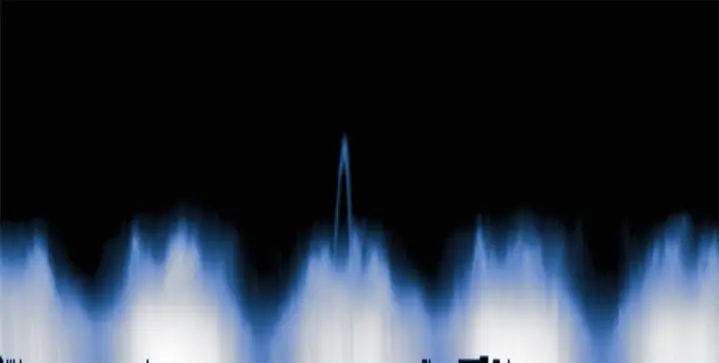
Cloudspotting on Mars asks members of the public to look for arches such as this one (center) in data collected by NASA’s Mars Reconnaissance Orbiter (Source: NASA)

It will involve looking at graphs such as the one above to look for arches (spikes) that can indicate clouds. If you are interested, you can join from the project’s website.

Thanks to Digital Trends: NASA wants your help to solve an enduring Mars mystery for the link.

– Suramya

« Newer PostsOlder Posts »

Powered by WordPress