Suramya's Blog : Welcome to my crazy life…

January 2, 2026

Steganography: Hiding data in Document Files using color tags

Steganography is the art of hiding information within container files to conceal the existence of embedded information. Media files have been the most common containers for hiding embedded data due to which there is a lot of scrutiny on media files when they are transferred. Most of the DLP (Data Leak Prevention) system focus on media files when checking for steganography. Word documents on the other hand are common enough that they can be used as containers for hidden information without raising flags.

In this paper we explore hiding secret data in a Word document by inserting multiple color tags into the file that alter the color for each character in the document to encode data without changing the visual look of the document.

Modern DLP systems can detect hidden information in media files such as images, videos or audio files by performing analysis of files to detect modification and potentially identify the hidden data. In order to be able to send data without detection a new method of hiding data needs to be found. In this paper we look at how to hide text in a word document by modifying the color tags in the word document. This allows us to exfiltrate data using word files with a minimal risk of detection using existing tools.

Introduction and History

Steganography is the art of hiding data or a message inside another file or object. This object can be an image, text, audio or video file. The word has Greek roots, and is a combination of steganos (“concealed, protected”) and graphy (“writing.”).

The first known use of steganography was in ancient Greece around 440 B.C, where the Greek ruler Histaeus would shave the head of a slave and tattoo a secret message on the slave’s scalp. After which he would wait for their hair to grow to hide the secret message and send the slave to the recipient who would then shave the head to get the message. (UK Essays, 2021) Another example from the same time period is when Demaratus sent a warning about a forthcoming attack to Greece by carving the message on the wood of a wax tablet before covering it with a fresh wax coat. This tablet that looked blank was delivered to Greece along with other blank tablets, where the Greeks removed the wax layer to read the hidden message. (Perera, 2011)

In more modern times, Steganography was used during the second world war by the Germans who used Microdots to reduce complete documents to the size of a dot which was then placed on a normal looking letter or document. Another technique used often was to encode messages in knitted scarves or sweaters sent to operatives. Every knitted garment is made of different combinations of just two stitches: a knit stitch, which is smooth and looks like a “v”, and a purl stitch, which looks like a horizontal line or a little bump. By making a specific combination of knits and purls in a predetermined pattern, spies could pass on a custom piece of fabric and read the secret message. (Zarrelli, 2021)
With the Digital age, the options to encode messages in digital files became available and steganography evolved to make use of the new medium.

How Digital Steganography works

Most digital files contain sections that can be altered without showing any obvious effects in the file. Modern techniques hide data in files by using one of the following approaches:

Adding bits to a file:

In this approach the hidden text is added to the “file header”, which usually contains information such as the file type or the resolution and color depth of a photo. This method is relatively easy to detect if we look at the file size difference. For example, if we add 1 MB of secret data to a 4 MB file, the output file size would increase by 1MB making it easy to detect if the resultant file was compared with the original.

Changing the Least Significant Bit (LSB):

To resolve this problem of changing file size, a new technique was created that makes use of the fact that the LSB’s in a file can be altered without significantly altering the source i.e. if the container was an image the altered image would look the same to human eyes. As an example, in an image file each pixel is comprised of three bytes of data corresponding to the colors red, green, and blue. LSB steganography changes the last bit of each of those bytes to hide one bit of data. Which allows a user to hide data in the file without changing the file size. The same technique can be applied to other media files such as Video or Audio files as well.

The larger the container file, the more data can be encoded into the file, which is why use of Images, Video and audio files is very popular with Steganographic users, as it allows the user to hide large quantities of data in a single file. The major limitation of using media files is that if the target doesn’t usually send or receive media files, then it is a break in the routine if they start suddenly sending or receiving such files.

Word Documents or Text files on the other hand are the bread and butter of all organizations and every user sends and receives a lot of documents throughout the course of the day. So, if we are able to hide data in a word file, then it would be easier to exfiltrate the data.

How to hide data in a text file

There are a lot of options available for use to hide information in a text file and some of them have been used historically for this purpose already, the digital text just gives us a new medium for the hidden text. Some of the options are as below:

Using patterns of letters within word

In this technique the user would send a normal looking message or document to another user. They would hide a secret message in the file by encoding a message that can only be read by taking the ith letter of each word in the message. The advantage is that you can send a lot of data using this technique, but the disadvantage is that the message can end up sounding very stilted because of the requirements of the steganography.

Using the Whitespace in the document to hide data

Another option is to use the spacing differences in the file to encode a message. One example is for the sender to put in one space after a full stop to mean 0 and two spaces after it to represent a 1. By looking at the spacing the secret message can be spelled out. The main problem with this approach is that it does not allow large quantity of data to be sent in a file, but the advantage is that it is harder to detect.

In this paper we are looking at a third way to hide data in a document by modifying the color tags in the document and we will look at this in more detail in the next section.

Hiding information using color tags in a Word Document

All versions of MS Office since 2007 save files in the Microsoft Office Open XML specification which are then zipped to create files in the DOCX format. Word files allow a user to show text in multiple colors by inserting the corresponding color tag into the file. (Microsoft, 2021) When the color of the displayed text is modified to a different color, the system adds a tag in the document.xml file located in the zip file like the following: <w:color w:val=”000000″/> to show the change in font color. The tag shows the color of the text in a Hex format, with 00 as Black and FF showing White color.

Each of the pair of bits in the color tag corresponds to the Red, Green or Blue color pallet. In each pair, the second bit is the least significant bit and its value can be modified without the output color looking significantly different to the viewer. So, visually speaking the font color represented by Hex value 000000 looks almost exactly the same as color represented by the Hex value of 010101. By altering the value of the second bit in the pair from 0 to 1 or vice versa information can be encoded into the file without adding text or information that can be found by security systems/reviewers. Since the data is in XML format, the sender can insert data into the document by inserting color tags into the document for each character. The process to hide the data would look like the following:

  • The user provides a word file to be used as an input. The file would contain sufficient text to allow the sender to encode data.
  • The system extracts the contents of the documents from the file by unzipping it.
  • The content of the document is stored in the ‘documents.xml’ file under the word folder created in the previous step.
  • The system extracts the text from the file by striping the XML tags from the file
  • For each character in the text, it adds a color tag such as or . The second bit in the pair is set to a 0 or a 1 depending on the data being encoded.
  • The original tags are restored to the file along with the new tags created.
  • The resulting file is saved as document.xml in the word folder
  • The folder is compressed as a ZIP file and renamed to .docx

The resultant file will contain the hidden data with little visual indication of the changes being made to the document and can be mailed our as usual with little chance of detection.

The recipient would follow these steps to extract the hidden data from the file:

  • Unzip the document to extract the content
  • Extract all the color font tags in the file
  • Read the second bit in every pair of color code
  • Save the values in a separate file that contains the secret information.
  • Review the information at your leisure.

This technique is fairly easy to implement with minimal coding skills required. If the setup doesn’t allow users to send out word documents, then the same technique can also be used to hide data in the html source of a website that the recipient would then download and extract. The same can also be accomplished by encoding data in emails sent from the user’s account.

Detection Techniques for hidden data in documents

Like any techniques to send hidden data the technique we just discussed has its weaknesses which can be used to detect hidden messages encoded in the document. However, such detection is not easy and most of the currently available tools will not be able to detect data hidden using this technique. This is because most commercial tools available in the market focus their efforts to detect hidden data with media files such as images, videos or audio files as they have traditionally been the most common containers used to hide data. Some of the options available to detect the possibility of hidden data are as follows:

  • Create a tool that examines all documents sent out to count the number of font tags in use in the document. If the count of the tags is over a certain threshold the file can be quarantined for review by a human
  • Use a tool checks the size a given document is expected to be based on the amount of text in the document. If the size of the file is significantly higher (due to anomalously high number of tags in the file) the file can be quarantined for review.
    • We would need to take into account any images etc embedded in the file when performing the analysis
  • Create a machine learning tool that uses AI/ML to detect files with hidden data.

Conclusion

Any data or file being sent outside the organizations network can be used to exfiltrate information from the network. The trick to detecting these attempts is to create a baseline of the activity, data sizes of the files transferred during a regular day and create alerts to notify administrators when there is a significant variation from the baseline.

Done correctly this will decrease the risk of data exfiltration but no technique to detect data is perfect so a lot of review and audits need to be done on a periodic basis to ensure that the system is still secure.

References

Microsoft. (2021, August 25). File format reference for word, Excel, and PowerPoint. Deploy Office | Microsoft Docs. Retrieved September 19, 2021, from https://docs.microsoft.com/en-us/deployoffice/compat/office-file-format-reference.
Perera, H. L. (2011, February 4). History of steganography. hareenlaks. Retrieved September 19, 2021, from http://hareenlaks.blogspot.com/2011/04/history-of-steganography.html.
UK Essays. (2021, August 12). The history & background of steganography. UK Essays. Retrieved September 19, 2021, from https://www.ukessays.com/essays/english-language/background-of-steganography.php.
Zarrelli, N. (2021, June 10). The wartime spies who used knitting as an espionage tool. Atlas Obscura. Retrieved September 19, 2021, from https://www.atlasobscura.com/articles/knitting-spies-wwi-wwii.


Note: This was originally written as a paper for one of my classes at EC-Council University in Q3 2021.

– Suramya
December 9, 2025

Security vs Accessibility: Thoughts on the problem and how it can be addressed

Security is something that always comes at an expense of Usability and I wrote about this earlier as well. However, in this post I am going to talk about something slightly different: How security measures impact accessibility. At first glance it might look that both topics are the same but there are extra nuances in the Accessibility that unfortunately are not considered a lot of the time when we design a system. To be honest I didn’t think about it much either until I saw a post by James on Mastodon highlighting the issue:

https://mastodon.social/@jscholes@dragonscave.space/115673620717345529
Security measures impacting Accessibility for blind users

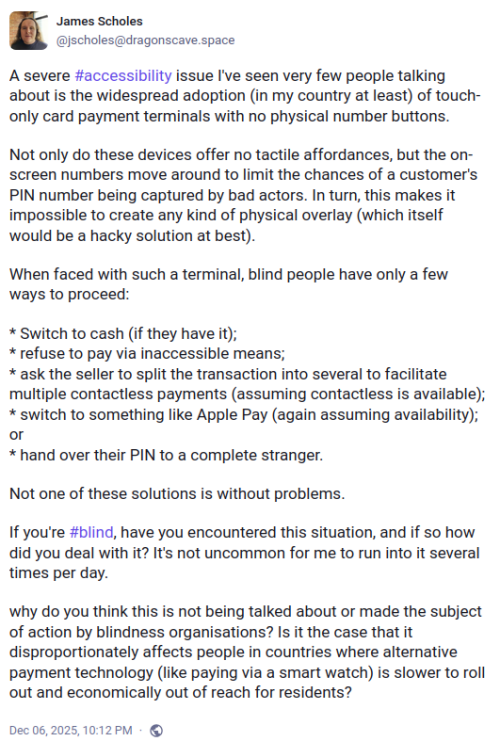
A severe issue I’ve seen very few people talking about is the widespread adoption (in my country at least) of touch-only card payment terminals with no physical number buttons.

Not only do these devices offer no tactile affordances, but the on-screen numbers move around to limit the chances of a customer’s PIN number being captured by bad actors. In turn, this makes it impossible to create any kind of physical overlay (which itself would be a hacky solution at best).

When faced with such a terminal, blind people have only a few ways to proceed:

* Switch to cash (if they have it);
* refuse to pay via inaccessible means;
* ask the seller to split the transaction into several to facilitate multiple contactless payments (assuming contactless is available);
* switch to something like Apple Pay (again assuming availability); or
* hand over their PIN to a complete stranger.

Not one of these solutions is without problems.

If you’re , have you encountered this situation, and if so how did you deal with it? It’s not uncommon for me to run into it several times per day.

why do you think this is not being talked about or made the subject of action by blindness organisations? Is it the case that it disproportionately affects people in countries where alternative payment technology (like paying via a smart watch) is slower to roll out and economically out of reach for residents?

It is easy to forget that others have different requirements and needs than you and navigating a world which is moving towards removing tactile feedback makes it harder for people with vision problems or motor control issues from interacting with the world. Every single security feature that we add to a system the more the potential of making the system inaccessible increases. For example, if we have captcha checks while logging into a site or a computer then screen readers can’t read the captcha by design so blind users are unable to log in to the system. A fix for that was to have audible captcha code but with the advances in voice recognition an attacker can use a voice recognition system to identify the code and bypass the security measure.

Accessibility features / functionality seems to be an afterthought (if that) for developers even in 2025. There are major accessibility issues in Linux and Fireborn (Couldn’t find their real name) did a whole series of blog post’s about the issues they face as a blind person using Linux (I Want to Love Linux. It Doesn’t Love Me Back: Post 1 – Built for Control, But Not for People) on a day to day basis. The sad part is that while a lot of people acknowledged the issue and agreed to work on fixing it there were the usual gatekeepers who wrote nasty/condescending messages in response to the post, Fireborn responded to the comment quite beautifully (and a lot more politely than I would have in their position) in another blog post (You Don’t Own the Word “Freedom”: A Full-Burn Response to the GNU/Linux Comment That Tried to Gatekeep Me Off My Own Machine) This right here is the issue that we need to solve. People don’t think we need to work on accessibility because they don’t need it. I remember reading an article about how there was a group of people really upset because a streaming solution was giving more focus on subtitles for their shows. No one is forcing you to enable subtitles but folks who don’t speak the language or have hearing issues they are a lifesaver.

Coming back to the security & accessibility issue for a POS (Point of Sales system), there is no easy way to solve this problem for card users. One option I can think of is for stores to keep a physical bluetooth pin-pad that is paired with the POS machine so that users with vision problems can use the physical keyboard to enter the pin. This would require effort (and have a cost implication) from the store so I don’t know how many stores will do that. It would work if there was a law that required the store to do this but if that is not there then the users are lost.

Another option would be to have a screen/image reader application on a phone that the user (or store) owns that scans the display and then reads out the numbers displayed. Even better functionality would be to have the app detect which number is covered by the user’s finger and let the user know verbally (over a headset ideally) so that they can enter the numbers.

These are some of the ways that I can think of to solve this problem but since I am not the target user a better way to approach this issue would be to work with folks with vision problems and have them confirm if the solution we are coming up is actually solving their problem or not.

– Suramya

February 8, 2025

Reserve Bank of India launches exclusive domains ‘bank.in’ and ‘fin.in’ for Indian Banks to reduce cyber fraud

Filed under: Computer Security,Tech Related — Suramya @ 10:49 PM

A big problem in online security is verifying that the site you are accessing is the authentic version. As techies we have a bunch of ways to check if the site is valid but for regular users it can be a hard problem to solve. I personally know a few folks who have been scammed out of a lot of money so it is a pretty prevalent problem in the industry.

One of the ways people get scammed is that they are sent a link to a site that looks like the official bank site but is instead a cloned version of the site that hijacks the entered password and OTP to steal money. To combat this issue and the problem of banking sites not having a verifiable URL / Domain name, the Government of India has announced the launch an exclusive “.bank.in” domain for banks starting from April 2025.

Similar to how the .gov address is a known domain name for US Government and .gov.in for official Indian Government sites this new domain will be for verified/validated banks only. The Institute for Development and Research in Banking Technology (IDRBT) will be the exclusive registrar for the new domain and will start rolling out in April.

In addition, the RBI is also planning to launch a “.fin.in” domain for non-bank entities in the financial sector. This will cover entities like paypal/PhonePe and other Fintech firms in India.

I think that this is a great idea and it would be awesome if we have have a global official .bank domain. But something like that would take a lot of time and coordination to implement so for now we will just have the India specific domains.

Source: Times of India: RBI announces exclusive domains ‘bank.in’ and ‘fin.in’ to enhance cyber security in Indian banking

– Suramya

September 26, 2024

Python in Excel launched for all Office 365 Business and Enterprise users

Filed under: Computer Security,Computer Software,My Thoughts,Tech Related — Suramya @ 10:35 PM

Excel is both a blessing and a bane for companies. Because of its capabilities folks have created formulas/macros/scripts/functions etc in Excel that allows them to generate data that is used to take major financial decisions with real world impact. But that capability also makes it an ideal vector for infiltrating an organization using Macros or scripts in Excel files to compromise systems.

Back in Aug 2023, Microsoft first announced that they are going to support running Python inside an Excel file. After that there was no major talk about it so I had hoped this meant that they had abandoned the project, but sadly I was mistaken. Redmond announced the official release of Python in Excel for Windows users of Microsoft 365 Business and Enterprise in a blog post. The post has a lot of details on the new capabilities this gives to power users and frankly I can see why folks are excited about it. But from a security and version control point of view this is a disaster waiting to happen.

There is a new learning series available for free for 30 days on LinkedIn that incorporates numerous examples, tutorials, and tips on how to best leverage Python in Excel.

Included in the Excel for Python release is a large language model integration that will allow Excel users to ask the Copilot to build scripts for them with plain language commands.

Microsoft partnered with data science tool maker Anaconda to develop the Python-Excel integration. As we’ve previously reported, data can move effortlessly between the two platforms using a few custom-defined functions.

This two-way function sending is a key part of security – Microsoft states Python processes Excel data without revealing the user’s identity, and all Python code runs in a secure, isolated environment, only accessing libraries approved by Anaconda​.

As with all the stuff MS has released recently, this also has LLM Integration but is on a very restricted list. The service is available to all Office 365 users with a valid Enterprise or Business Microsoft 365 subscription on the Current Channel.

Source: The Register: Python in Excel is here, but only for certain Windows users

– Suramya

August 21, 2024

First three Post-Quantum Encryption Algorithms released by NIST

Filed under: Computer Security,My Thoughts,Quantum Computing — Suramya @ 8:30 PM

NIST has been reviewing algorithms as part the the PQC (Post Quantum Cryptography) Standardization process for over 8 years now and they have released the first three standards for post-quantum cryptography. These standards will allow systems to protect their data and communications with encryption that are not vulnerable to Quantum Computers. Current standards and tools rely on complex math problems that are difficult or impossible to solve using conventional computers but are vulnerable to a sufficiently capable quantum computer which would be able to process potential solutions very quickly.

The new standards are designed for two essential tasks for which encryption is typically used: general encryption, used to protect information exchanged across a public network; and digital signatures, used for identity authentication. NIST announced its selection of four algorithms — CRYSTALS-Kyber, CRYSTALS-Dilithium, Sphincs+ and FALCON — slated for standardization in 2022 and released draft versions of three of these standards in 2023. The fourth draft standard based on FALCON is planned for late 2024.

While there have been no substantive changes made to the standards since the draft versions, NIST has changed the algorithms’ names to specify the versions that appear in the three finalized standards, which are:

  • Federal Information Processing Standard (FIPS) 203, intended as the primary standard for general encryption. Among its advantages are comparatively small encryption keys that two parties can exchange easily, as well as its speed of operation. The standard is based on the CRYSTALS-Kyber algorithm, which has been renamed ML-KEM, short for Module-Lattice-Based Key-Encapsulation Mechanism.
  • FIPS 204, intended as the primary standard for protecting digital signatures. The standard uses the CRYSTALS-Dilithium algorithm, which has been renamed ML-DSA, short for Module-Lattice-Based Digital Signature Algorithm.
  • FIPS 205, also designed for digital signatures. The standard employs the Sphincs+ algorithm, which has been renamed SLH-DSA, short for Stateless Hash-Based Digital Signature Algorithm. The standard is based on a different math approach than ML-DSA, and it is intended as a backup method in case ML-DSA proves vulnerable.

Similarly, when the draft FIPS 206 standard built around FALCON is released, the algorithm will be dubbed FN-DSA, short for FFT (fast-Fourier transform) over NTRU-Lattice-Based Digital Signature Algorithm.

This is a significant step in ensuring our data and systems are protected against threats that are on the horizon. The Register has a good article on this topic (NIST finalizes trio of post-quantum encryption standards) that I highly recommend you check out.

Sources:
* Mastodon.social
* Schneier.com: NIST Releases First Post-Quantum Encryption Algorithms

May 24, 2024

OpenSSF launches Siren to provide real-time security warning for Open Source Software

Securing OpenSource software (OSS) can be a bit of a challenge at times and a lot of the Infosec feeds that give information on Security issues in software are commercial paid entities. There are software that scan for OSS vulnerabilities but we can always use more threat intelligence networks.

Open Source Security Foundation (OpenSSF) has launched a new threat intelligence sharing group called ‘OpenSSF Siren‘ that aims to provide real-time security warning bulletins and deliver a community-driven knowledge base to fill the gap between the open-source and enterprise communities.

The OpenSSF Siren is a collaborative effort to aggregate and disseminate threat intelligence specific to open source projects. Hosted by the OpenSSF, this platform provides a secure and transparent environment for sharing Tactics, Techniques, and Procedures (TTPs) and Indicators of Compromise (IOCs) associated with recent cyber attacks. Siren is intended to be a post-disclosure means of keeping the community informed of threats and activities after the initial sharing and coordination.

The Key features of the OpenSSF Siren include:

  • Open Source Threat Intelligence: shared with the community about actively exploited public vulnerabilities and threats.
  • Real-Time Updates: List members receive notifications via email about emerging threats which may be relevant to their projects, enabling swift action to mitigate risks.
  • TLP:CLEAR: To facilitate effective unrestricted transparent communication, the list follows the Traffic Light Protocol (TLP), Clear guidelines for the sharing and handling of intelligence.
  • Community-driven: Contributors from diverse backgrounds collaborate to enrich the intelligence database, fostering a culture of shared responsibility and collective defense.

You can sign up for it here: Siren Sign-Up
Source: OpenSSF sings a Siren song to steer developers away from buggy FOSS

– Suramya

May 23, 2024

Windows 11 will feature builtin Spyware in the near future or Recall AI as Microsoft Calls it

Till recently if you wanted to spy on someone and see what they have been doing on the computer, you had to infect their computer by making them visit a dodgy site or get physical access and download a RAT (Remote Access Trojan) & install it on the target’s computer, configure the Antivirus to ignore it and put in a backdoor so that you can access the data remotely. Obviously this was a lot of work so looks like some cyber criminals reached out to Microsoft (MS) and asked for help. MS being a super helpful company, has added a functionality called ‘Windows Recall’ to it’s windows 11 Preview build to solve this. Recall takes a snapshot (literally) of the screen every few seconds and stores it in a searchable database ‘stored locally’. Basically it does exactly what spyware does without having to install anything new on your system. As per the company below is how the Recall works:

Recall uses Copilot+ PC advanced processing capabilities to take images of your active screen every few seconds. The snapshots are encrypted and saved on your PC’s hard drive. You can use Recall to locate the content you have viewed on your PC using search or on a timeline bar that allows you to scroll through your snapshots. Once you find the snapshot that you were looking for in Recall, it will be analysed and offer you options to interact with the content. What actions you can take depend on the content and the chat provider capabilities in Copilot in Windows. For example, you may highlight a block of text and decide to summarise it, translate it, or open it with a text editor like Word or Notepad. If you highlight an image, you will be able to edit it or use your chat provider in Copilot in Windows to find or create a similar image.

Recall will also enable you to open the snapshot in the original application in which it was created, and, as Recall is refined over time, it will open the actual source document, website or email in a screenshot. This functionality will be improved during Recall’s preview phase.

The best part is that according to their own announcement the snapshots will not hide passwords/account numbers etc. However, it does block you from recording DRM’d video you might be watching because protecting that is important not simple things like personal information etc.

Note that Recall does not perform content moderation. It will not hide information such as passwords or financial account numbers. That data may be in snapshots that are stored on your device, especially when sites do not follow standard internet protocols like cloaking password entry.

This is a gold mine for data thieves, abusers, industrial espionage, identity thieves and other cyber criminals. Once they have access to a PC they don’t need to do anything else except copy the data from the Recall DB to their own system and happily browse through the users personal data at their leisure.

I don’t think MS has thought about folks who use public computers such as the ones in an Internet Cafe or Hotels or Libraries. With this feature enabled all someone has to do is wait a few days then come back and copy incredibly private information that they can then sell/use. Privacy and Domestic Abuse experts are raising questions about this as well because sure as night follows day, abusers will use this to track what their victims are doing on a computer and that can go bad very quickly.

Even if the data is supposedly only on the local machine we don’t know when MS is going to force it to be uploaded to their servers using OneDrive or other similar setups. All the coverage I have seen for this functionality 99% of them have raised similar concerns about the security, privacy and quite frankly the need for this kind of surveillance.

Imagine what would a regieme like Taliban, China or other conservative/restrictive governments do with information they get from this system. You are dreaming if you think that they will not force MS to make this information available to them at the risk of losing access to that market if they don’t. Once you have the capability to do this, feature creep will happen for sure and we will end up in a Surveillance state.

The only Windows 11 system at my place is my wife’s laptop and you can be sure that I am going to disable this ‘feature’ as soon as it launches.

Source: Bleepingcomputer: Windows 11 Recall AI feature will record everything you do on your PC

– Suramya

May 12, 2024

A High-Level Technical Overview of Fully Homomorphic Encryption

Homomorphic Encryption is an interesting application of data encryption in that it allows us to encrypt data in a way such that we can perform computations on it without first having to decrypt it. The more formal definition states “Homomorphic encryption is the conversion of data into ciphertext that can be analyzed and worked with as if it were still in its original form. Homomorphic encryption enables complex mathematical operations to be performed on encrypted data without compromising the encryption.”

I have been following the work on Homomorphic Encryption solutions since 2017 onwards, which was when I first became aware of it and have read tons of articles and papers on it. The overview by Jeremy Kun is probably the best one I have seen so far. His post with A High-Level Technical Overview of Fully Homomorphic Encryption goes into enough technical details that you understand it without going so deep that you are lost in the details.

Homomorphic encryption lets you encrypt data in such a way that you can run programs on it without ever decrypting it. This means that the computer running the program has no access to the underlying data while running the program—neither via intermediate computed values, nor even the result. In particular, if a nefarious human had access to the machine’s raw memory, they still could not learn any information about the underlying data (without breaking the cryptography). A user sends the program an encrypted input, and when the program is done, the encrypted result is sent back to the user to decrypt.

Running a program on encrypted data sounds magical. It works by choosing an encryption scheme that is “compatible” with addition and multiplication in the following sense:

Adding ciphertexts gives you an encryption of the sum of the underlying plaintexts.
Multiplying two ciphertexts give you an encryption of the product of the underlying plaintexts.

Given this power, you can encrypt your data bit by bit, express your program as a boolean circuit—an XOR gate is addition and an AND gate is multiplication—and simulate the circuit. Since XOR and AND form a universal basis for boolean logic, you can always decompose a circuit this way.

Check it out if you are curious about Homomorphic Encryption and want to learn more.

– Suramya

April 21, 2024

Crescendo Method enables Jailbreaking of LLMs Using ‘Benign’ Prompts

LLMs are becoming more and more popular across all industries and that creates a new attack surface for attackers to target to misuse for malicious purposes. To prevent this LLM models have multiple layers of defenses (with more being created every day), one of the layers attempts to limit the capability of the LLM to what the developer intended. For example, a LLM running a chat service for software support would be limited to answer questions about software identified by the developer. Attackers attempt to bypass these safeguards with the intent to achieve unauthorized actions or “jailbreak” the LLM. Depending on the LLM, this can be easy or complicated.

Earlier this month Microsoft published a paper showcasing the “Crescendo” LLM jailbreak method called “Great, Now Write an Article About That: The Crescendo Multi-Turn LLM Jailbreak Attack“. Using this method a successful attack could usually be completed in a chain of fewer than 10 interaction turns.

Large Language Models (LLMs) have risen significantly in popularity and are increasingly being adopted across multiple applications. These LLMs are heavily aligned to resist engaging in illegal or unethical topics as a means to avoid contributing to responsible AI harms. However, a recent line of attacks, known as “jailbreaks”, seek to overcome this alignment. Intuitively, jailbreak attacks aim to narrow the gap between what the model can do and what it is willing to do. In this paper, we introduce a novel jailbreak attack called Crescendo. Unlike existing jailbreak methods, Crescendo is a multi-turn jailbreak that interacts with the model in a seemingly benign manner. It begins with a general prompt or question about the task at hand and then gradually escalates the dialogue by referencing the model’s replies, progressively leading to a successful jailbreak. We evaluate Crescendo on various public systems, including ChatGPT, Gemini Pro, Gemini-Ultra, LlaMA-2 70b Chat, and Anthropic Chat. Our results demonstrate the strong efficacy of Crescendo, with it achieving high attack success rates across all evaluated models and tasks. Furthermore, we introduce Crescendomation, a tool that automates the Crescendo attack, and our evaluation showcases its effectiveness against state-of-the-art models.

Microsoft has also published a Blog post that goes over this attack and potential mitigation steps that can be implemented along with details on new tools developed to counter this attack using their “AI Watchdog” and “AI Spotlight” features. The tools attempt to identify adversarial content in both input and outputs to prevent prompt injection attacks.

SCM Magazine has a good writeup on the attack and the defenses against it.

– Suramya

Source: Slashdot: ‘Crescendo’ Method Can Jailbreak LLMs Using Seemingly Benign Prompts

April 2, 2024

Soon it will be possible to update Apple Devices while still in the box

Filed under: Computer Security,My Thoughts — Suramya @ 11:43 PM

Apple has come up with an interesting new technology that allows stores to install the latest updates to an iPhone without removing it from the box. If the technology works (and it looks like it does) it will remove one of the major hassles of buying a new phone or device which is to install the latest updates and patches on the phone.

This device can wirelessly turn on the iPhone, update its software and then power it back down. We still don’t have a full explanation on how it works but based on at a guess, it leverages the fact that the NFC chip in the phone can work potentially work even when the phone is switched off (it already works with a low battery). Placing the phone in the device would potentially trigger the NFC chip which would then start the phone in a special mode that allows it to connect to the WiFi and download the updates. Post completion the system would shutdown the phone and it would be ready to use.

In theory this sounds like a great enhancement but I fear that unless the system has sufficient controls and checks around it it will open up a whole new attack vector. Previously, there have been attacks where Nation States or Criminal organizations would intercept hardware being delivered to a target open the package, make changes and then reseal and send it on to the target. This is a sure shot way of ensuring that a device is compromised before it reaches the target, however it requires a lot of resources and manual effort to implement and there is a risk of exposure since multiple folks are involved. With this new update option an attacker just has to have physical access to the device and can be done by simply taking the packaged device and putting it in the updater for a little while.

This assumes that the security checks and authentication built around the process can be bypassed. That being said, once the tech is live there are going to be a lot of very smart people trying to bypass the checks to be able to update the phone. Keep in mind that there is nothing stopping anyone from updating the phone using this method even after someone is actively using it.

Source: Mastodon.social: arstechnica

Older Posts »

Powered by WordPress