Suramya's Blog : Welcome to my crazy life…

March 30, 2015

Bought a whole lot of books today

Filed under: My Life — Suramya @ 11:59 PM

This is what happens when you get an email telling you about a massive sale going on at your favorite online bookstore and you have some time to kill. Ended up ordering 9 books before forcefully convincing myself that it was was more than enough. Although considering the sale is going on till tomorrow night I think I should avoid going online till tomorrow morning. Which is something that I don’t see happening in the near future.

I should log off for the day before I am tempted to log back on to the site and place more orders… Well, atleast I will have enough to read when I take my next vacation. I am going to crash now before my credit card decides to go on strike and stop working.

– Suramya

March 29, 2015

Rosetta Stone for Unix/Linux

Filed under: Knowledgebase,Linux/Unix Related,Tech Related — Suramya @ 9:53 PM

If you have been in the industry for a while then you have been in a situation where you need to do something on the server but have no idea what the appropriate command is because you always worked on a different variant/version of the Operating System. Think having to work on Solaris or Linux when all you have worked on is the Mac OS. To make things easier for the poor admins that have to keep switching OS’s, Bruce Hamilton has created a site he calls the ‘Rosetta Stone: A Sysadmin’s Universal Translator‘. This site has a list of tasks and the corresponding command that you would have to run for each of the OS’s. The Stone supports the following OS’s:

  • AIX
  • A/UX
  • DG/UX
  • FreeBSD
  • HP-UX
  • IRIX
  • Linux
  • Mac OS X
  • NCR Unix
  • NetBSD
  • OpenBSD
  • Reliant
  • SCO OpenServer
  • Solaris
  • SunOS 4
  • Tru64
  • Ultrix
  • UNICOS

and covers tasks in the following categories:

  • hardware
  • firmware
  • devices
  • disks
  • kernel
  • boot
  • files
  • networking
  • security
  • software
  • patching, tracing, logging

Check it out, bookmark it. It will save you some grief down the line the next time you are in this situation.

– Suramya

March 2, 2015

RIP Mr Spock

Filed under: My Thoughts — Suramya @ 2:07 AM

He did live long and prosper but unfortunately it wasn’t as long as we would want it to be. He will be missed by all his fans.
Leonard Nimoy the actor who played Mr Spock died on 27th Feb at the age of 84.

– Suramya

January 8, 2015

Microsoft Office now available for Android tablets

Filed under: Computer Software,Tech Related — Suramya @ 11:35 PM

MS is spending a lot of time and effort trying to overcome the cloud of their previous actions where they did their level best to eradicate their competitors by any means necessary, even if they were morally in a grey area. The latest volley in this effort is their move to make MS Office available on the Android tablets for free. They have MS Word, MS Excel and MS Powerpoint available and the reviews so have have been very good even though the apps are technically still in Preview mode.

Today, we are excited to announce that we are further expanding the preview. We want more feedback from more users to ensure that Office apps work well on a range of different Android tablets before launching the official apps. To participate in the preview, you can use an ARM-based Android tablet running KitKat or Lollipop, with a screen size between 7″ and 10.1″. Starting today, anyone can go to Google Play and download the Word, Excel and PowerPoint preview apps. No waitlist. No requesting access. Just go and download the apps!

Office apps are one of the apps that need to be there on every OS. I have tried a lot of the alternatives like OpenOffice and other clones but I keep coming back to MS Office because of the stability and compatibility that it gives me with other Office users. On my Linux machine I use Crossover to have a native install of Office and it works great. When I get some time and restore Android to my Tablet (I am trying to install Kali Linux on it) I will try Office out on it even though I don’t see myself editing a lot of documents on the tablet.

Well this is all for now. Will write more later.

– Suramya

Source: androidcentral.com and Microsoft Blog Announcement

January 7, 2015

Over 2,400 classic DOS games now playable in your web browser for free

Filed under: Computer Software,Interesting Sites,Tech Related — Suramya @ 11:28 PM

Last year the Internet arcade released over 900 classic arcade games playable in a browser to the public. Not satisfied with that accomplishment they topped it by releasing the over 2400 classic DOS games to the public and as before they are all playable in your web browser. The list of games include classics like Prince of Persia, The Oregon Trail, Castle Wolfenstein and many many more. This collection sure brings back a lot of memories for me.

If you’re a PC gamer of a certain age (cough), you’ve probably lamented that many of the titles you played as a kid are hard to use on modern systems without downloading emulators or waiting for special re-releases. Well, it just got a lot easier to relive your gaming glory days. The Internet Archive’s growing collection of web-based retro games now includes roughly 2,400 MS-DOS classics

I think I am going to be spending some time ensuring that the games function correctly in a browser. Purely for verification of the work done here of-course 🙂

– Suramya

Source: engadget.com

January 6, 2015

Welcoming 2015 with camping and live music

Filed under: My Life,Travel/Trips — Suramya @ 8:18 PM

This year I decided to do something different for New Years and instead of the usual club/house party I went for a 48 hour camping event with live music. Think of it as a music festival with camping. The event is called Chasing Storm and it happened near Coorg which is about 270 km from Bangalore.

I Left for the event at 5am on the 31st and got there by 9:30am, unfortunately the entry for the camping area wasn’t opened up till 12:30pm because they were still in the process of setting up the tents and ensuring that folks didn’t get any reptilian visitor’s at night by spraying stuff to subdue snakes. Once we were in there wasn’t a lot to do till evening so we just hung around and chatted with other folks attending the festival. In the evening the live bands started playing and some of them were really good. I specially liked Swarathma and Solder.

The highlight of the event for me was getting to listen to Usha Uthup live. She is one of my all time favourite singers and hearing her in person was an awesome experience. It made the entire trip worth it. Even though the lady is 67 years old (she announced it on stage) the energy she has is amazing. I wanted to take a photo with her and get her autograph but wasn’t able to as she was swamped and then left before I got the chance.

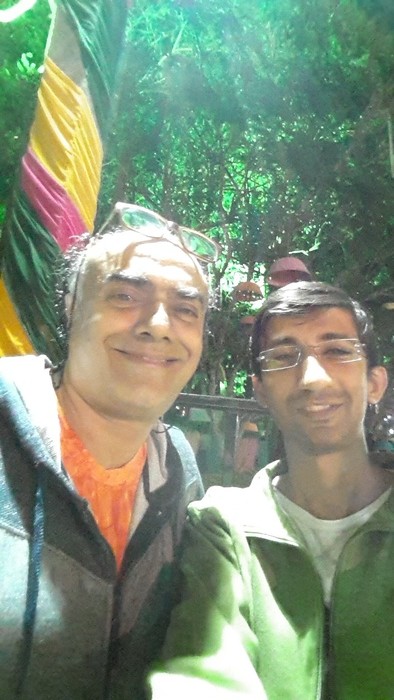
In any case I was busy chasing the other star who was also in attendance, ‘Rajit Kapur’ who played ‘Byomkesh Bakshi’ in the early 90’s TV series. The series is one my favourite Indian detective shows. So meeting him was a great pleasure. I did manage to get a photo with him (see below) and talk to him for a few mins. And before you ask; No I did not tell him that my sister named her dog after him (Vyomkesh) as I didn’t want him to beat me to death. 😉


Me and Rajit Kapur (Byomkesh Bakshi) at Chasing Storm

Here are some pics (A lot of the night photos didn’t come out too well because of the disco lights) I took during the performances at Chasing Storm .


Usha Uthup performing live at Chasing Storm


Solder live at Chasing Storm


Swarathma taking a bow

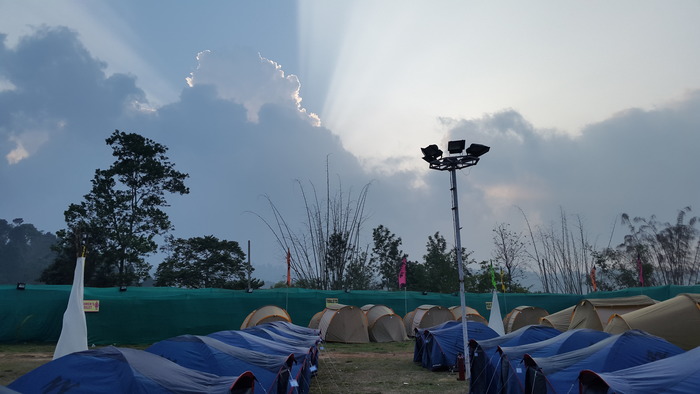
Finally here’s a photo of the camping area where we spent two days. Well, sort of… didn’t really get that much sleep over the two days because of the sheer no of things going on at the time.


The Camping ground

The drive back was a bit painful because at 5am the visibility was down to maybe 2 mtrs and it took me about an hour to cover 10kms. Once the sun came out around 6 am the visibility improved and I was able to pick up a bit of speed but it wasn’t till about 7-7:30 that I was able to drive at a speed higher than crawling. Finally made it to Bangalore at 11am and went straight to work so that was fun. Survived that day mostly on Red bull and Coffee.

Over all it was a good experience and I had fun so it was worth the 500+ Kms drive. Well this is all for now. Will write more later.

– Suramya

PS: This was supposed to be posted last week but didn’t really have the energy required to write/think so kept pushing it out. But better late than never right?

December 29, 2014

Kids these days….

Filed under: My Thoughts — Suramya @ 11:19 PM

I was surfing the web and found yet another post by some ‘genius’ who claims that people below 40 can’t fix anything and just consume. Considering I am 34 right now I must be one of those people who can’t fix anything. So I guess the tooth fairy must have come and fixed all the stuff I have repaired over the years and the same must be true for things that my friends fixed (or permanently broke in some cases), or created or improved on.

Every few years a post or an article will come out stating something to the effect of “Woe is me, the kids nowadays don’t know anything. They refuse to learn and just want to play on ‘gadget x’ and not listen to their elders (me)”. Here’s a quote that most of these folks will agree with “The children now love luxury. They have bad manners, contempt for authority; they show disrespect for elders and love chatter in place of exercise.”. Can you guess who made this quote? It was made by Socrates in Greece. Yes, that Socrates. Every generation thinks that the next generation is useless, they don’t do enough, they have it easy whereas the previous generation had so many hardships that they barely had any fun.

One of easiest ways to put down someone is to make such baseless statements that ‘kids nowadays don’t fix anything’. Guess what, plenty of them do fix stuff, or build new things. If that wasn’t the case then all new inventions will have stopped in another 30-40 years because anyone capable of making new stuff would have died by then. Just because they don’t fix stuff/or work on things the same way you did doesn’t mean that they don’t know what they are doing.


I am tired of the kids these days posts

If you still think that is the case, visit the nearest hackerspace or checkout sites like hackaday.com. There are plenty of folks out there who are pushing the limits of both hardware and software. For example this virtual machine in Excel was created by a highschool student. If folks weren’t out there pushing the limits then event’s like Hacking for Kids, rootz etc would not exist and companies selling electronics/hacking tools for kids would go out of business.

Keep in mind that not everyone has the same aptitude, take my dad and my mom for example. Dad loves to take things apart and fix them while mom prefers to write articles and read. The same is true for my nephews/nieces as well, some of them are technically inclined and others are not. It is human nature. Think of how boring it would be if everyone was interested in the same thing.

Please do me a favor, stop publishing this nonsense, all you are doing is telling people that you are an idiot (I wanted to use a much stronger word but…) who is stuck in their ways and is scared of the next generation so goes out of their way to put them down. I am going to close this post with two words for these folks “Grow up…”.

– Suramya

December 28, 2014

Update/Patch multiple Windows software in one shot

Filed under: Computer Software,Tech Related — Suramya @ 11:53 PM

One of the many downsides of using Windows is that there is no central way of updating all software installed on the computer in one shot. In Debian I can do an ‘apt-get upgrade’ and it will upgrade all the software installed on the system to the latest versions available. Patch my PC attempts to give you the same functionality on a Windows system. It has support for around 100 different applications and it can install or update them automatically when you run a scan.

I haven’t tried it out because I don’t have a Windows machine, but it is recommended by the folks at Lifehacker so it should be stable and work as advertised.

However please use it at your own risk, I am not responsible if this manages to destroy your computer or summon an imp.

– Suramya

December 26, 2014

Writing A Virtual Machine In Excel

Filed under: Computer Software,My Thoughts,Tech Related — Suramya @ 6:03 PM

Microsoft Excel should soon be classified as an Operating System. In the past we have seen a 3D shoot them up Doom Clone, a Flight Simulator and other games included in it as Easter eggs. Then we saw people using it to watch movies at work, and now here’s the latest entry that forces Excel way outside its comfort zone…

A programmer named Ádám was participating in a contest where he had to solve a problem in Excel but the official rules prohibited the use of Excel macros so he went and created an assembly interpreter for Excel and used it to solve the problem instead. Talk about overkill. The idea is quite interesting. However the thought process required to imagine this as a possibility and then actually going ahead and implementing this is mind boggling.

This is a virtual Harvard architecture machine without writable RAM; the stack is only lots and lots of IFs. The instructions – mostly load, MOV, JNZ, INC, and CMP solves this problem, examining two inputs to see if they multiples of each other. If you’re wondering, an example cell from [Ádám]’s Excel sheet looks like this:

=F6
   INDEX($C$2:$C99999,$G2,1),
   IF(AND(INDEX($B$2:$B99999,$G2,1)="JZ",$I2=0),
      INDEX($C$2:$C99999,$G2,1),
         IF(AND(INDEX($B$2:$B99999,$G2,1)="JNZ",$I2<>0),
         INDEX($C$2:$C99999,$G2,1),
         G2+1
         )
      )
   )
)

You can check out Adam’s solution at Hackaday.io if you are interested. I think I am going to go find my excel for Dummies book now and get just a little bit more proficient in it.

Thanks to hackaday.com for the original article.

-Suramya

December 14, 2014

Cleaning your Linux computer of cruft and duplicate data

When you use a computer and keep copying data forward everytime you upgrade or work with multiple systems it is easy to end up with multiple copies of the same file. I am very OCD about organizing my data and still I ended up with multiple copies of the same file in various locations. This could have happened because I was recovering data from a drive and needed a temp location to save the copy or forgot that I had saved the same file under another directory (because I changed my mind about how to classify the file). So this weekend I decided to clean up my system.

This was precipitated because after my last system reorg I didn’t have a working backup strategy and needed to get my backups working again. Basically I had moved 3 drives to another server and installed a new drive on my primary system to serve as the Backup drive. Unfortunately this required me to format all these drives because they were originally part of a RAID array and I was breaking it. Once I got the drives setup I didn’t get the chance to copy the backup data to the new drive and re-enable the cron job that took the daily backup snapshots. (Mostly because I was busy with other stuff). Today when I started copying data to the new Backup drive I remembered reading about software that allowed you to search for duplicate data so thought I should try it out before copying data around. It is a good thing I did because I found a lot of duplicates and ended up freeing more than 2 GB of space. (Most of it was due to duplicate copies of ISO images and photos).

I used the following software to clean my system:

Both of them delete files but are designed for different use cases. So let’s look at them in a bit more detail.

FSlint

FSlint is designed to remove lint from your system and that lint can be duplicate files, broken links, empty directories and other cruft that accumulates when a system is in constant use. Installing it is quite easy, on Debian you just need to run the following command as root

apt-get install fslint

Once the software is installed, you can either use the GUI interface or run it from the command line. I used the GUI version because it was easier to visualize the data when seen in a graphical form (Yes I did say that. I am not anti-GUI, I just like CLI more for most tasks). Using the software was as easy as selecting the path to search and then clicking on Find. After the scan completes you get a list of all duplicates along with the path and you can choose to ignore, delete all copies or delete all except one. You need to be a bit careful when you delete because some files might need to be in more than one location. One example for this situation is DLL files installed under Wine, I found multiple copies of the same DLL under different directories and I would have really messed up my install if I had blindly deleted all duplicates.

Flossmanuals.net has a nice FSlint manual that explains all the other options you can use. Check it out if you want to use some of the advanced features. Just ensure that you have a good backup before you start deleting files and don’t blame me when you mess up your system without a working backup.

BleachBit

BleachBit is designed for the privacy conscious user and allows you to get rid of Cache, cookies, Internet history, temporary files, logs etc in a quick and easy way. You also have the option to ensure that the data deleted is really gone by overwriting the file with random data. Obviously this takes time but if you need to ensure data deletion then it is very useful. Bleachbit works on both Windows and Linux and is quite easy to install and use (at least on Linux, I didn’t try it on Windows). The command to install it on Debian is:

apt-get install bleachbit

The usage also is very simple, you just run the software and tick the boxes relevant to the clutter that you want gone and BleachBit will delete it. It does give you a preview of the files it found so that you can decide if you actually want to delete the stuff it identifies before you delete it.

Well this is all for now. Will write more later.

Thanks to How to Sort and Remove Duplicate Photos in Linux for pointing me towards FSlint and Ten Linux freeware apps to feed your penguin for pointing me towards BleachBit.

– Suramya
« Newer PostsOlder Posts »

Powered by WordPress